Windows 7 Forums Search
Welcome to Windows 7 Forums. Our forum is dedicated to helping you find solutions with any problems, errors or issues you are experiencing with Windows 7. The Windows 7 forum also covers news and updates and has an extensive Windows 7 tutorial section that covers a wide range of tips and tricks.


Windows 7 - Sent items gone after upgrade to outlook 2010 (POP)

 
12-09-2011   #1


win 7 prof 64 Service pack 1 (7601)


Sent items gone after upgrade to outlook 2010 (POP)

After a hard disk crash I upgraded to outlook 2010 prof plus. (from 2007). I used the original pst-file from crashed computer (Vista home and Outlook 2007) and moved it to a clean install of Windows 7 and outlook.

No old sent items show up, all new sent items stores perfectly in folder sent items.

I use POP and outlook connector for Hotmail. I have used the repair tool on the .pst file, errors were repaired.

I have started with cleanviews.

I used "use existing pst.file" when setting up outlook 2010 for the first time.

I have tried tips from different forums, like filter and different view settings

Archive is holding older emails only.

Is there maybe a way to see inside the PST if sent items are there?

Can anyone please direct me to my sent items?

My System SpecsSystem Spec
12-09-2011   #2


Windows 7 Ultimate x64 SP1, LinuxMint 9 LTS x64, Debian 6, Ubuntu 10.04 LTS x64


Hi,

Try this FREE PST viewer to see if you can see your items:

FREE Outlook PST Viewer — View PST Files Without Outlook Installed

Regards,
Golden
My System SpecsSystem Spec
12-10-2011   #3


Windows 7 Home Premium 64bit


Try running the Inbox Repair Tool:
How to find and run the Inbox Repair tool in Outlook
My System SpecsSystem Spec
.


12-10-2011   #4


win 7 prof 64 Service pack 1 (7601)


Thank you, I found the folder sent items and 23 old emails but they are more than one year old.

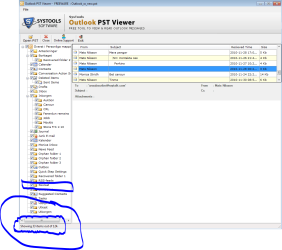
In sent items folder: Showing 30 items out of 121, where are the other 91?
My System SpecsSystem Spec
12-10-2011   #5


win 7 prof 64 Service pack 1 (7601)


"I have used the repair tool on the .pst file, errors were repaired." Tried several times, also tried non repaired pst file.
My System SpecsSystem Spec
12-10-2011   #6


Windows 7 Home Premium 64bit


Perhaps there is something relevant in the following information from Microsoft:
Changes in Outlook 2010

There is a section dealing with migration, which may offer some suggestions as to the culprit...
.
Quote:
Migration considerations

Even though several new features and user interface changes are added in Outlook 2010, the Outlook data files (.ost and .pst) and Outlook profile file (.prf) formats in Outlook 2010 are compatible with earlier releases.

Outlook data files (.pst and .ost)

With Outlook 2010, users can open and use Outlook data files that were created in earlier versions of Outlook. Users who have Outlook data files (.pst) can continue to use the files without converting or migrating the files. Users whose Exchange accounts are configured to use Cached Exchange Mode have offline Outlook data files (.ost). You do not have to re-create these .ost files if you perform an in-place upgrade to Outlook 2010.
Note that moving .ost files between computers is not supported. Therefore, you should not manually copy .ost files between computers. Additionally, the User State Migration Tool (USMT) cannot be used to migrate .ost files.
By default, Outlook .pst and .ost files that are created by using Office Outlook 2003 through Outlook 2010 are in the updated Unicode file format that allows for larger file sizes (the 2-gigabyte (GB) limit is eliminated). The non-Unicode ANSI data file format s also supported by Outlook 2010.
If users currently have non-Unicode ANSI-formatted .ost files, we recommend that you upgrade the .ost files to Unicode.

Outlook profile file (.prf)

As in earlier versions of Outlook, you can continue to use the Outlook profile file (.prf) to provide options for specifying additional Outlook settings or MAPI services. The Outlook 2010 .prf file format has changed but Office Outlook 2007, Office Outlook 2003, and Outlook 2002 versions of the file will work with Outlook 2010. If you plan to make updates to the .prf file for an Outlook 2010 deployment, we recommend that you re-create the .prf file by using the Office 2010 Office Customization Tool (OCT), export the settings to a new .prf file, and use that file to specify the additional Outlook settings or MAPI services that you want.

Reverting to Office 2007 from Office 2010

Because of the changes in Outlook 2010 that enable multiple Exchange e-mail accounts, user profiles that were upgraded to Outlook 2010 will not work if the user removes Outlook 2010, reinstalls Office Outlook 2007, and then attempts to start Office Outlook 2007 by using the same user profile. In this scenario, the user profile must be removed and re-created in Windows through the Control Panel and Mail options.

VBA settings migration

In Office 2010, Visual Basic for Applications (VBA) 6.0 is updated to VBA 7.0. VBA 7.0 settings are reset to their defaults after migration instead of automatically repopulating. This occurs because the registry settings for VBA are in a different hive in Office 2010, as shown in the following table.
My System SpecsSystem Spec
12-10-2011   #7


win 7 prof 64 Service pack 1 (7601)


well, i'm not using .ost. The .prf i'm not sure what it is, same with VBA.

So based on my knowledge, it does not relate to any of the suggestions in this article

Last edited by mostmani; 12-11-2011 at 02:15 PM..
My System SpecsSystem Spec
12-13-2011   #8


Windows 7 Home Premium 64bit


There is some very helpful information about pst files here:
About the Outlook PST-File | HowTo-Outlook
My System SpecsSystem Spec
12-13-2011   #9


W7 X-64 RTM,SUSE 11.1, XP PRO SP3 as a VM, VMware ESXi


Hi there
The Ms Outlook email backup tool can also be use to "recover" pst files -- although not actually intended for that purpose.

Download pfbackup.exe from the MS site -- although it says 2007 it DOES work on 2010 --I use it daily.

Download: Outlook 2007/2003/2002 Add-in: Personal Folders Backup - Microsoft Download Center - Download Details

After installing in Office 2010 you will see it in the ADDINS menu. Open it and choose open backup. Browse to the pst file(s) you want to examine and it will open these in a new folder. Then you can copy / move these to your regular folders.

Ensure also that you enable the Keep sent mail in the send folder option enabled too.
Cheers

jimbo
My System SpecsSystem Spec
12-14-2011   #10


win 7 prof 64 Service pack 1 (7601)


Thanks, tried the backup option, but no luck. I have also tried 3 "professional" applications but see no additional emails.

Maybe I will have to face that I lost my emails...

The only thing that is bothering me is that "PSTVIEWER" seams to have 91 email hidden somewere
Attached Thumbnails
Sent items gone after upgrade to outlook 2010 (POP)-pst-viewer.png  
My System SpecsSystem Spec
Reply

 Sent items gone after upgrade to outlook 2010 (POP) problems?


Thread Tools


Similar Threads for: Sent items gone after upgrade to outlook 2010 (POP)
Thread Forum
Solved Outlook 2010 search not checking Hotmail's Deleted Items? Microsoft Office
Outlook 2010 Sent Items question Microsoft Office
sent items without attachment in Outlook 2010. Microsoft Office
Search and Deleted Items folders in Outlook 2010 pst files Microsoft Office
Outlook 2010 - items duplicated in To-Do Bar Microsoft Office


All times are GMT -5. The time now is 05:49 PM.


Windows 7 Forums is an independent web site and has not been authorized,
sponsored, or otherwise approved by Microsoft Corporation.
"Windows 7" and related materials are trademarks of Microsoft Corp.
© Designer Media Ltd
  

1 2 3 4 5 6 7 8 9 10 11 12 13 14 15 16 17 18 19 20 21 22 23 24 25 26 27 28 29 30