Windows 7 Forums Search
Welcome to Windows 7 Forums. Our forum is dedicated to helping you find solutions with any problems, errors or issues you are experiencing with Windows 7. The Windows 7 forum also covers news and updates and has an extensive Windows 7 tutorial section that covers a wide range of tips and tricks.


Windows 7 - How to open a copy of the document once clicked

 
01-27-2012   #1


Windows 7 32 Bit


How to open a copy of the document once clicked

Hey I am creating a document template in Word and in Excel to send to my employees.

Now I don't want them to make changes to that particular template so what I am trying to do is If they try to edit or make any other changes, it should open a same document for them to edit in or ask them to save it as a different file.

I am not sure if putting "Read-Only" permission would help?

My System SpecsSystem Spec
01-30-2012   #2


Systems 1 and 2: Windows 7 Enterprise x64, Win 8 Developer


Welcome to SF.

File -> Save As -> Tool -> General -> Read Only
Attached Images
 
My System SpecsSystem Spec
01-31-2012   #3


Windows 7 32 Bit


thanks..
My System SpecsSystem Spec
.


01-31-2012   #4


Microsoft Windows 7 Home Premium 64-bit 7601 Multiprocessor Free Service Pack 1


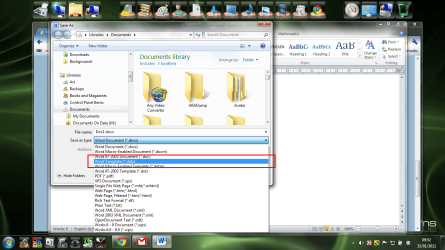
Or even File->Save As Word Template(.dotx).

How to open a copy of the document once clicked-screenshot109_2012-01-31.png
My System SpecsSystem Spec
Reply

 How to open a copy of the document once clicked problems?


Thread Tools


Similar Threads for: How to open a copy of the document once clicked
Thread Forum
Use WebBrowser control in VB6 to open an Office document on Win7 Microsoft Office
Solved Can't Copy Text From pdf Document! General Discussion
Solved Make menus only open if clicked on Customization
Outlook 2007 clicked links don't open!!! PLEASE help! Microsoft Office
Office 2007 Open Word Document Window Microsoft Office


All times are GMT -5. The time now is 05:58 PM.


Windows 7 Forums is an independent web site and has not been authorized,
sponsored, or otherwise approved by Microsoft Corporation.
"Windows 7" and related materials are trademarks of Microsoft Corp.
© Designer Media Ltd
  

1 2 3 4 5 6 7 8 9 10 11 12 13 14 15 16 17 18 19 20 21 22 23 24 25 26 27 28 29 30