Windows 7 Forums Search
Welcome to Windows 7 Forums. Our forum is dedicated to helping you find solutions with any problems, errors or issues you are experiencing with Windows 7. The Windows 7 forum also covers news and updates and has an extensive Windows 7 tutorial section that covers a wide range of tips and tricks.


Windows 7 - Import .txt in Excel 2010 issue

 
01-30-2012   #1


Windows 7 Home Premium 32 bit


Import .txt in Excel 2010 issue

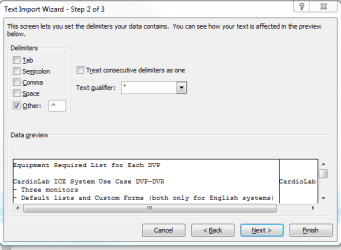
I have a .txt file that is imported into Excel using delimiters("^").
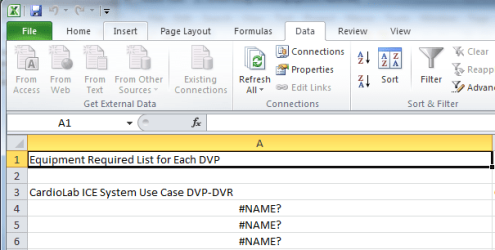
I look at the .txt file, and do not see anything different/out of place, but when I import it into Excel 2010, some of the lines end up with a "=" attached.

For example,

.txt Excel 2010


- Three monitors =- Three monitors (resulting in #NAME?)

Why is an "=" inserted into the import?

Thank you.

I have attached some screenshots to demonstrate.

Attached Thumbnails
Import .txt in Excel 2010 issue-import1.png   Import .txt in Excel 2010 issue-import2.png  

Last edited by gedinfo; 01-30-2012 at 12:34 PM.. Reason: Added screenshots
My System SpecsSystem Spec
01-30-2012   #2


32bit: XP, Win7 H.P. / 64bit: 2008R2, Win7 Pro, Ultimate / Several flavors of Linux


See if setting import step 3 "Column data format" to "Text" helps. Otherwise, need more information about your source material and import parameters.

Regards,
GEWB
My System SpecsSystem Spec
01-30-2012   #3


Windows 7 Home Premium 32 bit


Issue Solved

thank you for the prompt reply.

That resolved my issue!!!
My System SpecsSystem Spec
.


01-30-2012   #4


32bit: XP, Win7 H.P. / 64bit: 2008R2, Win7 Pro, Ultimate / Several flavors of Linux


Quote   Quote: Originally Posted by gedinfo View Post
thank you for the prompt reply.

That resolved my issue!!!
Glad it worked for you!

Regards,
GEWB
My System SpecsSystem Spec
Reply

 Import .txt in Excel 2010 issue problems?


Thread Tools


Similar Threads for: Import .txt in Excel 2010 issue
Thread Forum
Outlook 2010: Unable to import mail from WLM Microsoft Office
Excel 2010 save as issue Microsoft Office
Formatting Excel 2010, Excel 2003 Microsoft Office
Outlook 2010 import Browsers & Mail
Toshiba Printer/Excel 2010 Issue Microsoft Office


All times are GMT -5. The time now is 05:58 PM.


Windows 7 Forums is an independent web site and has not been authorized,
sponsored, or otherwise approved by Microsoft Corporation.
"Windows 7" and related materials are trademarks of Microsoft Corp.
© Designer Media Ltd
  

1 2 3 4 5 6 7 8 9 10 11 12 13 14 15 16 17 18 19 20 21 22 23 24 25 26 27 28 29 30