Windows 7 Forums


Windows 7: The top bar for my microsoft 2010 products became too large .

24 Feb 2012  
Lady Uzumaki

Windows 7 Professional
4 posts
 
 
The top bar for my microsoft 2010 products became too large .

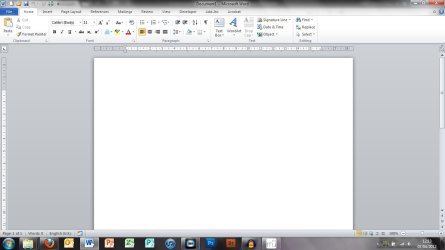
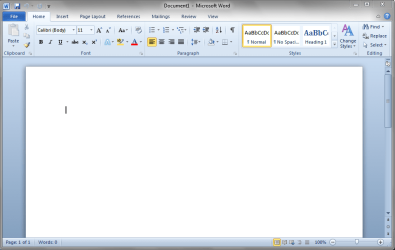
As you can see , the top bar is too big and its getting annoying because Im using a Tablet PC and I can't write properly on the screen because of this issue .


Does anyone have a solution to resolve this matter ? Thanks in advance !
Attached Thumbnails
The top bar for my microsoft 2010 products became too large .-wffrfwfrw.png   The top bar for my microsoft 2010 products became too large .-fvefveerg.png   The top bar for my microsoft 2010 products became too large .-erfrrfer.png  

Last edited by Lady Uzumaki; 25 Feb 2012 at 12:23 AM..
My System SpecsSystem Spec

24 Feb 2012  
DustSailor

Windows 8 Pro with Media Center x64
2,457 posts
Southern California, USA


Hello lady, and welcome to Sevenforums.

Unfortunately, I cannot see. You might look at this tutorial that will enable me to see it: Screenshots and Files - Upload and Post in Seven Forums - tutorial created by Brink
My System SpecsSystem Spec
25 Feb 2012  
DavidW7ncus

Win 7 Pro x64 SP1, Win 7 Ult x86 SP1
1,901 posts
NC, USA


Right mouse click on the top bar (Ribbon) and click "Minimize the Ribbon".
My System SpecsSystem Spec
.


25 Feb 2012  
Lady Uzumaki

Windows 7 Professional
4 posts


@David : By minimizing it , it only closes the top bar (ribbon) but it doesn't make it any smaller :c
Attached Thumbnails
The top bar for my microsoft 2010 products became too large .-vfvfwwrrwf.png  
My System SpecsSystem Spec
25 Feb 2012  
DavidW7ncus

Win 7 Pro x64 SP1, Win 7 Ult x86 SP1
1,901 posts
NC, USA


When you click on a Ribbon Tab such as "Insert", the ribbon should open up so you can use the tools on that tab.

Is that the issue, that you don't see the tools at all when the ribbon is minimized?
My System SpecsSystem Spec
25 Feb 2012  
DustSailor

Windows 8 Pro with Media Center x64
2,457 posts
Southern California, USA


Lady,

Type "Display" into the start menu search without quotes, click it, and click "Smaller - 100% (default)"

You can also change the resolution under "Adjust reslolution" (higher is smaller-looking programs)

Reset DPI to 100% under "Set custom text size (DPI)"
My System SpecsSystem Spec
25 Feb 2012  
Lady Uzumaki

Windows 7 Professional
4 posts


@Dusty : I have already selected "Smaller - 100% (default)" and also reset the DPI to 100% , but it still doesn't work .
@David : Yup that is the issue .
My System SpecsSystem Spec
25 Feb 2012  
DavidW7ncus

Win 7 Pro x64 SP1, Win 7 Ult x86 SP1
1,901 posts
NC, USA


Lady,

You did see that you can temporarily pop open the minimized ribbon by clicking on a ribbon tab, right?
It then re-minimizes when you click on something.
Using it this way does not work well for you, right?

I don't know of a way to re-size the ribbon, or if that's possible.
If someone else knows how to do that, hopefully they will post that info for you.

It sounds like you would like the Office 2003 style toolbar in Office 2010.

There may be 3rd party tools that can do what you want, but I don't have any experience with them and can't recommend any.

Regards, David
My System SpecsSystem Spec
25 Feb 2012  
GEWB

32bit: XP, Win7 H.P. / 64bit: 2008R2, Win7 Pro, Ultimate / Several flavors of Linux
636 posts
Denver, Colorado


I do not think you can change the height of the collapsed ribbon bar. However, you can move the Quick Access Toolbar above the ribbon into the window Title area. You will gain the space currently occupied by the Quick Access Toolbar.

Right-click on the Quick Access Toolbar then select Show Quick Access Toolbar Above The Ribbon.

The top bar for my microsoft 2010 products became too large .-wordbars.png

Regards,
GEWB
My System SpecsSystem Spec
25 Feb 2012  
DavidW7ncus

Win 7 Pro x64 SP1, Win 7 Ult x86 SP1
1,901 posts
NC, USA


Quote   Quote: Originally Posted by GEWB View Post
However, you can move the Quick Access Toolbar above the ribbon into the window Title area. You will gain the space currently occupied by the Quick Access Toolbar.
Based on the OP screen prints i think she is already doing this.

Thanks, David
My System SpecsSystem Spec
Reply

 The top bar for my microsoft 2010 products became too large . problems?


Thread Tools


Similar help and support threads for: The top bar for my microsoft 2010 products became too large .
Thread Forum
cannot enable updates for other microsoft products Windows Updates & Activation
Google vs. Microsoft Isn’t Just a Battle of Products, News
How do i report a bad seller of microsoft Products Windows Updates & Activation
What were the best new hardware products of 2010? Hardware & Devices
can not input any letters with microsoft beta products General Discussion


All times are GMT -5. The time now is 01:04 PM.


Windows 7 Forums is an independent web site and has not been authorized,
sponsored, or otherwise approved by Microsoft Corporation.
"Windows 7" and related materials are trademarks of Microsoft Corp.
© Designer Media Ltd