I have a file that is displaying same symptoms
In my case this is with a small file (6.5 MB with no calculations)
This file also takes and extraordinarily long time to open (30-90 secs)
The problem is occurring on several computers that I have tried (including with Windows 8 & Excel 13)
I'm not even able to delete 1 row of data (30-40 columns with data)
I have other bigger files with pivot tables etc. and these have no problem.
This seems to be a file issue, but I have been unable to resolve it.
64 bit edition seems to be an overkill as the standard (recommended) version should do this easily.
"this additional capacity is needed only by those Microsoft Excel users who require Excel spreadsheets that are larger than 2 gigabytes (GB). "
The suggestions by
Microsoft support don't have any effect
I have noticed over that last year or more that excel seems to struggle with memory, especially with bigger files.
Any help or suggestions would be appreciated
#evernoteContentClipperWait { FONT-FAMILY: arial, helvetica, sans-serif; PADDING-BOTTOM: 0px; PADDING-TOP: 0px; PADDING-LEFT: 0px; MARGIN: 0px; Z-INDEX: 2147483647; DISPLAY: block; PADDING-RIGHT: 0px; opacity: 1}#evernoteContentClipperWait * { DISPLAY: block !important; text-shadow: none}.quirk-mode-container#evernoteContentClipperWait { WIDTH: 160px}#evernoteContentClipperWait DIV.content-less-than-nine-container#evernoteContentClipperWaitContent { FILTER: progid

XImageTransform.Microsoft.Alpha(opacity=80); BACKGROUND-COLOR: rgb(0,0,0)}DIV#evernoteContentClipperWaitContent { FONT-SIZE: 10pt; HEIGHT: 100%; FONT-FAMILY: arial, helvetica, sans-serif; BACKGROUND: black; COLOR: white; PADDING-BOTTOM: 9px; PADDING-TOP: 9px; PADDING-LEFT: 15px; PADDING-RIGHT: 15px; WIDTH: 100%; border-radius: 5px; opacity: .8}#evernoteContentClipperWaitText { FLOAT: none; PADDING-BOTTOM: 0px; PADDING-TOP: 0px; PADDING-LEFT: 0px; MARGIN: 0px; DISPLAY: inline; LETTER-SPACING: 1pt; LINE-HEIGHT: 18px; PADDING-RIGHT: 0px}#evernoteContentClipperWait IMG { BORDER-TOP: medium none; BORDER-RIGHT: medium none; BORDER-BOTTOM: medium none; FLOAT: left; PADDING-BOTTOM: 0px; PADDING-TOP: 0px; PADDING-LEFT: 0px; MARGIN: 0px 0px 0px 4px; BORDER-LEFT: medium none; DISPLAY: inline; PADDING-RIGHT: 0px}DIV#evernote-spinner-container { HEIGHT: 18px; FLOAT: left; WIDTH: 20px}' ; // get html // ======== var _html = _response; // normalize // ========= _html = _html.replace(//gi, '>'); _html = _html.replace(/\s+\/>/gi, '/>'); // remove // ====== _html = _html.replace(/#next_pages_container { POSITION: absolute; LEFT: -100px; Z-INDEX: 2147483647 !important; TOP: -100px; WIDTH: 5px; hight: 5px}



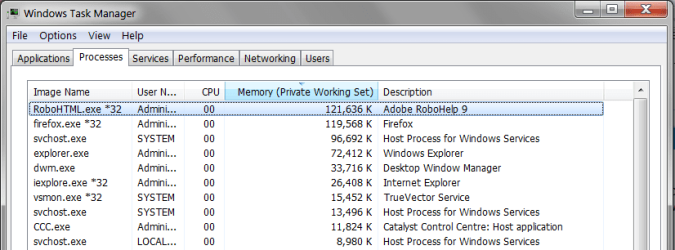
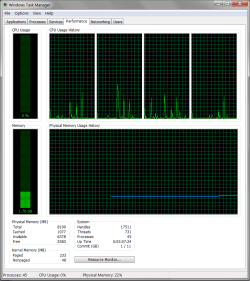
 . It wasn't until I started looking at the version of Excel that I had a break through
 . By default Office is installed as 32-bit, but you can install a 64-bit version that allows Office to use all the resources that a work station has. 32 bit Excel only allows 2GB, whereas 64 uses all resources. This link explains how you should use 64 bit Office 2010 and how to install
