Windows 7 Forums


Windows 7: Word 2007 default margins

26 Mar 2012   #1

Windows 7 Home Premium (x64) Service Pack 1
virginia beach
 
 
Word 2007 default margins

Is there a way to set margins in the normal teplte? My margins changed unexpectly


My System SpecsSystem Spec

26 Mar 2012   #2

Windows 7 SP1, Home Premium, 64-bit


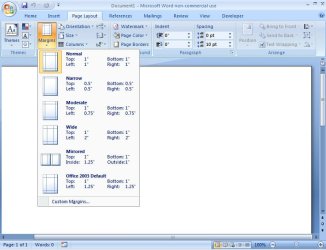
Look at the Page Layout tab. Then margins under that.
Attached Thumbnails
Word 2007 default margins-untitled-1.jpg  
My System SpecsSystem Spec
26 Mar 2012   #3

Windows 7 Home Premium (x64) Service Pack 1
virginia beach
 
 
word 2007 ruler expansion?

Is there a way to expand the rulrer and resultant docunment in word 2007?

Last edited by Brink; 09 Apr 2012 at 12:38 PM.. Reason: moved to original thread
My System SpecsSystem Spec
.


26 Mar 2012   #4

Windows 8; Windows 7 x86 (Dec2008-Jan2013)


Sorry, it is not clear what are you talking about.

If you are talking about changing paper size - you can change it in tab - Page Layout - Size.

If you are talking about Zoom, please use tab View - Zoom or at the right bottom of Word window
there are + and - controls for that too.
My System SpecsSystem Spec
27 Mar 2012   #5

Vista 64 bit and 32 bit (SP2)
Los Angeles, California + Milwaukee, Wis


First of course, you have to have your ruler activated. If it isn't, go into the Ribbon to the View section, and click on the Ruler link. Once the rule appears at the top of the Word page, it extends all the way from the left edge of the document to the right edge of the document. If you wish to change the TAB settings, so that your text is closer or further from the edges of the page, there are a number of ways to do this, but the simplest is to either change your MARGIN settings, or merely move the 2 tabs at the left edge of the document and/or move the 1 tab at the right edge.
My System SpecsSystem Spec
27 Mar 2012   #6

Vista 64 bit and 32 bit (SP2)
Los Angeles, California + Milwaukee, Wis


Yes you can change the margins in the Normal Template.

Open a Word doc, access your Quick Access Toolbar and open your Styles link. Click on the down-arrow 6 to the right of the Styles icon, and click on Modify. (If you don't have a Styles icon in your Quick Access Toolbar, you can add one by opening the Quick Access Toolbar and clicking on More Commands, and then following the on-screen directions. OR you can go into the Ribbon to Home, go to the Style section, and in the bottom of the Style section, at the far-right, click on the down-arrow, which should open up the same Menu of styles.)

Either way, once you've clicked Modify, when the new screen opens, in the lower-left hand corner click on Format. Then select Paragraph. There you will see all the options to set your margin preferences for your Normal Template.

When you're done, be sure to click the box that makes the new setting for ALL docs in your Normal Template, not just the one you have open.
My System SpecsSystem Spec
27 Mar 2012   #7

Windows 7 Home Premium (x64) Service Pack 1
virginia beach
 
 
ruler question

How do I expand the ruler horizontally? It is so small that it has a small matching word document.

Last edited by Brink; 09 Apr 2012 at 12:39 PM.. Reason: Moved to original thread
My System SpecsSystem Spec
27 Mar 2012   #8

Windows 7 Pro X64
Space Coast of Florida


Can you post a screen shot of what you mean? That might help us to understand better.
My System SpecsSystem Spec
28 Mar 2012   #9

Windows 7 Home Premium (x64) Service Pack 1
virginia beach
 
 
ruler help

My System SpecsSystem Spec
28 Mar 2012   #10

Windows 7 Home Premium (x64) Service Pack 1
virginia beach


My System SpecsSystem Spec
Reply

 Word 2007 default margins problems?


Thread Tools


Similar help and support threads for: Word 2007 default margins
Thread Forum
Solved MS Word 2007 Cannot save default quick styles Microsoft Office
Restore a default shortcut in Word 2007 Microsoft Office
Change default text and paragraph style + save location in Word 2007? Microsoft Office
Word 2007 - perm change default settings for photo insertion Microsoft Office
How to show horiz.ruler+margins at the top of an doc in Word 2007? Microsoft Office


All times are GMT -5. The time now is 11:52 PM.


Seven Forums Android App Seven Forums IOS App Follow us on Facebook

Windows 7 Forums is an independent web site and has not been authorized,
sponsored, or otherwise approved by Microsoft Corporation.
"Windows 7" and related materials are trademarks of Microsoft Corp.
© Designer Media Ltd
  

1 2 3 4 5 6 7 8 9 10 11 12 13 14 15 16 17 18 19 20 21 22 23 24 25 26 27 28 29 30 31 32