| Windows 7: How to insert a Macro into Word 2010 in Windows 7 & Assign Shortcut |
12 May 2012
|
#1 | | windows 7 professional 64 bit |
How to insert a Macro into Word 2010 in Windows 7 & Assign Shortcut I cannot find up to date, step by step instructions on creating a macro in Word 2010 on Windows 7.
While in Word, View, I see Create Macros.
And I can name it and paste in this info below.
Sub PrintCurrentPage()
Application.PrintOut Range:=wdPrintCurrentPage
End Sub
But how do I assign a keyboard short cut to it? Is there a youtube video that is up to date on this?
Thanks. | My System Specs |
| OS windows 7 professional 64 bit |
12 May 2012
|
#2 | | Windows 7 Home Premium 64bit (O.E.M) |
Hi and welcome to Seven Forums,
The best way to do this would be to record a macro and in the dialog box that comes up, create a keyboard shortcut. Then record something, it can be anything. Then open the macro dialog box with all the macros listed, click your newly created macro and click edit. Then delete the code and replace it with your own. Save and test it.
Hope this helps
Stephen | My System Specs | | System Manufacturer/Model Number Dell XPS 15 L502x OS Windows 7 Home Premium 64bit (O.E.M) CPU Intel Core i7 2630QM @2.00GHz Memory 6GB DDR3 Graphics Card Intel Intergrated Graphics 3000, nVidia GT525M (1GB) Screen Resolution 1366x768 Keyboard Backlit Dell XPS 15 L502x Keyboard Mouse Microsoft Wireless Mobile Mouse 4000 Hard Drives 750GB Seagate 7200rpm Internet Speed 2.5 Mb/s down, 0.36 up |
12 May 2012
|
#3 | | Windows 7 Ultimate SP1 64-Bit Peterborough, England |
Welcome to Windows Seven Forums.
Have a look at this tutorial. Create Macros In Word 2010 | My System Specs | | System Manufacturer/Model Number HP Pavilion Elite 495UK OS Windows 7 Ultimate SP1 64-Bit CPU Intel Core i7 870 @ 2.93GHz Motherboard MSI 2A9C (CPU1) Memory 8Gb Dual-Channel DDR3 @ 664MHz Graphics Card nVidia GeForce GTX 460 1024MB dedicated RAM Sound Card Realtek HD Audio Monitor(s) Displays HP2310i Screen Resolution 1920 x 1080 Keyboard Logitech K750 solar-powered keyboard Mouse Logitech Wireless M180 mouse PSU 460W Case HP Elite Cooling Air cooled Hard Drives 1x1954GB Hitachi HDS22020ALA 330 (RAID), 1x1954GB Hitachi External for backup and storage Internet Speed 2Mb Other Info Pure Avanti Flow Internet Radio with iPod Dock, 64Gb iPod, HP USB Speakers, Sony MDR-V500 Headphones, Sony Vaio F-Series Laptop |
12 May 2012
|
#4 | | Windows 7 Home Premium 64bit (O.E.M) |
Good link. I posted my directions as I included how to add the OP's code and still have a keyboard shortcut. | My System Specs | | System Manufacturer/Model Number Dell XPS 15 L502x OS Windows 7 Home Premium 64bit (O.E.M) CPU Intel Core i7 2630QM @2.00GHz Memory 6GB DDR3 Graphics Card Intel Intergrated Graphics 3000, nVidia GT525M (1GB) Screen Resolution 1366x768 Keyboard Backlit Dell XPS 15 L502x Keyboard Mouse Microsoft Wireless Mobile Mouse 4000 Hard Drives 750GB Seagate 7200rpm Internet Speed 2.5 Mb/s down, 0.36 up |
12 May 2012
|
#5 | | windows 7 professional 64 bit |
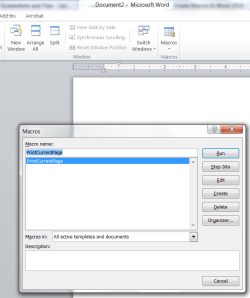
This is weird. I have viewed the tutorials and still can't figure it out. I have a working macro. But I am stuck on the attached screenshot. I cannot get to a place where I can assign keyboard strokes to the macro. Please help. thanks in advance. | My System Specs | | OS windows 7 professional 64 bit |
13 May 2012
|
#6 | | |
I agree with Tekno that the easiest way when creating a new macro is to record a macro and assign a keyboard shortcut then. If you wish to change the assigned shortcut or add one to a existing macro then you can click
File > Options > Customize Ribbon and at the bottom of the window click Keyboard Shortcuts: Customize.
Under Categories scroll to the bottom and you should find Macros. If you can't find your particular macro check what document it's saved in under the drop down box "Save changes in:".
It would make more sense to have this option in the Macros window but that's MS for you. | My System Specs | | System Manufacturer/Model Number Self built OS Windows 7 Ultimate x64 CPU Intel Pentium Dual Core E5200 2.5GHz (3.77GHz OC) Motherboard Asus P5Q-E Memory Corsair 4GB DDR2 (4x1GB CM2X1024-6400C4) Graphics Card Palit GeForce GTS 250 (1024MB) Sound Card On Board (ADI AD2000B 8ch HD) Monitor(s) Displays Samsung 32in LCD TV Screen Resolution 1360x768 Keyboard Logitech MX5000 Laser (Combo) Mouse Logitech MX5000 Laser (Combo) PSU 550W Antec Neo HE 550 Case Antec P180 Cooling Xigmatex Red Scorpion CPU Cooler. 3x120mm Fans Hard Drives 2 x 1TB Samsung 103SJ (Raid0)
2 x External 500GB Samsung 502IJ (NexStar 3 HD Enclosures) Internet Speed ADSL2+ (avg 10 Mbps Down, 0.80 Mbps up) Other Info Gigabyte GN-WP01GS 54g Wireless Lan Card |
13 May 2012
|
#7 | | Windows 7 Ultimate SP1 64-Bit Peterborough, England |

Quote: Originally Posted by dell3 This is weird. I have viewed the tutorials and still can't figure it out. I have a working macro. But I am stuck on the attached screenshot. I cannot get to a place where I can assign keyboard strokes to the macro. Please help. thanks in advance. Did you assign a keyboard shortcut when you recorded the macro, as you should have done?
The macro has obviously been recorded because it has a name and a list of options e.g. if you click on Run, it will run the macro. | My System Specs | | System Manufacturer/Model Number HP Pavilion Elite 495UK OS Windows 7 Ultimate SP1 64-Bit CPU Intel Core i7 870 @ 2.93GHz Motherboard MSI 2A9C (CPU1) Memory 8Gb Dual-Channel DDR3 @ 664MHz Graphics Card nVidia GeForce GTX 460 1024MB dedicated RAM Sound Card Realtek HD Audio Monitor(s) Displays HP2310i Screen Resolution 1920 x 1080 Keyboard Logitech K750 solar-powered keyboard Mouse Logitech Wireless M180 mouse PSU 460W Case HP Elite Cooling Air cooled Hard Drives 1x1954GB Hitachi HDS22020ALA 330 (RAID), 1x1954GB Hitachi External for backup and storage Internet Speed 2Mb Other Info Pure Avanti Flow Internet Radio with iPod Dock, 64Gb iPod, HP USB Speakers, Sony MDR-V500 Headphones, Sony Vaio F-Series Laptop |
13 May 2012
|
#8 | | Windows 7 Home Premium 64bit (O.E.M) |
Hi,
Created a video myself to show you how to do this as I couldn't find a good one. Hope it helps. You'll want to watch it in HD as the quality isn't very good
Stephen EIDT - REMOVED THE VIDEO FROM YOUTUBE. SORRY. YOU'LL JUST HAVE TO MANAGE WITH THE WRITTEN STEPS. | My System Specs | | System Manufacturer/Model Number Dell XPS 15 L502x OS Windows 7 Home Premium 64bit (O.E.M) CPU Intel Core i7 2630QM @2.00GHz Memory 6GB DDR3 Graphics Card Intel Intergrated Graphics 3000, nVidia GT525M (1GB) Screen Resolution 1366x768 Keyboard Backlit Dell XPS 15 L502x Keyboard Mouse Microsoft Wireless Mobile Mouse 4000 Hard Drives 750GB Seagate 7200rpm Internet Speed 2.5 Mb/s down, 0.36 up |
13 May 2012
|
#9 | | windows 7 professional 64 bit |

Quote: Originally Posted by Duzzy File > Options > Customize Ribbon and at the bottom of the window click Keyboard Shortcuts: Customize. Duzzy and everyone, thank you! That gets me to the right place. Had no idea it would be there, instead of under the Macros icon. Which brings me to a follow up question: What are the best keyboard shortcuts, stroke combinations, to assign to Word 2010 macros? I tried to look up a list of unused keystroke combinations but have not found such a list. And, I can't get a simple list to show up on my screen. I seem to have to click through thousands of options to see what keystrokes are being used. What is some combination that is definitely not being used in Windows 7 or Word 2010? Do they all have to being with Control? Thanks again. | My System Specs | | OS windows 7 professional 64 bit |
13 May 2012
|
#10 | | Windows 7 Ultimate SP1 64-Bit Peterborough, England |
You may find it easier to use the button option rather than a keyboard shortcut.
There's no time penalty, because all you'll do is click a button on the ribbon instead of pressing a keyboard shortcut. | My System Specs | | System Manufacturer/Model Number HP Pavilion Elite 495UK OS Windows 7 Ultimate SP1 64-Bit CPU Intel Core i7 870 @ 2.93GHz Motherboard MSI 2A9C (CPU1) Memory 8Gb Dual-Channel DDR3 @ 664MHz Graphics Card nVidia GeForce GTX 460 1024MB dedicated RAM Sound Card Realtek HD Audio Monitor(s) Displays HP2310i Screen Resolution 1920 x 1080 Keyboard Logitech K750 solar-powered keyboard Mouse Logitech Wireless M180 mouse PSU 460W Case HP Elite Cooling Air cooled Hard Drives 1x1954GB Hitachi HDS22020ALA 330 (RAID), 1x1954GB Hitachi External for backup and storage Internet Speed 2Mb Other Info Pure Avanti Flow Internet Radio with iPod Dock, 64Gb iPod, HP USB Speakers, Sony MDR-V500 Headphones, Sony Vaio F-Series Laptop How to insert a Macro into Word 2010 in Windows 7 & Assign Shortcut problems? All times are GMT -5. The time now is 10:00 PM. | |