Windows 7 Forums


Windows 7: Running Office XP under Windows 7 - error on startup

24 Oct 2012   #1

Windows 7 Professional 64-bit
Johannesburg, South Africa
 
 
Running Office XP under Windows 7 - error on startup

Hi

I have just bought a new laptop and it came with Windows 7 Professional 64-bit. My previous laptop was running XP (which I LOVE and am trying to get my Windows 7 to work like XP did.... but that's a different issue for another day....).

I have MS Office XP 2004 Professional on CD. When I bought my previous laptop (running XP), I had installed this and have been using it for the past 4 years without any trouble.

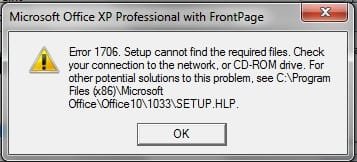
I have just loaded the CD onto my new laptop (I loaded only Word, Excel and Powerpoint because I don't need the other programs) and every time I try to start Word or Excel, I get this box:
Running Office XP under Windows 7 - error on startup-error1.jpg

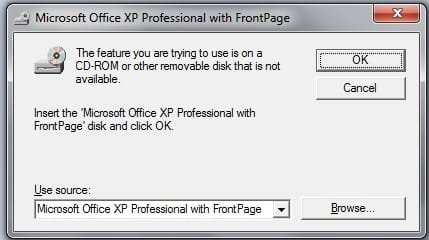
If I choose Cancel, I then get this:


Running Office XP under Windows 7 - error on startup-error2.jpg

And if I click OK, the program then starts and seems to be OK.

But I will be driven made if I have to go through these error boxes each time I open Word or Excel. Does anyone know how I can get rid of them? I even copied across my normal.dot from my old machine, but that didn't help.

Thanks,
Ros.
My System SpecsSystem Spec

24 Oct 2012   #2

Windows 7 Home Premium 64bit
Stafford, England


Hello rosb, welcome to Seven Forums.

Hopefully this MS Article will help. It does refer to Office XP 2003, but may well be relevant to Office XP 2004 too:
You receive an "Error 1706. Setup cannot find the required files
My System SpecsSystem Spec
24 Oct 2012   #3

Windows 7 Professional 64-bit
Johannesburg, South Africa


Quote   Quote: Originally Posted by Irene View Post
Hopefully this MS Article will help. It does refer to Office XP 2003, but may well be relevant to Office XP 2004 too:
You receive an "Error 1706. Setup cannot find the required files
Hey Irene... thanks for the prompt reply... problem is I can't access that page you recommended... it's been loading for the past 10 minutes... to be honest, I've been trying to access quite a few different pages within the "support.microsoft.com" domain today (<sigh> this moving over to a new operating system is TOUGH! Many, many questions....) and have had very little success.
My System SpecsSystem Spec
.


24 Oct 2012   #4

Windows 7 Home Premium 64bit
Stafford, England


That's strange, it loads immediately for me. Which browser are you using?

Could it possibly be a security program issue? This is just a guess...
Try rebooting your PC and try again.
My System SpecsSystem Spec
24 Oct 2012   #5

Windows 7 Professional 64-bit
Johannesburg, South Africa


OK, that website finally did load.... it's probably just the usual dodgy internet connection that we have down here in Africa....

The symptom for this solution is "When you insert a Microsoft Office CD-ROM, either to repair an Office installation or to install a feature set to Installed on First Use, you may receive the following error message"

But I receive the error message each time I run the program, not when I am trying to repair an Office installation or install a feature set to "Installed on First Use".

It then states:

This problem can occur if all the following conditions are true:
  • You originally installed Office from a network administrative installation.
  • The network administrative installation is no longer available to you.
  • You are trying to use an Office CD-ROM when you are prompted by the Windows Installer for an Office source location.
  • You click Cancel when you are prompted to insert the CD.
Only the last of these conditions is true, in my case. I did not install Office from a network administrative installation.

The resolution suggested is to "Create an Administrative Installation on Your Computer's Hard Disk", but then it says "Note To create an administrative installation, you must use an Enterprise edition of Office." I don't think I have such a thing.
My System SpecsSystem Spec
Reply

 Running Office XP under Windows 7 - error on startup problems?


Thread Tools


Similar help and support threads for: Running Office XP under Windows 7 - error on startup
Thread Forum
Changing color scheme of Office 2003 running on Windows 7 OS Microsoft Office
Running into BSOD error upon Startup, Stop: Access Denied c0000022 BSOD Help and Support
Windows Installer already running error Software
Win7 x64 and Office XP Pro Problem - Windows Installer Keeps Running Microsoft Office
help -- getting office running again Microsoft Office


All times are GMT -5. The time now is 08:59 PM.


Seven Forums Android App Seven Forums IOS App Follow us on Facebook

Windows 7 Forums is an independent web site and has not been authorized,
sponsored, or otherwise approved by Microsoft Corporation.
"Windows 7" and related materials are trademarks of Microsoft Corp.
© Designer Media Ltd
  

1 2 3 4 5 6 7 8 9 10 11 12 13 14 15 16 17 18 19 20 21 22 23 24 25 26 27 28 29 30 31 32