Windows 7 Forums


Windows 7: Text wrapping in Word 2010

14 Jan 2013   #1

Windows 7 Home Premium 32bit
Australia
 
 
Text wrapping in Word 2010

Hi,
When i insert/paste images into a word 2010 document it also seems to be pasted with the "In Line with text" wrapping. However i dont want that. I want my images to pasted in "Tight"


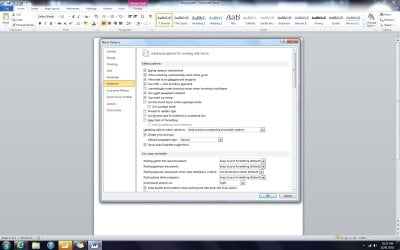
I have gone into Option > Advance, and changed my paste setting and saved it, however when ever i start a new document it still apears as "In line with text" but when i go into option it says default is "Tight" but the document doesnt seem to do it.

How can i fix this??
My System SpecsSystem Spec

14 Jan 2013   #2

Windows 8; Windows 7 x86 (Dec2008-Jan2013)


Here is a reg file to force those settings.

Save
the .reg file to your desktop.
Double click/tap on the downloaded .reg file to merge it.
When prompted, click/tap on Run, Yes (UAC-Windows 7/8), Yes, and OK to approve merging the .reg file.
You can now delete the downloaded .reg file if you like.
Attached Files
File Type: reg Office2010_insert_picture_tight.reg (336 Bytes, 2 views)
My System SpecsSystem Spec
15 Jan 2013   #3

Windows 7 Home Premium 32bit
Australia


Quote   Quote: Originally Posted by Neutron16 View Post
Here is a reg file to force those settings.

Save the .reg file to your desktop.
Double click/tap on the downloaded .reg file to merge it.
When prompted, click/tap on Run, Yes (UAC-Windows 7/8), Yes, and OK to approve merging the .reg file.
You can now delete the downloaded .reg file if you like.
So i did a repair instaill of Office, that didn't work.
I applyed your registery edit, but that didn't work :\

What is wrong with office??
Are my settings right?
Attached Thumbnails
Text wrapping in Word 2010-untitled.jpg  
My System SpecsSystem Spec
.


15 Jan 2013   #4

Windows 8; Windows 7 x86 (Dec2008-Jan2013)


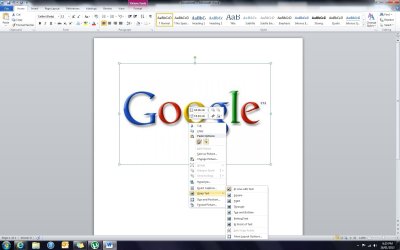
Please post a screenshot of a document, where you believe office is not doing "tight" paste setting.
My System SpecsSystem Spec
16 Jan 2013   #5

Windows 7 Home Premium 32bit
Australia


Quote   Quote: Originally Posted by Neutron16 View Post
Please post a screenshot of a document, where you believe office is not doing "tight" paste setting.
I went to show you an example, and it seemed to work, i was going to reply saying it fixed, but i throught i better try one more time to make sure. And it doesnt work again... :S
So strange..

Edit: It seems if i do a screen shot and paste it into the word doucment it does "tight" wrapping, but if i copy an image from google or my pc and paste, or ever drag it, and become "In line with text"
Attached Thumbnails
Text wrapping in Word 2010-untitled.jpg  
My System SpecsSystem Spec
17 Jan 2013   #6

Windows 8; Windows 7 x86 (Dec2008-Jan2013)


I was able to recreate this behaviour in Office 2013.
Yes, indeed, when you Right click an image in a browser and select copy, and then paste it in Word it will have "In line" layout position even if "Tight" position is set. I think this is feature not a bug, because it is pasting it in HTML format.
The only solution I was able to come up with is Special paste.

On the Office Ribbon below Paste button there is a little triangle. Click on it for more options -> Paste Special -> Device Independent Bitmap or File. Now this image will be pasted in Tight wrapping. At the point of time, I am not sure how to solve this in way that is more efficient (if there is a solution).

But my money is on the fact that likely there is no solution, because there is no such option as "Tight" in HTML format.
.

Last edited by Neutron16; 17 Jan 2013 at 02:05 PM.. Reason: run some tests with html
My System SpecsSystem Spec
17 Jan 2013   #7

Windows 7 Home Premium 32bit
Australia


Quote   Quote: Originally Posted by Neutron16 View Post
I was able to recreate this behaviour in Office 2013.
Yes, indeed, when you Right click an image in a browser and select copy, and then paste it in Word it will have "In line" layout position even if "Tight" position is set. I think this is feature not a bug, because it is pasting it in HTML format.
The only solution I was able to come up with is Special paste.

On the Office Ribbon below Paste button there is a little triangle. Click on it for more options -> Paste Special -> Device Independent Bitmap or File. Now this image will be pasted in Tight wrapping. At the point of time, I am not sure how to solve this in way that is more efficient (if there is a solution).

But my money is on the fact that likely there is no solution, because there is no such option as "Tight" in HTML format.
.
Huh... I never used to have this problem... (at least i dont think)
but thanks for your help anyway
My System SpecsSystem Spec
Reply

 Text wrapping in Word 2010 problems?


Thread Tools


Similar help and support threads for: Text wrapping in Word 2010
Thread Forum
Solved Word 2010 - Text Box Microsoft Office
Solved How to set default text wrapping in word Microsoft Office
Word 2010 - Text Condensation Microsoft Office
Wrapping text in Outlook 2007 Microsoft Office
Can't access text effects in Word 2010 Microsoft Office


All times are GMT -5. The time now is 02:19 PM.


Seven Forums Android App Seven Forums IOS App Follow us on Facebook

Windows 7 Forums is an independent web site and has not been authorized,
sponsored, or otherwise approved by Microsoft Corporation.
"Windows 7" and related materials are trademarks of Microsoft Corp.
© Designer Media Ltd
  

1 2 3 4 5 6 7 8 9 10 11 12 13 14 15 16 17 18 19 20 21 22 23 24 25 26 27 28 29 30 31 32