| Windows 7: Can't Save As PDF in Office 2007 |
25 Jan 2009
|
#1 | | Windows 7 Professional (64bit) Michigan |
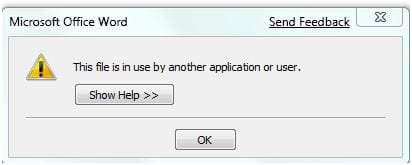
Can't Save As PDF in Office 2007 I downloaded the addon tool to save files in Office 2007 as PDF formats. I have successfully done this in Vista but can not perform this task in Win 7.
I'm not sure if this is a compatibility issue between Win 7 and this feature or it is specific to Office 2007, regardless of the OS. I'll yield to your wisdom.
Here are screen shots of 2 error messages, one from Word and the other from Powerpoint that I captured.
Thank you for your comments and suggestions.
Greg | My System Specs |
| System Manufacturer/Model Number Alienware Aurora OS Windows 7 Professional (64bit) CPU Core i7 Extreme 975 @ 3.33GHz overclocked to 3.6 GHz Motherboard Alienware 0H869M Memory 12 GB DDR3 1333MHz Graphics Card NVIDIA GeForce GTX 295 1.8 GB RAM Sound Card Creative SB X-Fi Titanium Monitor(s) Displays Dell 2407WFP Screen Resolution 1920 x 1200 Keyboard Logitech Mouse Logitech PSU 875 Watt Case Cosmic Black Cooling Alienware High-Performance Liquid Cooling Hard Drives OCZ Vertex 2 100GB SSD - Primary Drive, Western Digital 300GB SATA-II 3GB/X, 10,000 RPM, 16MB Cache - Secondary Drive Internet Speed 60/3MB Service Other Info Logitech Z-5500 THX-Certified 505-Watt 5.1 Digital Surround Sound Speaker System |
26 Jan 2009
|
#2 | | |
Wow, that is weird..I always look over the forums to see what problems other people are having, and i try them out to see if i have the same problem. I too have the "save as PDF/XPS" file, and Office 2007, but i don't have the problem you do. Mine come out just fine. It may be something on your system causing this error.
Just a thought..... | My System Specs | | |
26 Jan 2009
|
#3 | | win7 ultimate / virtual box weston super mare, UK |

Quote: Originally Posted by gzt7d8 I downloaded the addon tool to save files in Office 2007 as PDF formats. I have successfully done this in Vista but can not perform this task in Win 7.
Greg where do you get this tool ? | My System Specs | | System Manufacturer/Model Number built my own OS win7 ultimate / virtual box CPU Intel Core i7 3770K,1155, Ivy Bridge Motherboard MSI Z77A-G43 Memory GSkill Ripjaws Z Series 1600 CL 9.0 16GB Graphics Card KFA2 GeForce GTX 670 EX OC 2048MB GDDR5 PCI-E gfx card Sound Card onboard Nvidia HDMI audio Monitor(s) Displays ASUS VK222H 22" widescreen LCD monitor Screen Resolution 1680x1050 Keyboard logitech Mouse logitech MX518 PSU Corsair HX 750W ATX2.2 Modular Cooling Antec 25 Kuhler H2O 620 Hard Drives Kingston 128gb SSD
OCZ Vertex 90gb SSD
500GB WDCaviar 16mb 5000KS
320GB WDCaviar 16mb 3200AAKS sata 2
1TB Samsung 16mb HD103SJ sata 2 Internet Speed 7mb adsl |
26 Jan 2009
|
#4 | | XP pro, Win7 Ultimate x86 usually: Austria / atm: S.Korea |

Quote: Originally Posted by ickymay where do you get this tool ? 2007 Microsoft Office Add-in: Microsoft Save as PDF or XPS
Works like a charm for me. | My System Specs | | System Manufacturer/Model Number Acer Aspire 1692 OS XP pro, Win7 Ultimate x86 CPU Pentium M 1.73GHz Memory 2GB Samsung DDR2 667 Graphics Card ATI Mobility Radeon X700 64MB Sound Card Conexant AC-Link Audio Screen Resolution 1280x800 |
26 Jan 2009
|
#5 | | win7 ultimate / virtual box weston super mare, UK |

Quote: Originally Posted by killercat thnx for the link
downloaded and saved a ouple of my word documents in PDF format without any errors | My System Specs | | System Manufacturer/Model Number built my own OS win7 ultimate / virtual box CPU Intel Core i7 3770K,1155, Ivy Bridge Motherboard MSI Z77A-G43 Memory GSkill Ripjaws Z Series 1600 CL 9.0 16GB Graphics Card KFA2 GeForce GTX 670 EX OC 2048MB GDDR5 PCI-E gfx card Sound Card onboard Nvidia HDMI audio Monitor(s) Displays ASUS VK222H 22" widescreen LCD monitor Screen Resolution 1680x1050 Keyboard logitech Mouse logitech MX518 PSU Corsair HX 750W ATX2.2 Modular Cooling Antec 25 Kuhler H2O 620 Hard Drives Kingston 128gb SSD
OCZ Vertex 90gb SSD
500GB WDCaviar 16mb 5000KS
320GB WDCaviar 16mb 3200AAKS sata 2
1TB Samsung 16mb HD103SJ sata 2 Internet Speed 7mb adsl |
26 Jan 2009
|
#6 | | Windows 7 Professional (64bit) Michigan |
Thanks for the response, I wish I could pin point the problem. But you've confirmed it is not a multiple user problem but somewhat isolated to me. It works fine in Vista, but just can't get it in Win 7.
So, I'll try Microsoft and see if they have an answer. | My System Specs | | System Manufacturer/Model Number Alienware Aurora OS Windows 7 Professional (64bit) CPU Core i7 Extreme 975 @ 3.33GHz overclocked to 3.6 GHz Motherboard Alienware 0H869M Memory 12 GB DDR3 1333MHz Graphics Card NVIDIA GeForce GTX 295 1.8 GB RAM Sound Card Creative SB X-Fi Titanium Monitor(s) Displays Dell 2407WFP Screen Resolution 1920 x 1200 Keyboard Logitech Mouse Logitech PSU 875 Watt Case Cosmic Black Cooling Alienware High-Performance Liquid Cooling Hard Drives OCZ Vertex 2 100GB SSD - Primary Drive, Western Digital 300GB SATA-II 3GB/X, 10,000 RPM, 16MB Cache - Secondary Drive Internet Speed 60/3MB Service Other Info Logitech Z-5500 THX-Certified 505-Watt 5.1 Digital Surround Sound Speaker System |
27 Jan 2009
|
#7 | | XP pro, Win7 Ultimate x86 usually: Austria / atm: S.Korea |
On your screenshots it appears you are saving to the standard user directory.
Did you try saving to different folders as well?
Since I took ownership of users because of problems with other apps, some rights / privileges issue would be the only thing I can think of atm. And well, in that case I wouldn't get your error of course... | My System Specs | | System Manufacturer/Model Number Acer Aspire 1692 OS XP pro, Win7 Ultimate x86 CPU Pentium M 1.73GHz Memory 2GB Samsung DDR2 667 Graphics Card ATI Mobility Radeon X700 64MB Sound Card Conexant AC-Link Audio Screen Resolution 1280x800 |
28 Jan 2009
|
#8 | | Windows 7 Professional (64bit) Michigan |

Quote: Originally Posted by killercat On your screenshots it appears you are saving to the standard user directory.
Did you try saving to different folders as well? Killercat, I tried saving it to the desktop and to the Public directory and still got the same message.
So do you think it has something to do with the Win 7 privileges?
Greg | My System Specs | | System Manufacturer/Model Number Alienware Aurora OS Windows 7 Professional (64bit) CPU Core i7 Extreme 975 @ 3.33GHz overclocked to 3.6 GHz Motherboard Alienware 0H869M Memory 12 GB DDR3 1333MHz Graphics Card NVIDIA GeForce GTX 295 1.8 GB RAM Sound Card Creative SB X-Fi Titanium Monitor(s) Displays Dell 2407WFP Screen Resolution 1920 x 1200 Keyboard Logitech Mouse Logitech PSU 875 Watt Case Cosmic Black Cooling Alienware High-Performance Liquid Cooling Hard Drives OCZ Vertex 2 100GB SSD - Primary Drive, Western Digital 300GB SATA-II 3GB/X, 10,000 RPM, 16MB Cache - Secondary Drive Internet Speed 60/3MB Service Other Info Logitech Z-5500 THX-Certified 505-Watt 5.1 Digital Surround Sound Speaker System |
01 Feb 2009
|
#9 | | |
Do you have any other PDF printers in your system? Check the Start Menu - Devices and Printers. | My System Specs | | System Manufacturer/Model Number Homebuilt OS Windows 7 x64 CPU i7-2600K Motherboard Asus P8Z77-v Pro Memory 8 G Graphics Card GTX 480 Sound Card Onboard Monitor(s) Displays LG W2753V Screen Resolution 1920x1080 Hard Drives Crucial M4 128 G SSD |
02 Feb 2009
|
#10 | | Windows 7 Professional (64bit) Michigan |

Quote: Originally Posted by Saltgrass Do you have any other PDF printers in your system? Check the Start Menu - Devices and Printers. The only printers shown in that option are Fax, HP PSC 1310 Series (my default printer) and MS XPS Document Writer.
Greg | My System Specs | | System Manufacturer/Model Number Alienware Aurora OS Windows 7 Professional (64bit) CPU Core i7 Extreme 975 @ 3.33GHz overclocked to 3.6 GHz Motherboard Alienware 0H869M Memory 12 GB DDR3 1333MHz Graphics Card NVIDIA GeForce GTX 295 1.8 GB RAM Sound Card Creative SB X-Fi Titanium Monitor(s) Displays Dell 2407WFP Screen Resolution 1920 x 1200 Keyboard Logitech Mouse Logitech PSU 875 Watt Case Cosmic Black Cooling Alienware High-Performance Liquid Cooling Hard Drives OCZ Vertex 2 100GB SSD - Primary Drive, Western Digital 300GB SATA-II 3GB/X, 10,000 RPM, 16MB Cache - Secondary Drive Internet Speed 60/3MB Service Other Info Logitech Z-5500 THX-Certified 505-Watt 5.1 Digital Surround Sound Speaker System Can't Save As PDF in Office 2007 problems? All times are GMT -5. The time now is 03:35 AM. | |