Windows 7 Forums


Windows 7: Outlook 2010 Won't Open

28 Apr 2012   #31

Windows 7
Florida Panhandle
 
 
Thanks Capt Jack

Capt. Jack, I too want to thank you, your advise worked like a charm.

On a side note: I seen all of your movies, more than once.

Quote   Quote: Originally Posted by Capt.Jack Sparrow View Post
Hi Welcome to Seven Forum

Try this
Start-> type; outlook.exe /resetnavpane

Also an try this


Go to Start > Regedit
  1. Locate HKEY_CURRENT_USER\Software\Microsoft\Windows NT\CurrentVersion\Windows Messaging Subsystem
  2. Delete the Profiles key under the Windows Messaging (Subsystem) key.
Hope that Helps


My System SpecsSystem Spec

04 Oct 2012   #32

Windows 7 64 bit
 
 
Didn't work for me

Quote   Quote: Originally Posted by Capt.Jack Sparrow View Post
Hi Welcome to Seven Forum

Try this
Start-> type; outlook.exe /resetnavpane

Also an try this

Go to Start > Regedit
  1. Locate HKEY_CURRENT_USER\Software\Microsoft\Windows NT\CurrentVersion\Windows Messaging Subsystem
  2. Delete the Profiles key under the Windows Messaging (Subsystem) key.
Hope that Helps
Hi Jack,

This didn't work for me, I couldn't find the windows messaging key and the Profile key, under the HKEY_CURRENT_USER key
My System SpecsSystem Spec
11 Oct 2012   #33

window 7 home premium 64 bit
 
 
Tried Regedit and outlook.exe /resetnavpane but unsuccessful

Quote   Quote: Originally Posted by judygolland View Post
I tried with regedit. I deleted profiles and I still can't open Outlook. Help??
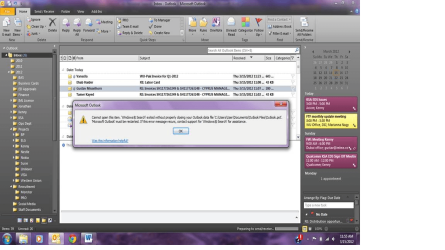
I also tried these approaches, but the same error message appears. The only difference is that now, when I attempt to open outlook, I am walked through the account setup for an email account. However, once the setup is complete, my system appears to try and install outlook. Then the message appears "Cannot start Microsoft Outlook. Cannot open Outlook window."

I have tried to uninstall, but windows won't allow me to. Also, I tried running the full setup again, but windows won't allow this either.

To note, this is only occurring recently. I was able to use outlook for about 2 months. However, I had to re-install my copy of windows 7, due to issues with update configuration failures. Don't know if this makes a difference.

Thanks!
My System SpecsSystem Spec
.


12 Oct 2012   #34

windows 7
 
 
Help!

Dear Capt.Jack Sparrow thanx for the info, My work is to provide IT support for a company in Germany, your workaround did the work! but many of my customers are asking me for an explanation of the problem and what I did delete, as Im no expert in the outlook field I was not able to provide a decent answer. would you be so kind and give me a small explanation of what the problem was and what the workaround does? I would apreciate it very much!! thank you very much for your time !

PD: This forum is great !
Quote   Quote: Originally Posted by Capt.Jack Sparrow View Post
Hi Welcome to Seven Forum

Try this
Start-> type; outlook.exe /resetnavpane

Also an try this

Go to Start > Regedit
  1. Locate HKEY_CURRENT_USER\Software\Microsoft\Windows NT\CurrentVersion\Windows Messaging Subsystem
  2. Delete the Profiles key under the Windows Messaging (Subsystem) key.
Hope that Helps
My System SpecsSystem Spec
14 Oct 2012   #35

Windows 7 Ultimate - 64-bit | Windows 8 Pro - 64-bit


We are just rebuilding the Outlook profile registry entry.
My System SpecsSystem Spec
09 Nov 2012   #36

Windows 7 64
 
 
Cannot Open Your Default Email Folders. The Info cannot be opened

Hello,

I have deleted registries and renamed my user profile, It works for about a day then reverts back to Outlook not working. This is going on in a Cloud Environment running on SBS 2011. Everything I have tried is not working, any advice?
My System SpecsSystem Spec
07 Feb 2013   #37

Windows 8 32 bit
 
 
A Win8 fix too?

Quote   Quote: Originally Posted by Capt.Jack Sparrow View Post
Hi Welcome to Seven Forum


Go to Start > Regedit
  1. Locate HKEY_CURRENT_USER\Software\Microsoft\Windows NT\CurrentVersion\Windows Messaging Subsystem
  2. Delete the Profiles key under the Windows Messaging (Subsystem) key.
Hope that Helps
This worked perfectly for my Win 7 system. Do you have analogous directions and registry key for Win8 systems?
My System SpecsSystem Spec
17 Mar 2013   #38

Windows 7 Home Premium 64bit
 
 
I've lost my Outlook account

HELP!!!!

I had the same problem with my Outlook : none of the word attachments would open (regardless of how I tried to open them). So I followed the suggestion from Capt.Jack Sparrow and went into Start > Regedit then deleted the Profiles key under the WindowsMessaging Subsystemkey (in the chain “HKEY_CURRENT_USER\Software\Microsoft\Windows NT\CurrentVersion\WindowsMessaging Subsystem”).

But now my whole Outlook account has disappeared and I can't get into my account. So I can't find any of my old messages or drafts etc.

Can soneone please help me to restore my Outlook account or allow me to access all my old messages.

Thanks.
My System SpecsSystem Spec
17 Mar 2013   #39

Windows 7 Home Premium 64bit
Stafford, England


Hello HiFiver, welcome to Seven Forums.

It would be better to begin a new thread for your problem because this one is marked as resolved. Your post will then attract more attention and help.
My System SpecsSystem Spec
Reply

 Outlook 2010 Won't Open problems?


Thread Tools


Similar help and support threads for: Outlook 2010 Won't Open
Thread Forum
outlook 2010 will not open Microsoft Office
Solved Outlook 2010 won't open Microsoft Office
OUtlook 2010 won't open links until after reboot Browsers & Mail
How to Open eml Files in Outlook 2010 Browsers & Mail
Archived outlook files will not open on outlook 2010, any suggestions? Browsers & Mail


All times are GMT -5. The time now is 06:54 PM.


Seven Forums Android App Seven Forums IOS App Follow us on Facebook

Windows 7 Forums is an independent web site and has not been authorized,
sponsored, or otherwise approved by Microsoft Corporation.
"Windows 7" and related materials are trademarks of Microsoft Corp.
© Designer Media Ltd
  

1 2 3 4 5 6 7 8 9 10 11 12 13 14 15 16 17 18 19 20 21 22 23 24 25 26 27 28 29 30 31 32