Hi,
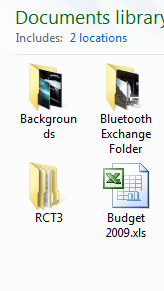
I've noticed an irritating thing about icons with labels too long to fit into one line, they end up looking like this (see Backgrounds folder). Is there anyway to prevent them wrapping the text this way?
Right click your desktop, choose Personalize > Windows Color > Advanced Appearance Settings. From here you can do one of two things, either change the icon font to a smaller size or increase the vertical spacing of the icons
My Computer
At a glance
Windows 7 Ultimate_x64AMD Phenom 9600 Quad Core3GBnVidia GeForce 9600 GT
I have the exact same problem, and it is rather annoying. It works fine if you use Large Icons, but if you're like me, they're too clunky.
Right click your desktop, choose Personalize > Windows Color > Advanced Appearance Settings. From here you can do one of two things, either change the icon font to a smaller size or increase the vertical spacing of the icons