- Local time
- 4:14 AM
- Messages
- 889
Ok this thing is just a mess and nothing works right and theres just too much "junk"
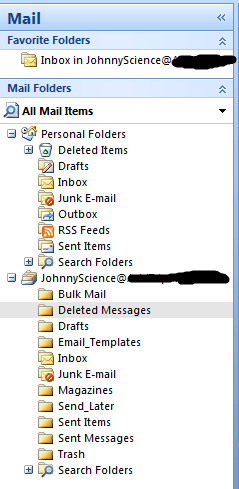
I've attached an image of the mail box.
I only want to run one email out of here & that is the one I have in the favorites folder, the one also below Personal Folders
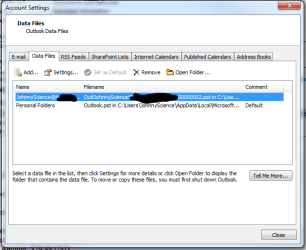
What is this Personal Folders?
Can I get rid of it.. it just seems to double up my mail box & make me less efficient by spending more time searching.
Why do all of my Sent Items show up under the Personal Folder Sent Items & not the main JohnnyScience one that I sent it from?
Why do I have
Send Later
Sent Items
Sent Messages
What is the difference between the last two? And I can delete the Send Later folder & it will work properly right?
Why is there nothing listed under Sent Items, but there are a bunch of old sporadic emails in Sent Messages?
Why is there a Trash AND a deleted messages?
The thing is, I cant even find the stuff I've deleted in any of the folders listed as this!
Whats with Bulk mail can I get rid of it?
Outlook as been so frustrating for me with these questions at hand.
Thanks.
I've attached an image of the mail box.
I only want to run one email out of here & that is the one I have in the favorites folder, the one also below Personal Folders
What is this Personal Folders?
Can I get rid of it.. it just seems to double up my mail box & make me less efficient by spending more time searching.
Why do all of my Sent Items show up under the Personal Folder Sent Items & not the main JohnnyScience one that I sent it from?
Why do I have
Send Later
Sent Items
Sent Messages
What is the difference between the last two? And I can delete the Send Later folder & it will work properly right?
Why is there nothing listed under Sent Items, but there are a bunch of old sporadic emails in Sent Messages?
Why is there a Trash AND a deleted messages?
The thing is, I cant even find the stuff I've deleted in any of the folders listed as this!
Whats with Bulk mail can I get rid of it?
Outlook as been so frustrating for me with these questions at hand.
Thanks.
My Computer
At a glance
Windows 7 64 & Ubuntu 64Intel Quad Core Q6600 2.40GHz8gNvidia 9600 GT & 9800 GT
- Computer Manufacturer/Model Number
- Built it myself
- OS
- Windows 7 64 & Ubuntu 64
- CPU
- Intel Quad Core Q6600 2.40GHz
- Motherboard
- Asus
- Memory
- 8g
- Graphics Card(s)
- Nvidia 9600 GT & 9800 GT
- Sound Card
- Turtle Beach 5.1
- Monitor(s) Displays
- Three 19" Dell's & one 46" Samsung 750