

BSkiLLs
New member
Syncing Outlook 2010 with Windows Media Device Center.
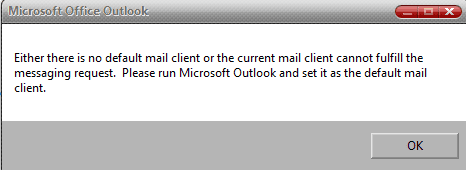
Ok guy's if you are trying to sync Office 2010 64bit version with (WMDC) Windows Media Device center. You will end up probably getting this error message saying.
" either there is no default email client or the current mail client cannot fulfill the message request. Please run Microsoft Outlook and set it as the default mail client "
As in this image below
Well do not even waste your time as i did trying to go through MS's beta help section for an answer or workaround nor googling it or whatever or going through and resetting your default profiles and files. As i even tried that doing it on a per file level also. Well there is no workaround and it can not be done. It has been turned into MS and they know about it and it will not be fixed until the final release is out (at least according to what they have said so far)
The only way to do it as the WMDC does not recognize the contacts and will not allow them to be selected in WMDC to be synced. So what you basically have to do is. Just uninstall it as most likely it is the 64bit version and you have to install the 32bit version. For it to work for the time being.
That is the only way to get it to sync correctly and recognize the contacts no matter how or what you have set for the default client.
Hope that helps!!
Ok guy's if you are trying to sync Office 2010 64bit version with (WMDC) Windows Media Device center. You will end up probably getting this error message saying.
" either there is no default email client or the current mail client cannot fulfill the message request. Please run Microsoft Outlook and set it as the default mail client "
As in this image below
Well do not even waste your time as i did trying to go through MS's beta help section for an answer or workaround nor googling it or whatever or going through and resetting your default profiles and files. As i even tried that doing it on a per file level also. Well there is no workaround and it can not be done. It has been turned into MS and they know about it and it will not be fixed until the final release is out (at least according to what they have said so far)
The only way to do it as the WMDC does not recognize the contacts and will not allow them to be selected in WMDC to be synced. So what you basically have to do is. Just uninstall it as most likely it is the 64bit version and you have to install the 32bit version. For it to work for the time being.
That is the only way to get it to sync correctly and recognize the contacts no matter how or what you have set for the default client.
Hope that helps!!
Attachments
My Computer
At a glance
Win-7HP, VistaHP, XPAMD Athlon II 240 dual-core processor 5050E 2...6GB1GB NVIDIA GeForce GT 220 [DVI, HDMI, VGA ada...
- Computer Manufacturer/Model Number
- HP's, Dell's
- OS
- Win-7HP, VistaHP, XP
- CPU
- AMD Athlon II 240 dual-core processor 5050E 2,6 GHz
- Memory
- 6GB
- Graphics Card(s)
- 1GB NVIDIA GeForce GT 220 [DVI, HDMI, VGA adapter]
- Sound Card
- Asus Xonar Essence STX
- Monitor(s) Displays
- HP 2159m 21.5-inch 16:9 Full LCD HD Widescreen
- Screen Resolution
- 1920x1080
- Hard Drives
- 500GB 7200 rpm SATA 3Gb/s hard drive
Seagate EHD 250gb
Seagate EHD 1T
- Internet Speed
- 16mb


