
You are using an out of date browser. It may not display this or other websites correctly.
You should upgrade or use an alternative browser.
You should upgrade or use an alternative browser.
Outloook 2010 massive headers?!?!?!?
- Thread starter nemo1966
- Start date

Dwarf
The Contemplator, (1963-2013)
Hi nemo1966,
Click the View tab. Next, click the View Settings button. The following will appear:
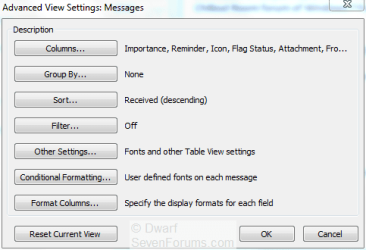
Click Other Settings...

Check the highlighted option is as shown above, and then click OK twice to close the dialogue panels.
Click the View tab. Next, click the View Settings button. The following will appear:
Click Other Settings...
Check the highlighted option is as shown above, and then click OK twice to close the dialogue panels.
My Computer
- Computer type
- PC/Desktop
- Computer Manufacturer/Model Number
- Dwarf Dwf/11/2012 r09/2013
- OS
- Windows 8.1 Pro RTM x64
- CPU
- Intel Core-i5-3570K 4-core @ 3.4GHz (Ivy Bridge) (OC 4.4GHz)
- Motherboard
- ASRock Z77 Extreme4-M
- Memory
- 4 x 4GB DDR3-1600 Corsair Vengeance CMZ8GX3M2A1600C9B (16GB)
- Graphics Card(s)
- MSI GeForce GTX770 Gaming OC 2GB
- Sound Card
- Realtek High Definition on board solution (ALC 898)
- Monitor(s) Displays
- ViewSonic VA1912w Widescreen (VGA)
- Screen Resolution
- 1440x900
- Hard Drives
- OCZ Agility 3 SSD 120GB SATA III x2 (RAID 0)
Samsung HD501LJ 500GB SATA II x2
Hitachi HDS721010CLA332 1TB SATA II
Iomega 1.5TB Ext USB 2.0
WD 2.0TB Ext USB 3.0
- PSU
- XFX Pro Series 850W Semi-Modular
- Case
- Gigabyte IF233
- Cooling
- 1 x 120mm Front Inlet 1 x 120mm Rear Exhaust
- Keyboard
- Microsoft Comfort Curve Keyboard 3000 (USB)
- Mouse
- Microsoft Comfort Mouse 3000 for Business (USB)
- Internet Speed
- NetGear DG834Gv3 ADSL Modem/Router (Ethernet) ~4.0 Mb/s (O2)
- Antivirus
- Avast! 8.0.1497
- Browser
- IE 11
- Other Info
- Optical Drive: HL-DT-ST BD-RE BH10LS30 SATA Bluray
Lexmark S305 Printer/Scanner/Copier (USB)
WEI Score: 8.1/8.1/8.5/8.5/8.25
Asus Eee PC 1011PX Netbook (Windows 7 x86 Starter)
Thanks for the reply but I already tried that and it merely removes a couple of lines in the header - although in Outlook 2010 it doesn't seem to work at all.
I just can't see why they would waste so much screen area for somehting with such little information value.
thanks
PS I went back to Office 2003 (the last decent version)
I just can't see why they would waste so much screen area for somehting with such little information value.
thanks
PS I went back to Office 2003 (the last decent version)
My Computer
- OS
- win7
ccatlett1984
Technophile
Can you post a screenshot highlighting the "massive" headers you speak of?
My Computer
- Computer Manufacturer/Model Number
- Black_Box (homebuilt)
- OS
- windows 7 RTM x64
- CPU
- Phenom II 965 Quad Core 3.4Ghz
- Motherboard
- Asus M4A79T Deluxe
- Memory
- Mushkin Blackline 8GB (4x2gb)
- Graphics Card(s)
- XFX Radeon 5970 Black Edition
- Sound Card
- onboard
- Monitor(s) Displays
- Dell 2408WPF-main Dell E248WFP-secondary
- Screen Resolution
- 1920x1200-main 1920x1200-secondary
- Hard Drives
- OCZ Vertex Limited Edition 100GB (OS)
x1 WD Black Edition 500GB drive (Storage)
- PSU
- XFX 850w Black Edition (Modular)
- Case
- Mountian Mods H2go
- Cooling
- CoolITSystems ECO A.L.C.
- Keyboard
- Logitech MX 5500 wireless keyboard
- Mouse
- Razor Copperhead
- Internet Speed
- 16Mb down/2Mb up Wowway Cable Internet
Dwarf
The Contemplator, (1963-2013)
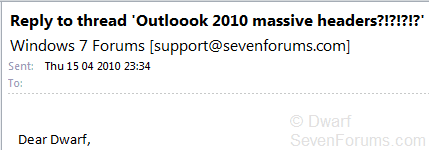
Here is a before and after image of the same header showing the effect of the option I suggested in my previous post.

My Computer
- Computer type
- PC/Desktop
- Computer Manufacturer/Model Number
- Dwarf Dwf/11/2012 r09/2013
- OS
- Windows 8.1 Pro RTM x64
- CPU
- Intel Core-i5-3570K 4-core @ 3.4GHz (Ivy Bridge) (OC 4.4GHz)
- Motherboard
- ASRock Z77 Extreme4-M
- Memory
- 4 x 4GB DDR3-1600 Corsair Vengeance CMZ8GX3M2A1600C9B (16GB)
- Graphics Card(s)
- MSI GeForce GTX770 Gaming OC 2GB
- Sound Card
- Realtek High Definition on board solution (ALC 898)
- Monitor(s) Displays
- ViewSonic VA1912w Widescreen (VGA)
- Screen Resolution
- 1440x900
- Hard Drives
- OCZ Agility 3 SSD 120GB SATA III x2 (RAID 0)
Samsung HD501LJ 500GB SATA II x2
Hitachi HDS721010CLA332 1TB SATA II
Iomega 1.5TB Ext USB 2.0
WD 2.0TB Ext USB 3.0
- PSU
- XFX Pro Series 850W Semi-Modular
- Case
- Gigabyte IF233
- Cooling
- 1 x 120mm Front Inlet 1 x 120mm Rear Exhaust
- Keyboard
- Microsoft Comfort Curve Keyboard 3000 (USB)
- Mouse
- Microsoft Comfort Mouse 3000 for Business (USB)
- Internet Speed
- NetGear DG834Gv3 ADSL Modem/Router (Ethernet) ~4.0 Mb/s (O2)
- Antivirus
- Avast! 8.0.1497
- Browser
- IE 11
- Other Info
- Optical Drive: HL-DT-ST BD-RE BH10LS30 SATA Bluray
Lexmark S305 Printer/Scanner/Copier (USB)
WEI Score: 8.1/8.1/8.5/8.5/8.25
Asus Eee PC 1011PX Netbook (Windows 7 x86 Starter)
Can you post a screenshot highlighting the "massive" headers you speak of?
Nope
"PS I went back to Office 2003 (the last decent version) "
My Computer
- OS
- win7
Here is a before and after image of the same header showing the effect of the option I suggested in my previous post.
View attachment 67636
View attachment 67637
It doesn't seem to work in Outlook 2010 the option resets itself.
PS wtf is going on with your sig? Perhaps you could make it a tad bigger - I can't see it properly

My Computer
- OS
- win7

echrada
New member
@nemo 1966
Were you born rude or made that way? Please behave yourself.
Were you born rude or made that way? Please behave yourself.
My Computer
- Computer Manufacturer/Model Number
- Self build
- OS
- Windows 7 Ultimate x64
- CPU
- AMD Phenom II x4
- Motherboard
- Gigabyte 880
- Memory
- 8GB
- Graphics Card(s)
- NVIDIA GeForce HD
- Sound Card
- Realtek HD Audio
- Screen Resolution
- 1920 x 1080
- Hard Drives
- 2 x 1TB
- PSU
- Thermalake 550w
- Case
- XCase
- Internet Speed
- 8MB
@nemo 1966
Were you born rude or made that way? Please behave yourself.
Made that way by fecktards using 5 inch high sigs... why?
Actually most consider using such large sigs rude.
My Computer
- OS
- win7
ccatlett1984
Technophile
Posting stuff like that is not going to get you help at all.Made that way by f*tards using 5 inch high sigs... why?
Actually most consider using such large sigs rude.
If you have a problem with a user, pm that user or a moderator, don't bash on the forums.
My Computer
- Computer Manufacturer/Model Number
- Black_Box (homebuilt)
- OS
- windows 7 RTM x64
- CPU
- Phenom II 965 Quad Core 3.4Ghz
- Motherboard
- Asus M4A79T Deluxe
- Memory
- Mushkin Blackline 8GB (4x2gb)
- Graphics Card(s)
- XFX Radeon 5970 Black Edition
- Sound Card
- onboard
- Monitor(s) Displays
- Dell 2408WPF-main Dell E248WFP-secondary
- Screen Resolution
- 1920x1200-main 1920x1200-secondary
- Hard Drives
- OCZ Vertex Limited Edition 100GB (OS)
x1 WD Black Edition 500GB drive (Storage)
- PSU
- XFX 850w Black Edition (Modular)
- Case
- Mountian Mods H2go
- Cooling
- CoolITSystems ECO A.L.C.
- Keyboard
- Logitech MX 5500 wireless keyboard
- Mouse
- Razor Copperhead
- Internet Speed
- 16Mb down/2Mb up Wowway Cable Internet

alphanumeric
slightly off center
Doesn't work for me ether. When I click the last OK to close the box the preview pane flashes but the header info is still there and when I go back and check the settings the check mark is gone. 
My Computer
- Computer type
- PC/Desktop
- Computer Manufacturer/Model Number
- Home Built
- OS
- Windows 10 Education 64 bit
- CPU
- AMD Phenom II X4 980 Black Edition Deneb 3.7GHz
- Motherboard
- Asus M4N68T-M V2 µATX Motherboard
- Memory
- 8GB 4GBx2 Kingston PC10600 DDR3 1333 Memory
- Graphics Card(s)
- Zotac NVIDIA Geforce GT640 2 Gig DDR3 PCIe
- Sound Card
- VIA VT1708s High Definition Audio 8-channel Onboard
- Monitor(s) Displays
- 22" LG E2242 1080p and 2 19" I-INC AG191D
- Screen Resolution
- 1280x1024 - 1920x1080 - 1280x1024
- Hard Drives
- Crucial M100 256 GB SSD and 500 GB WD Blue SATA
- PSU
- Thermaltake TR 620
- Case
- Power Up Black ATX Mid-Tower Case
- Cooling
- Stock heatsink and fan
- Keyboard
- Logitech Wireless K350 Wave
- Mouse
- Logitech Wireless M570 Trackman Wheel
- Internet Speed
- 80 Mbps Down 30 Mbps Up
- Antivirus
- Windows Defender
- Browser
- Internet Explorer 11
- Other Info
- HP DVD1040e Lightscribe - External USB2