JavaScript is disabled. For a better experience, please enable JavaScript in your browser before proceeding.
You are using an out of date browser. It may not display this or other websites correctly.
You should upgrade or use an
alternative browser .
Outlook 2010 (x-86) FONT TOO BIG and can't make smaller
New member
Guru
Gold Member
VIP
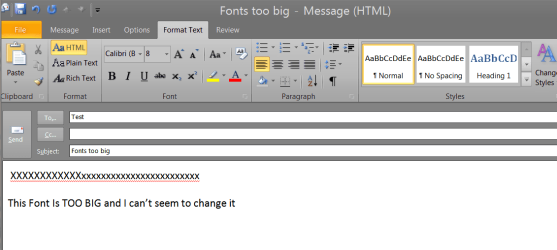
Hi all
fonts2big.png
25.5 KB
· Views: 414
Linux CENTOS 7 / various Windows OS'es and se... Intel i7 Intel i5 8GB, 16GB On Motherboard PC/Desktop Custom built, several laptops HP/ASUS Linux CENTOS 7 / various Windows OS'es and servers Intel i7 Intel i5 8GB, 16GB On Motherboard Realtek HD audio Apple Cinema display, Samsung LCD 1920 X 1080 4 X 1TB SATA Toshiba wireless laser > 20MB up
Consumer Security
Guru
Gold Member
VIP
Instead of HTML, have you tried using plain text and set the font to size 10 or 11?
Windows 7 Ultimate 32bit SP1 Intel(R) Core(TM)2 Quad CPU @ 2.40GHz, 2400 MHz 4 GB ATI Radeon HD 2600 Pro PC/Desktop Bruce ... somewhere in his 40's Windows 7 Ultimate 32bit SP1 Intel(R) Core(TM)2 Quad CPU @ 2.40GHz, 2400 MHz INTEL/D975XBX2 4 GB ATI Radeon HD 2600 Pro Samsung SyncMaster 914v 1280 x 1024 2/500GB each ... ST3500630AS ATA Device. Rocketfish 700 W G.Skill Gigabyte Chassis Standard PS/2 Keyboard Microsoft PS/2 Mouse DSL Avira Internet Security IE 11 ATI HDMI Audio
Have you highlightened it then try changing the text
Windows 7 Home Premium 64-bit (6.1, Build 7601) Intel(R) Pentium(R) CPU B950 @ 2.10GHz (2 CPU... 6GB DDR3 Dual 6034 Mbytes Intel HD Graphics Toshiba Satellite C855-1GP Windows 7 Home Premium 64-bit (6.1, Build 7601) Intel(R) Pentium(R) CPU B950 @ 2.10GHz (2 CPUs), ~2.1GHz Intel Sandy Bridge ID1E59 6GB DDR3 Dual 6034 Mbytes Intel HD Graphics Realtek High Definition Audio LGD033A 1366 x 768 (32 bit) (60Hz) Hitachi HTS547575A9E384 600GB Normal Keyboard Techair 3D Optical Mouse 4.04mbps download speed 0.54mbps upload speed Awesome Laptop.
Consumer Security
Guru
Gold Member
VIP
Windows 7 Ultimate 32bit SP1 Intel(R) Core(TM)2 Quad CPU @ 2.40GHz, 2400 MHz 4 GB ATI Radeon HD 2600 Pro PC/Desktop Bruce ... somewhere in his 40's Windows 7 Ultimate 32bit SP1 Intel(R) Core(TM)2 Quad CPU @ 2.40GHz, 2400 MHz INTEL/D975XBX2 4 GB ATI Radeon HD 2600 Pro Samsung SyncMaster 914v 1280 x 1024 2/500GB each ... ST3500630AS ATA Device. Rocketfish 700 W G.Skill Gigabyte Chassis Standard PS/2 Keyboard Microsoft PS/2 Mouse DSL Avira Internet Security IE 11 ATI HDMI Audio
I checked it seemingly doesn't work as it's not for outlook, I'm not entirely sure as I don't need it/I haven't actually run'd it
Windows 7 Home Premium 64-bit (6.1, Build 7601) Intel(R) Pentium(R) CPU B950 @ 2.10GHz (2 CPU... 6GB DDR3 Dual 6034 Mbytes Intel HD Graphics Toshiba Satellite C855-1GP Windows 7 Home Premium 64-bit (6.1, Build 7601) Intel(R) Pentium(R) CPU B950 @ 2.10GHz (2 CPUs), ~2.1GHz Intel Sandy Bridge ID1E59 6GB DDR3 Dual 6034 Mbytes Intel HD Graphics Realtek High Definition Audio LGD033A 1366 x 768 (32 bit) (60Hz) Hitachi HTS547575A9E384 600GB Normal Keyboard Techair 3D Optical Mouse 4.04mbps download speed 0.54mbps upload speed Awesome Laptop.
Consumer Security
Guru
Gold Member
VIP
Jeanne Sheldon [MS] said:
Those are the right links. Though the problem is most readily manifested in Outlook, the root cause is in Word 2010.
This person says the root cause is in Word 2010
Windows 7 Ultimate 32bit SP1 Intel(R) Core(TM)2 Quad CPU @ 2.40GHz, 2400 MHz 4 GB ATI Radeon HD 2600 Pro PC/Desktop Bruce ... somewhere in his 40's Windows 7 Ultimate 32bit SP1 Intel(R) Core(TM)2 Quad CPU @ 2.40GHz, 2400 MHz INTEL/D975XBX2 4 GB ATI Radeon HD 2600 Pro Samsung SyncMaster 914v 1280 x 1024 2/500GB each ... ST3500630AS ATA Device. Rocketfish 700 W G.Skill Gigabyte Chassis Standard PS/2 Keyboard Microsoft PS/2 Mouse DSL Avira Internet Security IE 11 ATI HDMI Audio
It doesn't work...not 32 bit anyway. When one clicks on the link (IE, FF, Chrome) does not open. DNS error. Tried several times.
Windows 7 Home Premium 64-bit (6.1, Build 7601) Intel(R) Pentium(R) CPU B950 @ 2.10GHz (2 CPU... 6GB DDR3 Dual 6034 Mbytes Intel HD Graphics Toshiba Satellite C855-1GP Windows 7 Home Premium 64-bit (6.1, Build 7601) Intel(R) Pentium(R) CPU B950 @ 2.10GHz (2 CPUs), ~2.1GHz Intel Sandy Bridge ID1E59 6GB DDR3 Dual 6034 Mbytes Intel HD Graphics Realtek High Definition Audio LGD033A 1366 x 768 (32 bit) (60Hz) Hitachi HTS547575A9E384 600GB Normal Keyboard Techair 3D Optical Mouse 4.04mbps download speed 0.54mbps upload speed Awesome Laptop.
Consumer Security
Guru
Gold Member
VIP
Do you mean the link I gave doesn't work, or the 'fix' doesn't work? ...
Windows 7 Ultimate 32bit SP1 Intel(R) Core(TM)2 Quad CPU @ 2.40GHz, 2400 MHz 4 GB ATI Radeon HD 2600 Pro PC/Desktop Bruce ... somewhere in his 40's Windows 7 Ultimate 32bit SP1 Intel(R) Core(TM)2 Quad CPU @ 2.40GHz, 2400 MHz INTEL/D975XBX2 4 GB ATI Radeon HD 2600 Pro Samsung SyncMaster 914v 1280 x 1024 2/500GB each ... ST3500630AS ATA Device. Rocketfish 700 W G.Skill Gigabyte Chassis Standard PS/2 Keyboard Microsoft PS/2 Mouse DSL Avira Internet Security IE 11 ATI HDMI Audio
In a comment on the site, that is what it said, I cannot quote properly..
Windows 7 Home Premium 64-bit (6.1, Build 7601) Intel(R) Pentium(R) CPU B950 @ 2.10GHz (2 CPU... 6GB DDR3 Dual 6034 Mbytes Intel HD Graphics Toshiba Satellite C855-1GP Windows 7 Home Premium 64-bit (6.1, Build 7601) Intel(R) Pentium(R) CPU B950 @ 2.10GHz (2 CPUs), ~2.1GHz Intel Sandy Bridge ID1E59 6GB DDR3 Dual 6034 Mbytes Intel HD Graphics Realtek High Definition Audio LGD033A 1366 x 768 (32 bit) (60Hz) Hitachi HTS547575A9E384 600GB Normal Keyboard Techair 3D Optical Mouse 4.04mbps download speed 0.54mbps upload speed Awesome Laptop.
I have this problem too. In fact, ALL of the Office programs have this overly sized icons and fonts (notice that the icons in the screenshot are somehow stretched?).
64-Bit Windows 7 - Home Premium Edition; Linu... 2.67-GHz Intel Core i7-620M 8-GB DDR3 RAM 1-GB ATI Radeon HD 5650M; Intel HD Series Lenovo IdeaPad Y460 64-Bit Windows 7 - Home Premium Edition; Linux Mint 11 2.67-GHz Intel Core i7-620M Lenovo KL2 8-GB DDR3 RAM 1-GB ATI Radeon HD 5650M; Intel HD Series Realtek High Definition Audio; Dolby Home Theater 3 1366 X 768 (Default); 1280 X 720 (For Video Gaming) 656-GB Samsung Hybrid HDD (With Integrated 32-GB SSD); 1-TB Seagate HDD (In A.C. Ryan Enclosure And USB) Logitech M305 Wireless Mouse 2 Mbps (Globe DSL); 1 Mbps (Sun Broadband Wireless Postpaid)
Zoom Button
Search your computer for "normal.dot"and rename it to something else. This issue is probably caused by your document template being messed up, renaming the file will make the computer generate a new empty one.
windows 7 RTM x64 Phenom II 965 Quad Core 3.4Ghz Mushkin Blackline 8GB (4x2gb) XFX Radeon 5970 Black Edition Black_Box (homebuilt) windows 7 RTM x64 Phenom II 965 Quad Core 3.4Ghz Asus M4A79T Deluxe Mushkin Blackline 8GB (4x2gb) XFX Radeon 5970 Black Edition onboard Dell 2408WPF-main Dell E248WFP-secondary 1920x1200-main 1920x1200-secondary OCZ Vertex Limited Edition 100GB (OS) XFX 850w Black Edition (Modular) Mountian Mods H2go CoolITSystems ECO A.L.C. Logitech MX 5500 wireless keyboard Razor Copperhead 16Mb down/2Mb up Wowway Cable Internet
A bit late to reply with this, I was having the same problem. Open a new email, type something onto the email. Hold down Ctrl and use the wheel on the mouse to zoom in/out to increase or reduce the font size.
32Bit & 64Bit Windows 7
In Option go to Mail .. there you will find a Stationery and Fonts .. you edit there which size and font you wnat for an new message and etc
Windows 7 Enterprise 64-Bit
PC/Desktop Custom Build Windows 7 Enterprise 64-Bit
Dungbug- Your solution worked like a charm for me. Infact i didnt believe your solution the first time. I could not believe it still, but it works mate !!
You're welcome, simple solutions are usually the best. I'd tried adjusting Font size to no avail, glad it's helped someone out.
32Bit & 64Bit Windows 7
Hi all
Just Read your post , and check my outlook 2007 .... ITs has the same problem ..
No matter how big or small i set in format optoin ...
It's so weird ... just happens today ...?
UPDATE ..:
That was it .... the zoom in CTRL + Scrl
Thanks .
Wds 7 Home Pre. 64-bit SP1 Intel Core i5 2450M @ 2.50GHz 4.00 GB Single-Channel DDR3 Intel(R) HD-3000-1813 MB * AMD Radeon(TM) HD ... Wds 7 Home Pre. 64-bit SP1 Intel Core i5 2450M @ 2.50GHz Sony Vaio 4.00 GB Single-Channel DDR3 Intel(R) HD-3000-1813 MB * AMD Radeon(TM) HD 6470M 596GB TOSHIBA (SATA)