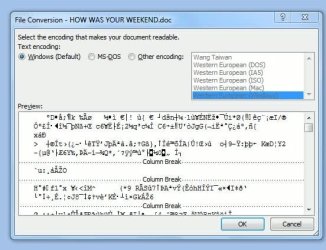
I am having the same problem - even after I changed the configurations! I hate this software!!!!!! any help would be really appreciated
Hi,
I suggest you make a new thread describing your problem in detail, instead of tacking onto the back of this thread, which is marked as solved. That way you will get more people actually looking at it and posting back with suggestions.
Computer type PC/Desktop System Manufacturer/Model Number Golden Mk. I.3 OS Windows 7 Ultimate SP1 (x64) CPU Intel i7 860 @ 2.80 GHz Motherboard Gigabyte P55A-UD3R Rev.1. Award BIOS F13 Memory 16GB Corsair Vengance DDR3 @ 661 MHz Dual Channel (9-9-9-24) Graphics Card EVGA NVidia GTX 560 1024MB Sound Card Realtek Integrated Monitor(s) Displays Dual Samsung SyncMaster 2494HS Screen Resolution 1920*1080 and 1920*1080
Keyboard Logitech G110 Mouse Logitech MX518 PSU Thermaltake ToughPower QFan 750W Case Thermaltake Element S VK60001W2Z Cooling Corsair H60 Water Cooling, 2*230mm and 2*80mm case fans Hard Drives 1*OCZ Vertex 2 60GB SSD;
2*Samsung F3 SpinPoint 1TB in RAID0;
3*Samsung F1 SpinPoint 1TB in RAID5;
1*Western Digital 500GB External USB 3.0
1*Seagate 500GB External USB 2.0 Internet Speed Not fast enough!!! Antivirus MSE and Malwarebytes Pro Browser Chrome Version 25 Other Info Laptop: ASUS X54C, Intel Core i3-2330M @ 2.0Ghz, 4GB RAM, Intel HD on-board graphics, Windows 7 Professional SP1 (x64), LinuxMint 14 (x64), PepperMint 3 (x86)
I've been having the same problem as everyone else. One thing I noticed is that I can open older Word documents using the starter version, which I luckily did not remove from my computer when I installed the full version of Office.
ReneGnam's post mentioning "Word 2010 doesn't do well on older converted docs that have several fonts and font attributes" gave me an idea. I opened the older document in starter version of Word and did a select all. Even though I used one font style (Times New Roman) it was not selected in the menu bar. I selected Times New Roman and saved the document. It now opens fine in Word 2010.
Not a perfect solution. It is a pain to do this for every older document and it does require the starter version of Word (although Open Office might work too).