|
Welcome to Windows 7 Forums. Our forum is dedicated to helping you find solutions with any problems, errors or issues you are experiencing with Windows 7. The Windows 7 forum also covers news and updates and has an extensive Windows 7 tutorial section that covers a wide range of tips and tricks.
Windows 7 - Windows Movie Maker Fill Screen |
08-13-2010
|
#1 | | |
Windows Movie Maker Fill Screen I have never made a dvd before, so I have a question. I have seasons of a show that I want to make a dvd of. The first file, as is most of the files, is 352 by 240. If I burn a dvd of a file this size, will it fill the screen of a 4:3 tv or fit in the correct 4:3 ratio, the image going from top to bottom with the bars on the sides, of a 16:9 screen ?
| My System Specs | | OS Windows 7 Home Premium Graphics Card Nvidia |
08-13-2010
|
#2 | | Windows 7 Home Premium 64bit |
Hi Spottedfeather, we meet again.
Exactly what are you asking as what you say happens is perfectly correct. You can make a 4x3 aspect video fit a widescreen 16x9 but it will either look distorted or or will loose some of the top and bottom if you maintain the aspect ratio. As you source clips are already small this will cause a loss of quality as you will have to zoom in to fill the screen. | My System Specs | | System Manufacturer/Model Number Dell Inspiron 570 OS Windows 7 Home Premium 64bit CPU AMD Athlon(tm) II X4 630 Prcossor, 2800 Mhz, 4 Cores Motherboard Dell Inc. 04GJJT A00 Memory 4 Gb Graphics Card ATI Radeon HD 4200 Sound Card Realtek High Definition Audio Monitor(s) Displays Samsung SyncMaster [Monitor] (22.0") Screen Resolution 1680 x 1050 Hard Drives WDC WD3200AAKS-75L9A0 [Hard drive] (320.07 GB) Seagate FreeAgentDesktop USB Device [Hard drive] (250.06 GB) Internet Speed 8mb |
08-13-2010
|
#3 | | |
Alright, but how do I get a 4:3 aspect video to go from top to bottom on a screen and how do I get a 16:9 video to fill a 16:9 screen and fit, bars on top and bottom, a 4:3 tv ? | My System Specs | | OS Windows 7 Home Premium Graphics Card Nvidia |
08-14-2010
|
#4 | | Windows 7 Home Premium 64bit |

Quote: Originally Posted by Spottedfeather Alright, but how do I get a 4:3 aspect video to go from top to bottom on a screen and how do I get a 16:9 video to fill a 16:9 screen and fit, bars on top and bottom, a 4:3 tv ? You will need a good video editing program. One of the easiest to use IMHO is Corel Video Studio x3. You can download a trial version of this, just Google it!
You need to use the overlay tracks and use the distortfacility. Happy to help with this if you take this route but bear in mind my post above, your clips are small so will never look really good filling a big screen! | My System Specs | | System Manufacturer/Model Number Dell Inspiron 570 OS Windows 7 Home Premium 64bit CPU AMD Athlon(tm) II X4 630 Prcossor, 2800 Mhz, 4 Cores Motherboard Dell Inc. 04GJJT A00 Memory 4 Gb Graphics Card ATI Radeon HD 4200 Sound Card Realtek High Definition Audio Monitor(s) Displays Samsung SyncMaster [Monitor] (22.0") Screen Resolution 1680 x 1050 Hard Drives WDC WD3200AAKS-75L9A0 [Hard drive] (320.07 GB) Seagate FreeAgentDesktop USB Device [Hard drive] (250.06 GB) Internet Speed 8mb |
08-14-2010
|
#5 | | |
Windows movie maker is such a terrible program, anything else would be better | My System Specs | | System Manufacturer/Model Number Self Built OS Windows 7 Ultimate x64 CPU Intel Core i7-930 @ 4GHz Motherboard ASUS Rampage III Extreme X58 Memory Corsair Dominator DDR3 2000MHz 12GB Graphics Card MSI Geforce 580 Twin Frozr II @ SLI Sound Card Realtek Integrated Monitor(s) Displays Dell Ultrasharp 24" Screen Resolution 1920x1200 Keyboard Logitech G110 Mouse CM Storm SENTINEL PSU Chieftec Super Series 1200W Case CM Storm Sniper Black Edition Cooling Noctua NH-D14 Hard Drives Intel 510 Series 250GB SSD
Corsair Reactor Series 120GB SSD
WD Caviar Black 1TB
3x External HDD's. Internet Speed Pretty Fast |
08-14-2010
|
#6 | | Vista and Windows7, sometimes Ubuntu and Fedora |
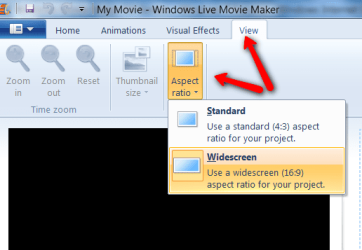
Actually it works very well with Windows Live Movie Maker. All you do is set the aspect ratio correctly before you save the movie, | My System Specs | | System Manufacturer/Model Number HP, Dell, Gateway - 2 laptops and 2 desktops OS Vista and Windows7, sometimes Ubuntu and Fedora CPU from 1.6GHz Duo to 2.5GHz Quad Monitor(s) Displays 2x HP w2207 Keyboard with trackball - no mices Mouse terrible devices, who wants them Hard Drives 5x HDD, 2x SSD, 6x Externals Internet Speed DSL 6000 |
08-14-2010
|
#7 | | Windows 7 Home Premium 64bit |
Like all software, some people love it, some people hate it. I just find the Corel so much easier to use ans as a bought program it does offer me the sort of effects, transitions and moe sophisticated facilities that I need. But then I do a lot of Video Editing. Lets see what spottedfeather wants to do with his finished Video then we can see what will suit him best! | My System Specs | | System Manufacturer/Model Number Dell Inspiron 570 OS Windows 7 Home Premium 64bit CPU AMD Athlon(tm) II X4 630 Prcossor, 2800 Mhz, 4 Cores Motherboard Dell Inc. 04GJJT A00 Memory 4 Gb Graphics Card ATI Radeon HD 4200 Sound Card Realtek High Definition Audio Monitor(s) Displays Samsung SyncMaster [Monitor] (22.0") Screen Resolution 1680 x 1050 Hard Drives WDC WD3200AAKS-75L9A0 [Hard drive] (320.07 GB) Seagate FreeAgentDesktop USB Device [Hard drive] (250.06 GB) Internet Speed 8mb |
08-14-2010
|
#8 | | Vista and Windows7, sometimes Ubuntu and Fedora |

Quote: Originally Posted by mitchell65 Like all software, some people love it, some people hate it. I just find the Corel so much easier to use ans as a bought program it does offer me the sort of effects, transitions and moe sophisticated facilities that I need. But then I do a lot of Video Editing. Lets see what spottedfeather wants to do with his finished Video then we can see what will suit him best! mitch, I never tried Corel Video Studio, but maybe I should because I do a fair amount of video work too. I responded mainly because hawkin90 took an extreme position on WMM. I think WLMM is a lot better in many aspects although it is ashame that they put away with the timeline. | My System Specs | | System Manufacturer/Model Number HP, Dell, Gateway - 2 laptops and 2 desktops OS Vista and Windows7, sometimes Ubuntu and Fedora CPU from 1.6GHz Duo to 2.5GHz Quad Monitor(s) Displays 2x HP w2207 Keyboard with trackball - no mices Mouse terrible devices, who wants them Hard Drives 5x HDD, 2x SSD, 6x Externals Internet Speed DSL 6000 |
08-14-2010
|
#9 | | Windows 7 Home Premium 64bit |

Quote: Originally Posted by whs mitch, I never tried Corel Video Studio, but maybe I should because I do a fair amount of video work too. I responded mainly because hawkin90 took an extreme position on WMM. I think WLMM is a lot better in many aspects although it is ashame that they put away with the timeline. Hi Wolfgang
Have PM'd you regarding Corel products as this is going off Topic and we are discussing 3rd Party Software. Should hate to get in trouble with Admin as I have a clean sheet in that dept. at the moment which is, I have to say, quite a novelty for me! | My System Specs | | System Manufacturer/Model Number Dell Inspiron 570 OS Windows 7 Home Premium 64bit CPU AMD Athlon(tm) II X4 630 Prcossor, 2800 Mhz, 4 Cores Motherboard Dell Inc. 04GJJT A00 Memory 4 Gb Graphics Card ATI Radeon HD 4200 Sound Card Realtek High Definition Audio Monitor(s) Displays Samsung SyncMaster [Monitor] (22.0") Screen Resolution 1680 x 1050 Hard Drives WDC WD3200AAKS-75L9A0 [Hard drive] (320.07 GB) Seagate FreeAgentDesktop USB Device [Hard drive] (250.06 GB) Internet Speed 8mb |
08-14-2010
|
#10 | | Vista and Windows7, sometimes Ubuntu and Fedora |
Thanks Mitch. I will be on the lookout for the PM - did not se it yet. | My System Specs | | System Manufacturer/Model Number HP, Dell, Gateway - 2 laptops and 2 desktops OS Vista and Windows7, sometimes Ubuntu and Fedora CPU from 1.6GHz Duo to 2.5GHz Quad Monitor(s) Displays 2x HP w2207 Keyboard with trackball - no mices Mouse terrible devices, who wants them Hard Drives 5x HDD, 2x SSD, 6x Externals Internet Speed DSL 6000 Windows Movie Maker Fill Screen problems? All times are GMT -5. The time now is 06:09 PM. |  |