Low colors in Windows Picture and Fax Viewer

GTSinc

New member
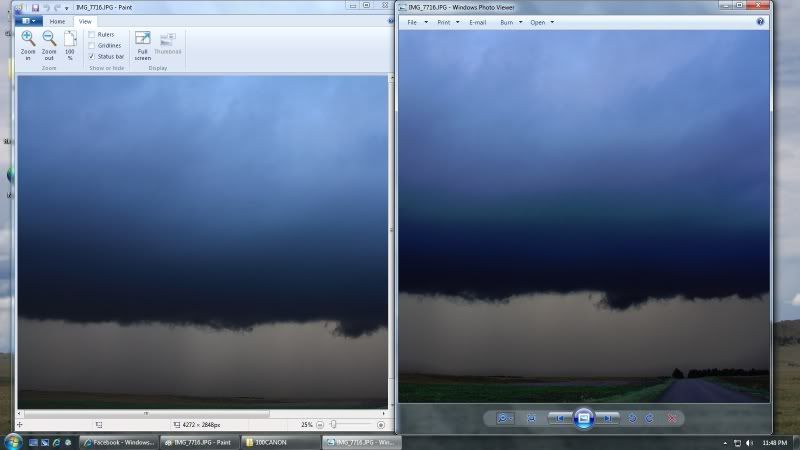
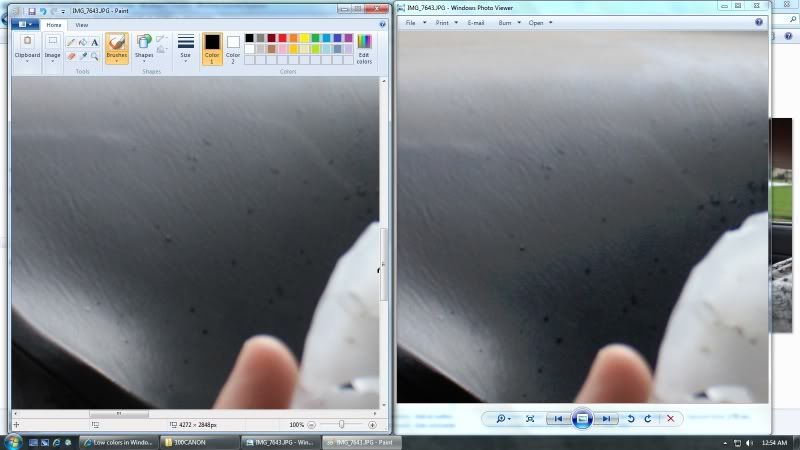
On my computer, if i open a picture in the default "Windows Picture Viewer", my pictures look horrible because its not in full color or something... it kind of reminds me as if you were to save a picture in 16-bit colors rather than 32-bit, however, if I open it in Paint, it looks just fine... is this a normal thing in Windows 7? An example from one of my pictures is below, same picture, but the left is Paint, and the right is Viewer.
Edit: I guess on Windows 7 its called Windows Photo Viewer... I must have gotten the other name from Vista or something...
example.jpg

example2.jpg

notice how grainy the on the right is compared to the left?
 
Last edited:

My Computer

Computer type
PC/Desktop
Computer Manufacturer/Model Number
Custom
OS
Windows XP Professional, Windows 7 Professional x64
CPU
Intel Core i7 3820
Motherboard
ASUS P9X79
Memory
G.SKILL Sniper 8 GB DDR3
Graphics Card(s)
HIS AMD Radeon HD 7850
Sound Card
RealTek on-board audio
Monitor(s) Displays
Dell 24 inch display
Screen Resolution
1920x1080
Hard Drives
Western Digital Caviar Blue 320 GB
Seagate Barracuda 500 GB
Western Digital Black 2 TB
PSU
Antec High Current 750W
Case
Antec 300
Cooling
Tuniq 120 Extreme
Keyboard
i-rocks
Mouse
Logitech wired
Internet Speed
25 Mbps
Antivirus
MSE
Browser
Firefox
Other Info
Built it myself
It's barely noticeable form the pics, but yes, it's there. Unless you already have the newest GPU drivers, update them.
 

My Computer

Computer type
Laptop
Computer Manufacturer/Model Number
Custom
OS
Windows 7 Home Premium x64
CPU
Intel Core i5 2500K
Motherboard
MSI MS-7750
Memory
8GB DDR3
Graphics Card(s)
nVidia GeForce GTX650 Ti BOOST
Sound Card
Realtek
Monitor(s) Displays
21' Philips
Screen Resolution
Full HD
Hard Drives
1TB
PSU
500W
Yeah it's pretty hard to see on here... haha, however some of them can get so bad that at first I thought there was something wrong with my lens or camera... until I opened it in Paint. And as far as I know the drivers are up to date... however, I'm planning to get a new video card soon so maybe that will take care of it.

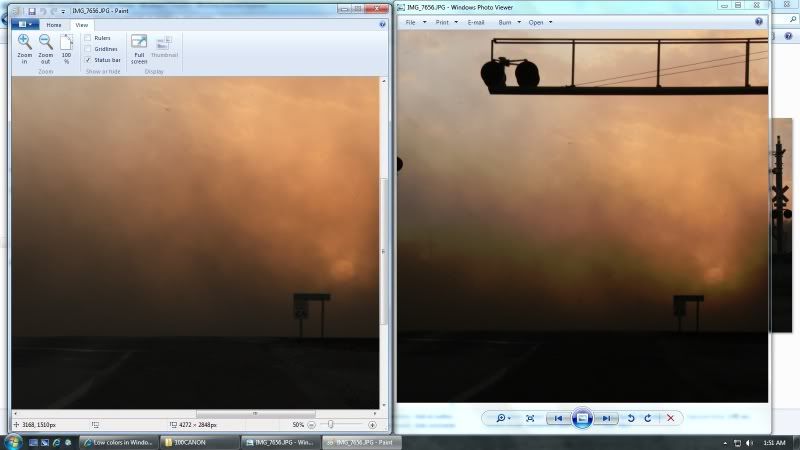
Here is a really good example... notice the greenish hue above the dust from the sun in the right picture?
example3.jpg


I'm a storm chaser so this is a real annoyance when you don't have the right colors showing up, haha.
 

My Computer

Computer type
PC/Desktop
Computer Manufacturer/Model Number
Custom
OS
Windows XP Professional, Windows 7 Professional x64
CPU
Intel Core i7 3820
Motherboard
ASUS P9X79
Memory
G.SKILL Sniper 8 GB DDR3
Graphics Card(s)
HIS AMD Radeon HD 7850
Sound Card
RealTek on-board audio
Monitor(s) Displays
Dell 24 inch display
Screen Resolution
1920x1080
Hard Drives
Western Digital Caviar Blue 320 GB
Seagate Barracuda 500 GB
Western Digital Black 2 TB
PSU
Antec High Current 750W
Case
Antec 300
Cooling
Tuniq 120 Extreme
Keyboard
i-rocks
Mouse
Logitech wired
Internet Speed
25 Mbps
Antivirus
MSE
Browser
Firefox
Other Info
Built it myself
Yeah, I can see it clearly.

Have you tried another software for viewing pictures? Like Windows Live Photo Viewer, Microsoft Office Picture Viewer, or something like Picasa?
 

My Computer

Computer type
Laptop
Computer Manufacturer/Model Number
Custom
OS
Windows 7 Home Premium x64
CPU
Intel Core i5 2500K
Motherboard
MSI MS-7750
Memory
8GB DDR3
Graphics Card(s)
nVidia GeForce GTX650 Ti BOOST
Sound Card
Realtek
Monitor(s) Displays
21' Philips
Screen Resolution
Full HD
Hard Drives
1TB
PSU
500W
Office Picture Viewer, Quicktime Picture Viewer, Media Center, and even IE all display it correctly.
 

My Computer

Computer type
PC/Desktop
Computer Manufacturer/Model Number
Custom
OS
Windows XP Professional, Windows 7 Professional x64
CPU
Intel Core i7 3820
Motherboard
ASUS P9X79
Memory
G.SKILL Sniper 8 GB DDR3
Graphics Card(s)
HIS AMD Radeon HD 7850
Sound Card
RealTek on-board audio
Monitor(s) Displays
Dell 24 inch display
Screen Resolution
1920x1080
Hard Drives
Western Digital Caviar Blue 320 GB
Seagate Barracuda 500 GB
Western Digital Black 2 TB
PSU
Antec High Current 750W
Case
Antec 300
Cooling
Tuniq 120 Extreme
Keyboard
i-rocks
Mouse
Logitech wired
Internet Speed
25 Mbps
Antivirus
MSE
Browser
Firefox
Other Info
Built it myself
Totally weird... I have never even heard that someone experienced such an issue. Perhaps you're better off with using one of the viewers that work. As to what's causing this, I personally have no idea :/
 

My Computer

Computer type
Laptop
Computer Manufacturer/Model Number
Custom
OS
Windows 7 Home Premium x64
CPU
Intel Core i5 2500K
Motherboard
MSI MS-7750
Memory
8GB DDR3
Graphics Card(s)
nVidia GeForce GTX650 Ti BOOST
Sound Card
Realtek
Monitor(s) Displays
21' Philips
Screen Resolution
Full HD
Hard Drives
1TB
PSU
500W
it could be a faulty monitor profile.

windows update gave me one once for my samsung monitor, and it affected the colours when viewed in windows picture viewer.

you can try 'uninstalling' your monitor from device manager, or type color in your start-menu search-box and have a look at your color management settings.

try setting things to default, and see what happens.

it worked for me, good luck. :)
 

My Computer

Computer Manufacturer/Model Number
mickey megabyte 1234
OS
ultimate 64 sp1
CPU
i5 2500K [email protected]
Motherboard
MSI P67A-GD53
Memory
8 gigs GSkill Ripjaws 1600
Graphics Card(s)
amd hd6950
Sound Card
creative x-fi gamer
Monitor(s) Displays
samsung 24"
Screen Resolution
1920x1080
Hard Drives
ocz vertex 2e 60 gig, samsung f3 1tb, buffalo 2tb ext
PSU
antec 550
Case
antec three hundred
Cooling
i'm a cooling fan
Keyboard
saitek eclipse ii
Mouse
logitech g3
Internet Speed
about 4 Mbps
Other Info
i love win7
No offense, but it makes no sense to me since it only happens in Windows' default Photo Viewer.
 

My Computer

Computer type
Laptop
Computer Manufacturer/Model Number
Custom
OS
Windows 7 Home Premium x64
CPU
Intel Core i5 2500K
Motherboard
MSI MS-7750
Memory
8GB DDR3
Graphics Card(s)
nVidia GeForce GTX650 Ti BOOST
Sound Card
Realtek
Monitor(s) Displays
21' Philips
Screen Resolution
Full HD
Hard Drives
1TB
PSU
500W
it may not make any sense to you, but that doesn't mean it's nonsense.

an old screenshot taken when i had my problem: on the left, photoshop. on the right windows photo viewer.

the op may not have the same problem, but i thought it was worth mentioning.
 

Attachments

  • live_or_dead.JPG
    live_or_dead.JPG
    61.7 KB · Views: 16

My Computer

Computer Manufacturer/Model Number
mickey megabyte 1234
OS
ultimate 64 sp1
CPU
i5 2500K [email protected]
Motherboard
MSI P67A-GD53
Memory
8 gigs GSkill Ripjaws 1600
Graphics Card(s)
amd hd6950
Sound Card
creative x-fi gamer
Monitor(s) Displays
samsung 24"
Screen Resolution
1920x1080
Hard Drives
ocz vertex 2e 60 gig, samsung f3 1tb, buffalo 2tb ext
PSU
antec 550
Case
antec three hundred
Cooling
i'm a cooling fan
Keyboard
saitek eclipse ii
Mouse
logitech g3
Internet Speed
about 4 Mbps
Other Info
i love win7
I see.
 

My Computer

Computer type
Laptop
Computer Manufacturer/Model Number
Custom
OS
Windows 7 Home Premium x64
CPU
Intel Core i5 2500K
Motherboard
MSI MS-7750
Memory
8GB DDR3
Graphics Card(s)
nVidia GeForce GTX650 Ti BOOST
Sound Card
Realtek
Monitor(s) Displays
21' Philips
Screen Resolution
Full HD
Hard Drives
1TB
PSU
500W
I have the same problem as OP. I have updated video drivers. Anything on this? It's about time to wipe and reinstall anyway.
 

My Computer

OS
Windows 7 Professional X64
I dont know... its done this since I installed Win 7. However it doest do it on my laptop that I just installed Win 7 on.
 

My Computer

Computer type
PC/Desktop
Computer Manufacturer/Model Number
Custom
OS
Windows XP Professional, Windows 7 Professional x64
CPU
Intel Core i7 3820
Motherboard
ASUS P9X79
Memory
G.SKILL Sniper 8 GB DDR3
Graphics Card(s)
HIS AMD Radeon HD 7850
Sound Card
RealTek on-board audio
Monitor(s) Displays
Dell 24 inch display
Screen Resolution
1920x1080
Hard Drives
Western Digital Caviar Blue 320 GB
Seagate Barracuda 500 GB
Western Digital Black 2 TB
PSU
Antec High Current 750W
Case
Antec 300
Cooling
Tuniq 120 Extreme
Keyboard
i-rocks
Mouse
Logitech wired
Internet Speed
25 Mbps
Antivirus
MSE
Browser
Firefox
Other Info
Built it myself
I have the exact same problem. Bad colors viewing photos in win 7 photo viewer, but in paint they look OK.

Does anyone have a fix for this?
 

My Computer

OS
Win 7 Pro 64-bit
Back
Top