Windows 7 Forums Search
Welcome to Windows 7 Forums. Our forum is dedicated to helping you find solutions with any problems, errors or issues you are experiencing with Windows 7. The Windows 7 forum also covers news and updates and has an extensive Windows 7 tutorial section that covers a wide range of tips and tricks.


Windows 7 - DVD Authoring

 
10-21-2010   #1


XP MCE .... XP Pro 64 .... W7 U x64


DVD Authoring

Now that Windows Movie Maker has been updated to 2011 …
I might be able to use Windows 7 for my video project.

It’s compatible with my Sony camcorder MPG2 videos .. And I don’t have to convert the Video format.
I’m now looking for a good DVD authoring app for Windows 7.

I liked the old Sonic in my XP computer so I tried the new Roxio version in Windows 7.
It’s not as good as the old Sonic .. Can’t control the Menu .. Each menu is limited to 4 clips ..
And of all the transition options .. There’s no fade To/From black that I can find …
And why not a WS menu format ???


Windows 7’s version of DVD maker seems to be a joke.
Any suggestions ??? .. Just something to make reasonably simple DVDs ??

I'm thinking Studio is like Photoshop .. It requires a long learning time.


Last edited by noyb; 10-23-2010 at 07:56 AM..
My System SpecsSystem Spec
10-21-2010   #2


W7 Professional x64


I use ulead video studio for my editing and what, and their DVD authoring software is great too.

Multimedia Software Developer: Ulead Products
My System SpecsSystem Spec
10-21-2010   #3


Windows 7 Home Premium 64bit


If you are looking for a paid for Video Editor/DVD Authoring software then Corel Video Studio Version X2 will do you proud. If you consider going to HD in the near future then go fo Version X3 but X2 has a better built in authoring tool than X3 which needs an extra stand alone piece of kit (free when you puchase the full program.) X2 is still available on Amazon here in the UK, I dont know about the US though. Would be very happy to assist with either version if you wish. Can use PM if you prefer!

Last edited by mitchell65; 10-21-2010 at 01:18 PM.. Reason: Typos as ever!
My System SpecsSystem Spec
.


10-21-2010   #4


W7 Professional x64


Lol, two votes for the same product at the same time
My System SpecsSystem Spec
10-21-2010   #5


XP MCE .... XP Pro 64 .... W7 U x64


Quote   Quote: Originally Posted by LiquidSnak View Post
Lol, two votes for the same product at the same time
Maybe I ought to try it then .. You think ???
This will take me a while .. I'll be back.
Got some more Videos to shoot this evening .. Now the gang on dial up want DVDs.
I've got a few more video questions .. Later and Thanks
My System SpecsSystem Spec
10-22-2010   #6


Windows 7 Home Premium 64bit


Quote   Quote: Originally Posted by noyb View Post
Quote   Quote: Originally Posted by LiquidSnak View Post
Lol, two votes for the same product at the same time
Maybe I ought to try it then .. You think ???
This will take me a while .. I'll be back.
Got some more Videos to shoot this evening .. Now the gang on dial up want DVDs.
I've got a few more video questions .. Later and Thanks
Well worth a try. You can download X3 on trial basis for 30 days but you can't download the new authoring module until you buy.
We await your further video questions with baited breath
My System SpecsSystem Spec
10-22-2010   #7


XP MCE .... XP Pro 64 .... W7 U x64


Got several hours of uploading to Utube ... Then I have to update the web page .. before I can get to trying something.
I'm wondering if there's a limit to how much I can upload to UTube ??
Adding about 1.75gig today.

Don't think HD is in my future .. My new cam isn't really HD .. (Sony DCR-SX63)
and HD would be overkill for what I'm recording.
Better sound would be nice .. It sounds much better in live surround sound.
When I bought it .. The saleslady said something about a better USB plugin Mic ???

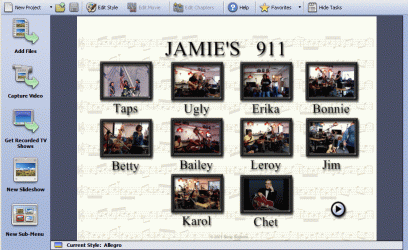
Attached is the DVD menu (page 1 of 2) that I can create in my Old Sonic .. And I kinda like it.
The default was music which fits what I'm recording .. But maybe I'd like to make my own background.
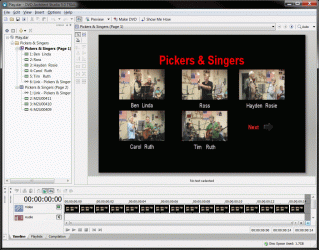
The new Roxio only allows about 4 Thumbs per menu ... and I usually have a bunch.
Something like this is what I'm looking for .. hope this makes sense
Attached Thumbnails
DVD Authoring-99.gif  

Last edited by noyb; 10-22-2010 at 08:38 AM..
My System SpecsSystem Spec
10-22-2010   #8


W7 Professional x64


Ulead/corel (same product) is at least as user friendly, but has more options as to what you can do with the video itself (since it is video editing software). I haven't played around too much with their standalone authoring program, but it is solid as far as I have used it.
My System SpecsSystem Spec
10-22-2010   #9


XP MCE .... XP Pro 64 .... W7 U x64


Still uploading to Utube ...
But I'll have to get the trial and see what you're talking about ...
Name:  avatar.gif
Views: 316
Size:  9.9 KB

He's actually trying to uncoil the mic cord ...
But that's not what it looks like in the video ..
This gave me a chance to play with captions in WLMM .. Here
My System SpecsSystem Spec
10-22-2010   #10


W7 Professional x64


Quote   Quote: Originally Posted by noyb View Post
Lol.
My System SpecsSystem Spec
Reply

 DVD Authoring problems?


Thread Tools


Similar Threads for: DVD Authoring
Thread Forum
Authoring MMC Panels General Discussion
DVD Authoring Program Music, Pictures & Video
Looking For Some DVD AUTHORING SOFWARE Software
Suggestions on DVD authoring SW? Software
Crash course on authoring Windows 7 Troubleshooting Packs News


All times are GMT -5. The time now is 03:02 PM.


Windows 7 Forums is an independent web site and has not been authorized,
sponsored, or otherwise approved by Microsoft Corporation.
"Windows 7" and related materials are trademarks of Microsoft Corp.
© Designer Media Ltd
  

1 2 3 4 5 6 7 8 9 10 11 12 13 14 15 16 17 18 19 20 21 22 23 24 25 26 27 28 29 30