Windows 7 Forums Search
Welcome to Windows 7 Forums. Our forum is dedicated to helping you find solutions with any problems, errors or issues you are experiencing with Windows 7. The Windows 7 forum also covers news and updates and has an extensive Windows 7 tutorial section that covers a wide range of tips and tricks.


Windows 7 - Video's doesn't show as before...HELP!

 
11-05-2010   #1


Window 7 Ultimate 32bit


Video's doesn't show as before...HELP!

Uhm this is not a to big problem but I like everything to be perfect after an restart my videos does not show as before. All my vids would show as windows media player did but now it doesn't anymore.

Attached Thumbnails
Video's doesn't show as before...HELP!-untitled.png  
My System SpecsSystem Spec
11-05-2010   #2


Windows 7 Ultimate


You should try this: right click the video>open with>choose default program> windows media player

If just the video thumbnails don't show up, then you can try installing a codec pack like k-lite codec or CCCP
My System SpecsSystem Spec
11-05-2010   #3


Window 7 Ultimate 32bit


I dont want to use windows media player i want to use km player or vlc but that is the 2 that doesn't show me the preview anymore. It did worked don't know what went wrong and don't have a restore point
My System SpecsSystem Spec
.


11-05-2010   #4


Windows 7 Home Premium 64bit


Hi Core7
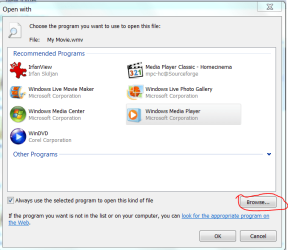
Right click on one of the files you want to open in your chosen player and click "Open With", go to the bottom of that window and click Choose Default Program... Another window will open like this:

Video's doesn't show as before...HELP!-capture70.png

Click "Browse" then navigate to the exe file of your chosen player, probably in C:/Program Files (x86) folder. Highlight the EXE file and click Open.
My System SpecsSystem Spec
11-05-2010   #5


Window 7 Ultimate 32bit


Still the same, I want the icon to be the preview of the movie and in the left hand down at the bottom the logo of km player it was like that but something went wrong....
My System SpecsSystem Spec
11-05-2010   #6


Windows 7 Home Premium 64bit


I think I understand now. You mean the preview doesn't show if you use alternative players? Does the preview work if you choose WMP as the default program. Do you get a message in the preview window? Just a thought you have got the preview pane wide enough to show a preview. Try dragging the line to the left of the preview pane to the left a bit!
My System SpecsSystem Spec
11-05-2010   #7
whs


Vista and Windows7, sometimes Ubuntu and Fedora


Go to Control Panel\Programs\Default Programs\Set Associations and associate all filetypes that you want to see as e.g. VLC to VLC as "Current Default". You do that via "Change Program" on the top, right of the page.
My System SpecsSystem Spec
11-05-2010   #8


Windows 7 Ultimate x86


The Problem/nuisance seems to be as soon as you set any external player as default, the thumbnail preview function is gone. (Makes sense in some way, since this preview is centered around wmp)
You're right is DOES work if an external player is set to default.
The question would be, what exactly did you do right before previews stopped to show? Did you install any additional Codec pack?

-DG
My System SpecsSystem Spec
11-05-2010   #9


Window 7 Ultimate 32bit


Quote   Quote: Originally Posted by mitchell65 View Post
I think I understand now. You mean the preview doesn't show if you use alternative players? Does the preview work if you choose WMP as the default program. Do you get a message in the preview window? Just a thought you have got the preview pane wide enough to show a preview. Try dragging the line to the left of the preview pane to the left a bit!
When I set WMP as my default is doesn't want to preview...it did work before with KMP and VLC but now it doesn't anymore. The only vids that shows an review is the file type .mpe the res like avi, mpg and all that doesn't work.

Is there now easy simple way?
My System SpecsSystem Spec
11-05-2010   #10


Windows 7 Home Premium 64bit


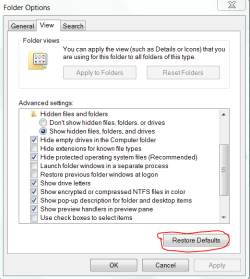
OK New idea Try this:
Click on TOOLS > FOLDER OPTIONS > VIEW Then click on RESTORE
DEFAULTS. as here:

Video's doesn't show as before...HELP!-capture71.png
My System SpecsSystem Spec
Reply

 Video's doesn't show as before...HELP! problems?


Thread Tools


Similar Threads for: Video's doesn't show as before...HELP!
Thread Forum
Video Import Wizard Doesn't Show Up when I plug in my Camcorder Hardware & Devices
ICS box doesn't show up Network & Sharing
Windows doesn't show yes/no tab General Discussion
Partition doesn't show up Installation & Setup
HD doesn't show up Hardware & Devices


All times are GMT -5. The time now is 03:02 PM.


Windows 7 Forums is an independent web site and has not been authorized,
sponsored, or otherwise approved by Microsoft Corporation.
"Windows 7" and related materials are trademarks of Microsoft Corp.
© Designer Media Ltd
  

1 2 3 4 5 6 7 8 9 10 11 12 13 14 15 16 17 18 19 20 21 22 23 24 25 26 27 28 29 30