I expect my EXOPC slate to be here tomorrow. Since it only has a 64 GB SSD I cannot put all my music on it.
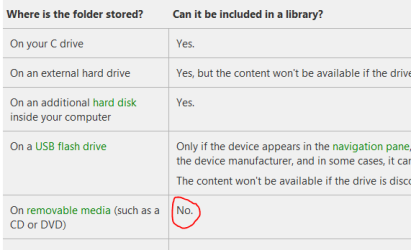
Therefore I wanted to use a 32GB SDHC card, put the less favorite music on it and add the contents to the media library. However, Windows doesn't let me add the SD card to the media library as it is removable. This is strange, because I AM able to add (for example) a folder on my HDD to the library and remove the MP3's from the file system. Then the files can't be found either...can they?
So, why is it that the SD card cannot be added? And more important: is there a tweak to make it useable?
Therefore I wanted to use a 32GB SDHC card, put the less favorite music on it and add the contents to the media library. However, Windows doesn't let me add the SD card to the media library as it is removable. This is strange, because I AM able to add (for example) a folder on my HDD to the library and remove the MP3's from the file system. Then the files can't be found either...can they?
So, why is it that the SD card cannot be added? And more important: is there a tweak to make it useable?
My Computer
At a glance
Windows 7 32 bit both Ultimate and Home PremiumVaries per systemVaries per systemVaries per system
- Computer Manufacturer/Model Number
- EXOPC, custom desktop, custom media center, HP laptop
- OS
- Windows 7 32 bit both Ultimate and Home Premium
- CPU
- Varies per system
- Motherboard
- Varies per system
- Memory
- Varies per system
- Graphics Card(s)
- Varies per system
- Sound Card
- Varies per system
- Monitor(s) Displays
- Varies per system
- Screen Resolution
- Varies per system
- Hard Drives
- Varies per system
- PSU
- Varies per system
- Case
- Varies per system
- Cooling
- Varies per system
- Keyboard
- Varies per system
- Mouse
- Varies per system
- Internet Speed
- 20Mbit