|
Welcome to Windows 7 Forums. Our forum is dedicated to helping you find solutions with any problems, errors or issues you are experiencing with Windows 7. The Windows 7 forum also covers news and updates and has an extensive Windows 7 tutorial section that covers a wide range of tips and tricks.
Windows 7 - Use SD card for Windows Media Player library |
11-24-2010
|
#1 | | Windows 7 32 bit both Ultimate and Home Premium |
Use SD card for Windows Media Player library I expect my EXOPC slate to be here tomorrow. Since it only has a 64 GB SSD I cannot put all my music on it.
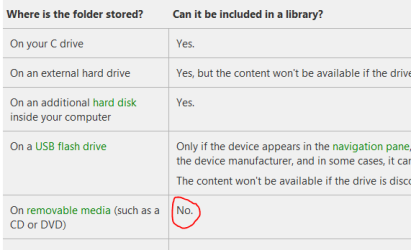
Therefore I wanted to use a 32GB SDHC card, put the less favorite music on it and add the contents to the media library. However, Windows doesn't let me add the SD card to the media library as it is removable. This is strange, because I AM able to add (for example) a folder on my HDD to the library and remove the MP3's from the file system. Then the files can't be found either...can they?
So, why is it that the SD card cannot be added? And more important: is there a tweak to make it useable?
| My System Specs | | System Manufacturer/Model Number EXOPC, custom desktop, custom media center, HP laptop OS Windows 7 32 bit both Ultimate and Home Premium CPU Varies per system Motherboard Varies per system Memory Varies per system Graphics Card Varies per system Sound Card Varies per system Monitor(s) Displays Varies per system Screen Resolution Varies per system Keyboard Varies per system Mouse Varies per system PSU Varies per system Case Varies per system Cooling Varies per system Hard Drives Varies per system Internet Speed 20Mbit |
11-24-2010
|
#2 | | Windows 7 Home Premium 64bit |

Quote: Originally Posted by Plantje So, why is it that the SD card cannot be added? And more important: is there a tweak to make it useable? Can't be done I'm afraid, see here: | My System Specs | | System Manufacturer/Model Number Dell Inspiron 570 OS Windows 7 Home Premium 64bit CPU AMD Athlon(tm) II X4 630 Prcossor, 2800 Mhz, 4 Cores Motherboard Dell Inc. 04GJJT A00 Memory 4 Gb Graphics Card ATI Radeon HD 4200 Sound Card Realtek High Definition Audio Monitor(s) Displays Samsung SyncMaster [Monitor] (22.0") Screen Resolution 1680 x 1050 Hard Drives WDC WD3200AAKS-75L9A0 [Hard drive] (320.07 GB) Seagate FreeAgentDesktop USB Device [Hard drive] (250.06 GB) Internet Speed 8mb |
11-24-2010
|
#3 | | Windows 7 32 bit both Ultimate and Home Premium |
Yes, I've found that one as well. However...there must be some sort of tweak possible...right? | My System Specs | | System Manufacturer/Model Number EXOPC, custom desktop, custom media center, HP laptop OS Windows 7 32 bit both Ultimate and Home Premium CPU Varies per system Motherboard Varies per system Memory Varies per system Graphics Card Varies per system Sound Card Varies per system Monitor(s) Displays Varies per system Screen Resolution Varies per system Keyboard Varies per system Mouse Varies per system PSU Varies per system Case Varies per system Cooling Varies per system Hard Drives Varies per system Internet Speed 20Mbit |
11-24-2010
|
#4 | | Windows 7 Home Premium 64bit |

Quote: Originally Posted by Plantje Yes, I've found that one as well. However...there must be some sort of tweak possible...right?  Not one that i know of! | My System Specs | | System Manufacturer/Model Number Dell Inspiron 570 OS Windows 7 Home Premium 64bit CPU AMD Athlon(tm) II X4 630 Prcossor, 2800 Mhz, 4 Cores Motherboard Dell Inc. 04GJJT A00 Memory 4 Gb Graphics Card ATI Radeon HD 4200 Sound Card Realtek High Definition Audio Monitor(s) Displays Samsung SyncMaster [Monitor] (22.0") Screen Resolution 1680 x 1050 Hard Drives WDC WD3200AAKS-75L9A0 [Hard drive] (320.07 GB) Seagate FreeAgentDesktop USB Device [Hard drive] (250.06 GB) Internet Speed 8mb |
11-24-2010
|
#5 | | Windows 7 32 bit both Ultimate and Home Premium |
I think it is so strange that it is possible to play music from an SD card, but it is impossible to add it to the library. | My System Specs | | System Manufacturer/Model Number EXOPC, custom desktop, custom media center, HP laptop OS Windows 7 32 bit both Ultimate and Home Premium CPU Varies per system Motherboard Varies per system Memory Varies per system Graphics Card Varies per system Sound Card Varies per system Monitor(s) Displays Varies per system Screen Resolution Varies per system Keyboard Varies per system Mouse Varies per system PSU Varies per system Case Varies per system Cooling Varies per system Hard Drives Varies per system Internet Speed 20Mbit |
11-24-2010
|
#6 | | Windows 7 Home Premium 64bit/ Mac OS X Lion |
SO just make a playlist (or multiple playlists) in WMP and organize your music there, idk. | My System Specs | | System Manufacturer/Model Number Custom OS Windows 7 Home Premium 64bit/ Mac OS X Lion CPU Intel Core2Duo E7500 Motherboard Gigabyte EP43-UD3L Memory Kingston 4GB DDR2 (2x2GB) Graphics Card nVidia GeForce 9800GT Sound Card Realtek High Definition Audio Monitor(s) Displays ASUS VH222D WIDE HD 1080P Screen Resolution 1920x1080 Keyboard Logitech Wireless Combo MK260 Mouse Logitech Wireless Combo MK260 PSU 500W Case Custom Midi Tower Hard Drives Western Digital WD3200KS. SATA Internet Speed DSL 1.5M Other Info Speakers: Labtec Pulse 285 S-0158B
Webcam: Logitech Webcam C100 |
11-25-2010
|
#7 | | Windows 7 32 bit both Ultimate and Home Premium |
Yes, thought about that as well. But I like the WMP feature "Play all music" That will probably not include that separate playlist...right?
But it's worth a shot. | My System Specs | | System Manufacturer/Model Number EXOPC, custom desktop, custom media center, HP laptop OS Windows 7 32 bit both Ultimate and Home Premium CPU Varies per system Motherboard Varies per system Memory Varies per system Graphics Card Varies per system Sound Card Varies per system Monitor(s) Displays Varies per system Screen Resolution Varies per system Keyboard Varies per system Mouse Varies per system PSU Varies per system Case Varies per system Cooling Varies per system Hard Drives Varies per system Internet Speed 20Mbit |
11-25-2010
|
#8 | | Windows 7 Home Premium 64bit/ Mac OS X Lion |
There's always another approch for everything. Pin WMP to the taskbar and upon start just drag&drop those playlists to the active playlist and you're good to go | My System Specs | | System Manufacturer/Model Number Custom OS Windows 7 Home Premium 64bit/ Mac OS X Lion CPU Intel Core2Duo E7500 Motherboard Gigabyte EP43-UD3L Memory Kingston 4GB DDR2 (2x2GB) Graphics Card nVidia GeForce 9800GT Sound Card Realtek High Definition Audio Monitor(s) Displays ASUS VH222D WIDE HD 1080P Screen Resolution 1920x1080 Keyboard Logitech Wireless Combo MK260 Mouse Logitech Wireless Combo MK260 PSU 500W Case Custom Midi Tower Hard Drives Western Digital WD3200KS. SATA Internet Speed DSL 1.5M Other Info Speakers: Labtec Pulse 285 S-0158B
Webcam: Logitech Webcam C100 |
11-25-2010
|
#9 | | Windows 7 Home Premium 64bit |

Quote: Originally Posted by Plantje I think it is so strange that it is possible to play music from an SD card, but it is impossible to add it to the library. This link will explain all: About Libraries (Windows)
In any case if you have an extensive range of music files I guess you might store them on an external hard drive. That being so why not just transfer from the SD card to the Ext HD? Or is that a silly idea? | My System Specs | | System Manufacturer/Model Number Dell Inspiron 570 OS Windows 7 Home Premium 64bit CPU AMD Athlon(tm) II X4 630 Prcossor, 2800 Mhz, 4 Cores Motherboard Dell Inc. 04GJJT A00 Memory 4 Gb Graphics Card ATI Radeon HD 4200 Sound Card Realtek High Definition Audio Monitor(s) Displays Samsung SyncMaster [Monitor] (22.0") Screen Resolution 1680 x 1050 Hard Drives WDC WD3200AAKS-75L9A0 [Hard drive] (320.07 GB) Seagate FreeAgentDesktop USB Device [Hard drive] (250.06 GB) Internet Speed 8mb |
11-25-2010
|
#10 | | Windows 7 32 bit both Ultimate and Home Premium |
Thanks for the link. It DID point me in the direction of a possible solution
It states that network locations can be added to the library. So, I decided to share my SD card to the network. Currently my machine is not connected to my home network, but that doesn't matter. I can still add my network share (being the SD card) to the library.
Now...put some music on it and check if it works out!
And it does!
Let's hope these files get included in the list as well when choosing for the "Play all music" option! | My System Specs | | System Manufacturer/Model Number EXOPC, custom desktop, custom media center, HP laptop OS Windows 7 32 bit both Ultimate and Home Premium CPU Varies per system Motherboard Varies per system Memory Varies per system Graphics Card Varies per system Sound Card Varies per system Monitor(s) Displays Varies per system Screen Resolution Varies per system Keyboard Varies per system Mouse Varies per system PSU Varies per system Case Varies per system Cooling Varies per system Hard Drives Varies per system Internet Speed 20Mbit Use SD card for Windows Media Player library problems? All times are GMT -5. The time now is 03:02 PM. |  |