Windows 7 Forums


Windows 7: Libraries

08 Dec 2010   #1

Windows 7 Home Premium 64-bit
Ohio - U.S.A
 
 
Libraries

Ive got a SD card that is going to live in my computer, treat it as another hard drive, and I want to add it to my videos library but Windows says I cant.


Is there a way to add removable storage into a library?
My System SpecsSystem Spec

08 Dec 2010   #2

Windows 7 Pro 64 SP1
East Bay Area, CA


Quote   Quote: Originally Posted by ZenixNet View Post
Ive got a SD card that is going to live in my computer, treat it as another hard drive, and I want to add it to my videos library but Windows says I cant.

Is there a way to add removable storage into a library?
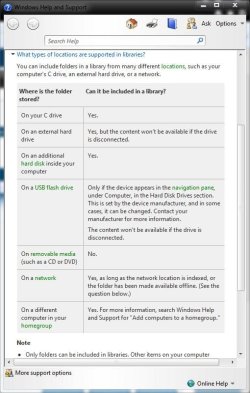
I just tried that too, looks like these are the only places you can add to the libraries.
Attached Thumbnails
Libraries-capture.jpg  
My System SpecsSystem Spec
09 Dec 2010   #3

Windows 7 Home Premium 64-bit
Ohio - U.S.A


Is there any way to get around it thought so i can?
My System SpecsSystem Spec
.


09 Dec 2010   #4

Windows 7 Home Premium x64
Osceola, WI


ZenixNet:

I don't know about setting it up, but won't using an SD as a hard drive fry that thing in no time?

I know "thumb-drives" weren't designed for that type of use and will die quickly if use in that manner.

Curious...
My System SpecsSystem Spec
09 Dec 2010   #5

Windows 7 Home Premium 64-bit
Ohio - U.S.A


Quote   Quote: Originally Posted by rap33042 View Post
ZenixNet:

I don't know about setting it up, but won't using an SD as a hard drive fry that thing in no time?

I know "thumb-drives" weren't designed for that type of use and will die quickly if use in that manner.

Curious...
I'm not actually going to use it as a hard drive, i was just comparing it to that. Im using it as additional storage on my HP Slate 500.
My System SpecsSystem Spec
09 Dec 2010   #6

Windows 7 Home Premium x64
Osceola, WI


"Ive got a SD card that is going to live in my computer, treat it as another hard drive, and I want to add it to my videos library but Windows says I cant."

This is what probably through me off track....
My System SpecsSystem Spec
10 Dec 2010   #7

Windows 7 Home Premium 64-bit
Ohio - U.S.A


Well yes, I was just trying to compare. But that's beside the point. I want to find out if there is a way to put it on a library.
My System SpecsSystem Spec
10 Dec 2010   #8

Microsoft Windows 7 Home Premium 64-bit 7601 Multiprocessor Free Service Pack 1
Cornwall UK


Do a search on the Forum there is a long thread only a week or two old on this subject. Conclusion was that you cannot add an SD card to the library in Windows 7!
My System SpecsSystem Spec
10 Dec 2010   #9

Microsoft Windows 7 Home Premium 64-bit 7601 Multiprocessor Free Service Pack 1
Cornwall UK


Have just found the link it's here:
Use SD card for Windows Media Player library
My System SpecsSystem Spec
10 Dec 2010   #10
whs

Vista, Windows7, Mint Mate, Zorin, Windows 8
Florida in winter, Black Forest/Germany


Quote   Quote: Originally Posted by ZenixNet View Post
Well yes, I was just trying to compare. But that's beside the point. I want to find out if there is a way to put it on a library.
It is actually pretty simple. Create a folder on that SD card. Then use "send to" to put this folder into e.g. Documents. Create a new library (or use an existing one) and include that folder. That's at least how I do it with USB sticks which have the same problem. Then you can create subfolders to that folder - if you wish.

Last edited by whs; 10 Dec 2010 at 02:04 PM.. Reason: update
My System SpecsSystem Spec
Reply

 Libraries problems?


Thread Tools


Similar help and support threads for: Libraries
Thread Forum
How do I open XP icon libraries which have libraries within them General Discussion
Libraries General Discussion
Libraries ugh General Discussion
Getting Used to Win 7 Libraries Customization
Libraries again - General Discussion


All times are GMT -5. The time now is 07:18 AM.


Seven Forums Android App Seven Forums IOS App Follow us on Facebook

Windows 7 Forums is an independent web site and has not been authorized,
sponsored, or otherwise approved by Microsoft Corporation.
"Windows 7" and related materials are trademarks of Microsoft Corp.
© Designer Media Ltd
  

1 2 3 4 5 6 7 8 9 10 11 12 13 14 15 16 17 18 19 20 21 22 23 24 25 26 27 28 29 30 31 32