Windows 7 Forums


Windows 7: Windows Media Player Problem

21 Jan 2011   #1
Sem

Windows 7 x64
 
 
Windows Media Player Problem

Having a small problem with media player on Windows 7 x64

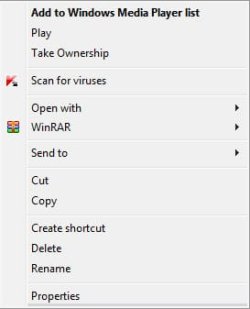
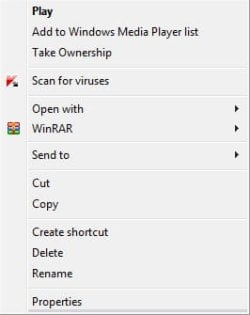
The default action has changed from "Play" to "Add to Windows Media Player list" for some files like .mp3 and .mp4 and it makes trying to play various single mp3s and other files a pain


for some reason .avi files are ok and "Play" is the default action

dont really know when or why it changed i haven't really done anything to make it happen

how do i fix it?

Thanks
Attached Thumbnails
Windows Media Player Problem-wmp.jpg   Windows Media Player Problem-wmp2.jpg  
My System SpecsSystem Spec

23 Jan 2011   #2

Windows 7 Home Premium 64 bit
Oklahoma


Why are you opening the context menu to play a single mp3, just double click the song and it will open WMP and play the song
My System SpecsSystem Spec
24 Jan 2011   #3
Sem

Windows 7 x64


Im not trying to play the file via the context menu and i only showed the context menu so you can see what the default action is

the problem was if wmp is open and i double click on a mp3 file instead of playing the file it will add it to the list

doesnt matter anyway ive solved it now
My System SpecsSystem Spec
.


26 Jan 2011   #4

Windows 7 Home Prem 64 bit


How did you fix it?
My System SpecsSystem Spec
26 Jan 2011   #5

Windows 7 Home Premium 64 bit
Illinois


Your default setting may have changed. Windows Media Player may not be the default player, which happens sometimes when another player is installed. In your menu above, select "Open with" and select WMP and enable the checkbox.
My System SpecsSystem Spec
27 Jan 2011   #6
Sem

Windows 7 x64


Quote   Quote: Originally Posted by p5bdkw View Post
Your default setting may have changed. Windows Media Player may not be the default player, which happens sometimes when another player is installed. In your menu above, select "Open with" and select WMP and enable the checkbox.
i think mpc-hc might have caused the problem but i already tried what you suggested and it didn't work

Quote   Quote: Originally Posted by kanimation View Post
How did you fix it?
Default Programs Editor

used that to change the default action to play
My System SpecsSystem Spec
29 Jan 2011   #7

Windows 7 Ultimate x64
Miami


MP4 = Can ONLY be played on iTunes & Any Apple Inc. Products

Just Saying XD
My System SpecsSystem Spec
29 Jan 2011   #8

Windows 7 Ultimate 64bit
British Columbia, Canada


Quote   Quote: Originally Posted by Gawd View Post
MP4 = Can ONLY be played on iTunes & Any Apple Inc. Products

Just Saying XD
excuse you? The fact that you have broken the native filetype associations by installing apple crap on your system doesnt mean you need to tell everyone to break their systems as you have.

MP4 is a native Windows 7 format - it plays without ANY additional software installed.
My System SpecsSystem Spec
Reply

 Windows Media Player Problem problems?


Thread Tools


Similar help and support threads for: Windows Media Player Problem
Thread Forum
Windows media player 12 rip problem. Media Center
windows media player problem Media Center
Windows Media Player Problem - Sound/skipping problem. Music, Pictures & Video
Windows Media Player 12 Problem Media Center
Windows Media Player problem Music, Pictures & Video


All times are GMT -5. The time now is 02:06 PM.


Seven Forums Android App Seven Forums IOS App Follow us on Facebook

Windows 7 Forums is an independent web site and has not been authorized,
sponsored, or otherwise approved by Microsoft Corporation.
"Windows 7" and related materials are trademarks of Microsoft Corp.
© Designer Media Ltd
  

1 2 3 4 5 6 7 8 9 10 11 12 13 14 15 16 17 18 19 20 21 22 23 24 25 26 27 28 29 30 31 32