Windows 7 Forums


Windows 7: powerdvd v8 always wants ....

06 May 2011   #1

Windows 7 Professional 64bit
 
 
powerdvd v8 always wants ....

I was wondering if there was afix for 2 issues i was having with PowerDVD v8....
1) why does it always ask me to register when i have a couple hundred times???
2) why does it always change my windows colour scheme back to basic, is thie a bug or do i have to live with it???

It does change back ounce i exit powerdvd...... I use it because it come with my LG bd/dvd rewriter.... i only use to play bluray ... its not a pressing matter, more of a annoyance than anything.. but help would be great....

My System SpecsSystem Spec

06 May 2011   #2

Windows 7 Pro 64 SP1
East Bay Area, CA


Quote   Quote: Originally Posted by Kodiak420 View Post
I was wondering if there was afix for 2 issues i was having with PowerDVD v8....
1) why does it always ask me to register when i have a couple hundred times???
2) why does it always change my windows colour scheme back to basic, is thie a bug or do i have to live with it???

It does change back ounce i exit powerdvd...... I use it because it come with my LG bd/dvd rewriter.... i only use to play bluray ... its not a pressing matter, more of a annoyance than anything.. but help would be great....
That register always bugged me too, I just went to,

C:\Program Files (x86)\CyberLink\PowerDVD11\OLRSubmission

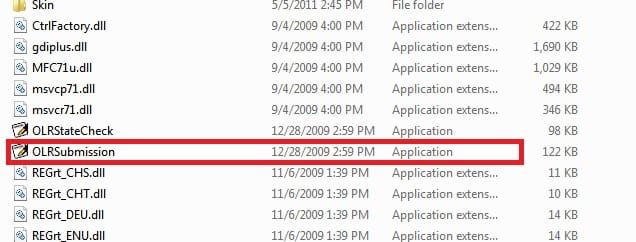
and deleted this, "OLRSubmission.exe" ..... no more registration bother.

The reason it's changing your color scheme is because it needs those resources to run the software.

Here's another thread that explains it a little more,

Color scheme will be changed to Basic message?
My System SpecsSystem Spec
06 May 2011   #3

Windows 7 Professional 64bit


Quote   Quote: Originally Posted by derekimo View Post
Quote   Quote: Originally Posted by Kodiak420 View Post
I was wondering if there was afix for 2 issues i was having with PowerDVD v8....
1) why does it always ask me to register when i have a couple hundred times???
2) why does it always change my windows colour scheme back to basic, is thie a bug or do i have to live with it???

It does change back ounce i exit powerdvd...... I use it because it come with my LG bd/dvd rewriter.... i only use to play bluray ... its not a pressing matter, more of a annoyance than anything.. but help would be great....
That register always bugged me too, I just went to,

C:\Program Files (x86)\CyberLink\PowerDVD11\OLRSubmission

and deleted this, "OLRSubmission.exe" ..... no more registration bother.

The reason it's changing your color scheme is because it needs those resources to run the software.

Here's another thread that explains it a little more,

Color scheme will be changed to Basic message?
i wil try that for the register problem thanx
My System SpecsSystem Spec
.


06 May 2011   #4

Windows 7 Pro 64 SP1
East Bay Area, CA


Quote   Quote: Originally Posted by Kodiak420 View Post
Quote   Quote: Originally Posted by derekimo View Post
Quote   Quote: Originally Posted by Kodiak420 View Post
I was wondering if there was afix for 2 issues i was having with PowerDVD v8....
1) why does it always ask me to register when i have a couple hundred times???
2) why does it always change my windows colour scheme back to basic, is thie a bug or do i have to live with it???

It does change back ounce i exit powerdvd...... I use it because it come with my LG bd/dvd rewriter.... i only use to play bluray ... its not a pressing matter, more of a annoyance than anything.. but help would be great....
That register always bugged me too, I just went to,

C:\Program Files (x86)\CyberLink\PowerDVD11\OLRSubmission

and deleted this, "OLRSubmission.exe" ..... no more registration bother.

The reason it's changing your color scheme is because it needs those resources to run the software.

Here's another thread that explains it a little more,

Color scheme will be changed to Basic message?
i wil try that for the register problem thanx
You're welcome, let us know how it goes.
My System SpecsSystem Spec
06 May 2011   #5

Windows 7 Professional 64bit


i have a question ive posted pics.. one of that file close.. one of it open.. un clear on which or if all should be deleted..[ATTACH]powerdvd v8 always wants ....-capture2.png[/ATTACH]
Attached Thumbnails
powerdvd v8 always wants ....-capture1.png  

Last edited by Kodiak420; 06 May 2011 at 01:29 PM.. Reason: spelling
My System SpecsSystem Spec
06 May 2011   #6

Windows 7 Pro 64 SP1
East Bay Area, CA


Just this one here,

powerdvd v8 always wants ....-capture2.jpg

Just to be on the safe side, you can just move it for now or just don't empty your recycle bin yet, then check to make sure it has stopped bugging you.
My System SpecsSystem Spec
06 May 2011   #7

Windows 7 Professional 64bit


that seemed to work thanx alot....
My System SpecsSystem Spec
06 May 2011   #8

Windows 7 Pro 64 SP1
East Bay Area, CA


Quote   Quote: Originally Posted by Kodiak420 View Post
that seemed to work thanx alot....
Glad to hear it, that always bugged me too.
My System SpecsSystem Spec
06 May 2011   #9

Windows 7 Professional 64bit


no prob
My System SpecsSystem Spec
Reply

 powerdvd v8 always wants .... problems?


Thread Tools


Similar help and support threads for: powerdvd v8 always wants ....
Thread Forum
PowerDVD Subtittle Music, Pictures & Video
Solved PowerDVD Ultra v 8 Software
PowerDVD 10 3D Software
BSOD while using powerdvd 8 BSOD Help and Support
PowerDVD 8 Software


All times are GMT -5. The time now is 01:59 AM.


Seven Forums Android App Seven Forums IOS App Follow us on Facebook

Windows 7 Forums is an independent web site and has not been authorized,
sponsored, or otherwise approved by Microsoft Corporation.
"Windows 7" and related materials are trademarks of Microsoft Corp.
© Designer Media Ltd
  

1 2 3 4 5 6 7 8 9 10 11 12 13 14 15 16 17 18 19 20 21 22 23 24 25 26 27 28 29 30 31 32