Windows 7 Forums Search
Welcome to Windows 7 Forums. Our forum is dedicated to helping you find solutions with any problems, errors or issues you are experiencing with Windows 7. The Windows 7 forum also covers news and updates and has an extensive Windows 7 tutorial section that covers a wide range of tips and tricks.


Windows 7 - file convert .ts to another

 
08-20-2011   #1


file convert .ts to another

i have a .ts file that is 350 mb in size i want to convert it to another file with the exact same quality i do not mind what extension whatever is the best

My System SpecsSystem Spec
08-20-2011   #2


Windows 7 Pro x64 / WinXP Pro x86 on (1), Win7 Pro X64 / WinXP Pro x86 on (2)


Quote   Quote: Originally Posted by Wicca View Post
i have a .ts file that is 350 mb in size i want to convert it to another file with the exact same quality i do not mind what extension whatever is the best
VideoReDo TV Suite v4.

.TS files are transport streams from HDTV, and utilize MPEG-2 compression inside.

You can, for example, re-package the .TS file into MPG form with 100% retention of original digital content, i.e. the underlying MPEG-2 datastream.

So use VideoRedo to (1) open the .TS video, and (2) select the entire video or edit it if you want to remove commercials, etc., (3) add the one or more "scenes" you mark, and then (4) SAVE AS... and choose MPG format. All the scene(s) you added will be combined into one output MPG file with MPEG-2 in the underlying data, with ZERO re-compression.
My System SpecsSystem Spec
08-20-2011   #3


Windows 7 Home Premium 32 bit


Another easy-to-use versatile video converter you may try is Freemake Video Coverter. Freemake Downloads | Download Free Video Converter | Download Free Video Downloader
My System SpecsSystem Spec
.


08-20-2011   #4


Microsoft Windows 7 Home Premium 64-bit 7601 Multiprocessor Free Service Pack 1


Quote   Quote: Originally Posted by jumanji View Post
Another easy-to-use versatile video converter you may try is Freemake Video Coverter. Freemake Downloads | Download Free Video Converter | Download Free Video Downloader
I concur. This will convert .ts into almost any format you like and it is fast.
My System SpecsSystem Spec
08-20-2011   #5


but quality to stay the same
My System SpecsSystem Spec
08-20-2011   #6


Windows 7 Pro x64 / WinXP Pro x86 on (1), Win7 Pro X64 / WinXP Pro x86 on (2)


Quote   Quote: Originally Posted by Wicca View Post
but quality to stay the same
I repeat... VideoRedo TV Suite WILL do ZERO re-compression on the conversion from TS to MPG.

These are both simply "wrapper" formats, with the underlying internal data compressed with MPEG-2 in both formats.

VideoReDo will do NOTHING to the underlying MPEG-2 data. It simply "re-wraps" the MPEG-2 inner contents of the TS file with a new external MPG wrapper.

In fact, the progress dialog during the conversion will show "fast frame copy", confirming that ZERO RE-COMPRESSION is occurring during the re-wrap process.

Try it. Download and install it for trial. It's a very highly regarded product. You'll like it (ask questions if you can't understand something about how to use it... either here, or on their Forum, which is answered by the author).
My System SpecsSystem Spec
08-20-2011   #7


Windows 7 x64 Home Premium


Quote   Quote: Originally Posted by Wicca View Post
i have a .ts file that is 350 mb in size i want to convert it to another file with the exact same quality i do not mind what extension whatever is the best
Certainly you care about what the extension is? If not, why not keep it in .ts.

I assume you must want to play on some non PC device, in which case you likely have specific format requirements beyond not .ts.
My System SpecsSystem Spec
08-20-2011   #8


Windows 7 Home Premium 64bit


You just want to change the container?

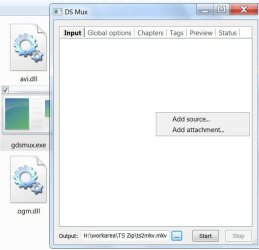
MKVmerge can do this. just add the .ts file as the Video stream, and again for the Audio stream. It will de-mux the raw video and audio and put it into a MKV container.
No recoding, so no quality loss.

Another option is MP4 if its 4GB or less. MP4box will work the exact same way as MKVmerge.
You'll need MP4box, and if you want UI, YAMB is pretty good.


Buit as Snowdog mentioned, depending what you are wanting to do there may be additional requirements.
Some of which may be not only the the Video or Audio Codec inside the container, but the settings used for the Video/Audio streams themselves. (For example must be 4ref frames or lower. If the current file has 6 for example, it will not work regardless what container its in)
My System SpecsSystem Spec
08-20-2011   #9


Windows 7 Pro x64 / WinXP Pro x86 on (1), Win7 Pro X64 / WinXP Pro x86 on (2)


Quote   Quote: Originally Posted by Wicca View Post
but quality to stay the same
You've checked this thread as "resolved".

What program did you end up using in the end?

And into what converted output file format did you create from the input TS file?

Also, to what program or device is this converted file intended to be fed?

(Just curious, for closure)
My System SpecsSystem Spec
08-21-2011   #10


Windows 7 Home Premium 32 bit


Quote   Quote: Originally Posted by dsperber View Post
Quote   Quote: Originally Posted by Wicca View Post
but quality to stay the same
You've checked this thread as "resolved".

What program did you end up using in the end?

And into what converted output file format did you create from the input TS file?

Also, to what program or device is this converted file intended to be fed?

(Just curious, for closure)
I am also curious to know what the OP has done.

Quote   Quote: Originally Posted by Wishmaster View Post
You just want to change the container?

MKVmerge can do this. just add the .ts file as the Video stream, and again for the Audio stream. It will de-mux the raw video and audio and put it into a MKV container.
No recoding, so no quality loss.

Another option is MP4 if its 4GB or less. MP4box will work the exact same way as MKVmerge.
You'll need MP4box, and if you want UI, YAMB is pretty good.


Buit as Snowdog mentioned, depending what you are wanting to do there may be additional requirements.
Some of which may be not only the the Video or Audio Codec inside the container, but the settings used for the Video/Audio streams themselves. (For example must be 4ref frames or lower. If the current file has 6 for example, it will not work regardless what container its in)
I was also thinking on the same line - putting the contents of the .ts file into an mkv container without any encoding but didn't know which prog could do it.

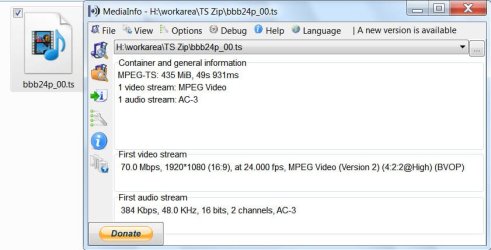
After reading your post and just to tryout, I downloaded a 435MB sample .ts file of a open movie project (70 Mbps,1920*1080@24fps MPEG2; 384Kbps 48KHz 16bits 2 channel AC3). When trying to add the .ts file to mkvmerge GUI v4.9.1, I only get a message that .ts is not a supported format. So what next?

Using Freemake Video converter however I could make a good quality BD M2TS file by clicking on "to bluray" conversion button and also good quality mkv file.

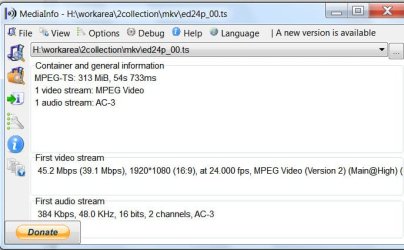
M2TS file:maximum possible video bitrate for the AVC 39 Mbps Audio bitrate 224 Kbps AC3 File size: 238MB

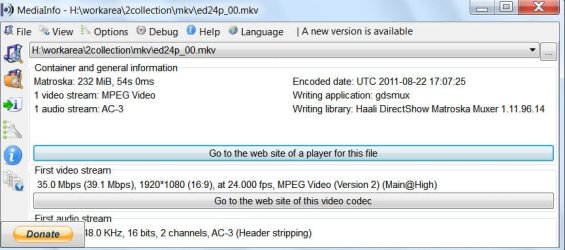
MKV file:maximum possible video bitrate for the AVC 32Mbps Audio bitrate 224Kbps AC3 File size: 187MB
My System SpecsSystem Spec
Reply

 file convert .ts to another problems?


Thread Tools


Similar Threads for: file convert .ts to another
Thread Forum
Convert a .rec file for uploading to Youtube? Music, Pictures & Video
Solved How do I convert .vob file to mkv/mp4 losslessly? Music, Pictures & Video
Can't convert a Camtasia file to AVI (with codecs) on an i7 Software
How convert exe to zip file? Software
convert nearly any file to pdf :D Software


All times are GMT -5. The time now is 03:07 PM.


Windows 7 Forums is an independent web site and has not been authorized,
sponsored, or otherwise approved by Microsoft Corporation.
"Windows 7" and related materials are trademarks of Microsoft Corp.
© Designer Media Ltd
  

1 2 3 4 5 6 7 8 9 10 11 12 13 14 15 16 17 18 19 20 21 22 23 24 25 26 27 28 29 30