Windows 7 Forums Search
Welcome to Windows 7 Forums. Our forum is dedicated to helping you find solutions with any problems, errors or issues you are experiencing with Windows 7. The Windows 7 forum also covers news and updates and has an extensive Windows 7 tutorial section that covers a wide range of tips and tricks.


Windows 7 - Winamp hotkeys don't work in some fullscreen apps

 
10-03-2011   #1


Windows 7 Home Edition 64-bit


Winamp hotkeys don't work in some fullscreen apps

I use the current Winamp.

I was wondering if I could somehow force these hotkeys to work in anything ?

Most notably, Battlefield 1942. Even my Play/Pause, Next Track and Previous Track buttons don't function when I'm playing

My System SpecsSystem Spec
10-03-2011   #2


Microsoft Windows 7 Home Premium 64-bit 7600


sadly ,winamp hotkeys only seem to work if winamp has focus ,which i think defeats the purpose . you could try creating a hot key to the winamp. exe to steal the focus enabling the play /pause etc hotkeys to work.
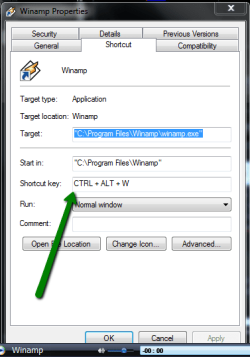
to create a set of hot keys for winamp. exe start winamp, and right click winamp on the taskbar ,in the jumplist right click on winamp again and select properties, in the window that opens there is an imput field for shortcut keys,

Winamp hotkeys don't work in some fullscreen apps-2011-10-03_2047.png

i chose ctrl+ alt+W ,its up to you which key you choose,it will give you ctrl +alt as a default anyway.
dont know if this will solve it for you but worth a shot.
My System SpecsSystem Spec
10-03-2011   #3


Windows 7 Home Edition 64-bit


I'm a bit confused.

Can I go straight to the main winamp.exe or I need to make a shortcut of it and go in its Properties ?

Is this for only one hotkey ?
My System SpecsSystem Spec
.


10-03-2011   #4


Microsoft Windows 7 Home Premium 64-bit 7600


just go straight to the winamp exe and select properties, the reason i said use the properties from the taskbar was that it seems easier and you may have a shortcut to it in rocketdock or whatever

,its for one hotkey to select winamp,
ie when you are playing a track in winamp and have a full screen game on, hiting the ctrl+ alt+w ,will ,should grab the focus for winamp then you should be able to use the hotkeys for play ,pause next track etc.
without exiting the game,
im not sure but like i say its worth a go.
failing that create a long playlist,
My System SpecsSystem Spec
10-03-2011   #5


Windows 7 Home Edition 64-bit


I did a mini playlist test.

First I pushed the music key, the open default player key and it minimized my game..

Then I tried your suggestion such as set a Ctrl+Alt+W shortcut but nothing can control Winamp while I'm focused in BF1942. Damn
My System SpecsSystem Spec
10-03-2011   #6


Microsoft Windows 7 Home Premium 64-bit 7600


Ok, sorry that didnt work for you, it was worth a try. have you considered posting in the winamp forum. they usually get to you within a day or so, set the notification to email, if you do.

Winamp Forums
My System SpecsSystem Spec
Reply

 Winamp hotkeys don't work in some fullscreen apps problems?


Thread Tools


Similar Threads for: Winamp hotkeys don't work in some fullscreen apps
Thread Forum
NEW XGR keyboard hotkeys doesn't want to work, HELP? Hardware & Devices
Multimedia buttons in fullscreen apps Sound & Audio
Winamp doesn't work in Win 7 Software
Solved Winamp Not Work Windows 7 Software
Apps that do not Work Software


All times are GMT -5. The time now is 03:08 PM.


Windows 7 Forums is an independent web site and has not been authorized,
sponsored, or otherwise approved by Microsoft Corporation.
"Windows 7" and related materials are trademarks of Microsoft Corp.
© Designer Media Ltd
  

1 2 3 4 5 6 7 8 9 10 11 12 13 14 15 16 17 18 19 20 21 22 23 24 25 26 27 28 29 30