| Windows 7: My laptop gets slow when I open a folder with multiple .wav files |
04 Nov 2011
|
#1 | | Windows 7 Home Premium 64bit |
My laptop gets slow when I open a folder with multiple .wav files Hi
I've had this issue with my laptop and someone else's before.
I make a beat, then I export it out into multiple .wav files for mixing and stuff, then when I go to that folder in Windows Explorer, it takes forever to load (like the address bar takes forever to load) and slows my computer very very bad.
Then when it's done loading and I'm not using the folder anymore, the computer stays slow still.
I have 6GB RAM and over 300GB free in my HDD (more than 50% is available), so I don't think that memory could be the issue. But I could be wrong.
Has anyone had this problem before and is there a solution?
Also, this happens with only .wav files. Other folders with multiple .mp3 files are perfectly fine.
Also, when I try to delete any .wav file in folders containing multiple of these wav files, the computer freezes on the screen saying something like "preparing to recycle" and doesn't get past it... then I have to restart my laptop.
Thanks for any help. | My System Specs |
| OS Windows 7 Home Premium 64bit |
05 Nov 2011
|
#2 | | Windows® 8 Pro (64-bit) Mumbai, India |
Looks like a thread in Explorer.exe process messing something up. Also, try disabling your AV and check if the issue persists. | My System Specs | | System Manufacturer/Model Number Samsung NP530U4B-S02IN OS Windows® 8 Pro (64-bit) CPU Intel® Core™ i5 Processor 2467M (1.60GHz, 3MB L3 Cache) Motherboard Samsung Electronics Memory 6GB DDR3 System Memory at 1,333MHz (on BD 4GB + 2GB x 1) Graphics Card AMD Radeon™ HD7550M 1GB DDR3 (Ext. Graphic) Sound Card Realtek High Definition Audio Monitor(s) Displays 35.56cm (14.0) SuperBright 300nit HD LED Display Screen Resolution 1366x768 Hard Drives 1TB S-ATA II Hard Drive (5400RPM) with ExpressCache 16GB SSD Internet Speed sucks Antivirus Microsoft Security Essentials Browser Google Chrome (Sync enabled) |
05 Nov 2011
|
#3 | | Windows 7 Professional SP1 32-bit Fantasyland |
Sounds like some Explorer shell extension trying to identify every single .wav file. Antivirus software is a possibility, but in this case I have a hunch it's something more specialized toward audio.
It would be interesting to know what audio software you have installed on your laptop? | My System Specs | | System Manufacturer/Model Number Custom-built OS Windows 7 Professional SP1 32-bit CPU Intel Core 2 Duo E6600 2.4GHz, overclocked to 2.7GHz Motherboard Asus PL5D2 Memory 4GB DDR2-667 (4x1GB in dual-channel config) Graphics Card nVidia GeForce 9800 GT Sound Card Creative X-Fi XtremeMusic Monitor(s) Displays Acer Screen Resolution 1920x1200 (DVI) Keyboard Standard Mouse Microsoft wireless optical mouse PSU Antec TruePower 2.0 Case Cooler Master Centurion Cooling various fans Hard Drives OCZ SSD Vertex Plus 60GB SATA (Firmware 3.55), 64MB cache
Hitachi HD321KJ SATA, 320GB, 7200rpm, 16MB cache Internet Speed DSL; ~330KB/sec down, ~110KB/sec up Other Info Have a laptop too :) (Compaq CQ60 also with Win7 Pro SP1 32-bit)
Drives in both systems:
C: - Windows 7 + apps. Pagefile is fixed size and located at the very end of the partition.
D: - various temp files/cache for Firefox and apps/games.
E: - videos, music, misc. storage, torrent downloads, etc. |
08 Nov 2011
|
#4 | | Windows 7 Home Premium 64bit |
Thanks The problem is probably with the search indexer maybe?
This issue is less noticeable when I access the folder with many .wav files from its original location/root in my C drive, but when I access this location from my library, it gets crazy slow.
I have FL Studio installed and Adobe Audition.
I use Norton Internet Security. I disabled it and tried and it didn't make a difference really. | My System Specs | | OS Windows 7 Home Premium 64bit |
08 Nov 2011
|
#5 | | Windows 7 x64 Ultimate A Finnish immigrant in Leipzig, Germany |
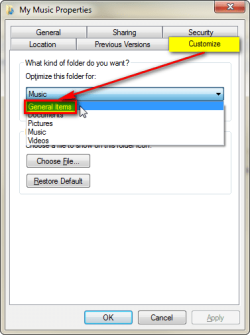
Change the Folder behaviour from Music (or anything else) to General Items and see if this helps.
This trick works amazingly well for instance with really big image, music and video folders; when Explorer reads a folder it reads the icon preview info for each file which can take really long time. Changing the optimizing behaviour to General Items skips this phase and loads the content of the folder much faster.
Kari | My System Specs | | Computer type Laptop System Manufacturer/Model Number HP ENVY 17-1150eg OS Windows 7 x64 Ultimate CPU 1.6 GHz Intel Core i7-720QM Processor Memory 6 GB Graphics Card ATI Mobility Radeon HD 5850 Graphics Sound Card Beats sound system with integrated subwoofer Monitor(s) Displays 17" laptop display, 22" LCD and 32" Full HD TV through HDMI Screen Resolution 1600*900, 1680*1050 and 1920*1080 Keyboard Logitech diNovo Media Desktop Laser (bluetooth) Mouse Logitech MX1000 Laser (Bluetooth) Hard Drives Internal: 2 x 500 GB SATA Hard Disk Drive 7200 rpm
External: 2TB for backups, 3TB USB3 network drive for media Internet Speed 50/10 Mbps VDSL Antivirus MSE, Windows Defender Browser Maxthon 3.5.2. Other Info Windows 7 Ultimate Retail Full in English, additional Guest-user accounts in Finnish, German and Swedish (Working languages English & Swedish, Family language German, my own language, mother tongue, Finnish. I really need Ultimate to get to use Language Packs!) |
08 Nov 2011
|
#6 | | Windows 7 Home Premium 64bit |
Thanks... that helps... but only temporarily.
It loads up fine... then when I click on one of the .wav files, it starts loading the window again... and starts eating the computer's memory again... | My System Specs | | OS Windows 7 Home Premium 64bit |
18 May 2012
|
#7 | | Windows 7 x64 Ultimate Winter Park |
Same Issue I think it has something to do with Fl Studio because I am having the same issue. I will export a project as split wav tracks and then can't copy, move or delete them Every time they get hung up on the screen representing the process attempting to happen. I logged into safe mode and was able to delete some of them, but I still have a few on my desktop that seem to be there permanently and are useless. Ive checked the index, I even reinstalled windows, and every time I export a project as a wav they completely useless and just take up space. | My System Specs | | OS Windows 7 x64 Ultimate CPU AMD Phenom(tm) II X6 1090T Processor, 3210 MHz Motherboard ASUS Crosshair IV Formula Memory 16 Gig G.Skill Ripjaw X Series Graphics Card XFX Radeon 5770 1Gb DDR5 PCI-E 16 Sound Card C-Media PcI Audio Device Monitor(s) Displays Viewsonic 1080p HD LED 22" Mouse CM Storm Inferno PSU KINGWIN Lazer LZ-1000 1000W Modular 80 PLUS BRONZE Certified Case Custom Cooling Custom Hard Drives 3 x 1TB Sata 6.0 Gb/s 7200 RPM Seagate
3 x 1.5TB Sata 6.0 Gb/s 7200 RPM Seagate My laptop gets slow when I open a folder with multiple .wav files problems? All times are GMT -5. The time now is 02:48 AM. | |