Windows 7 Forums


Windows 7: WMP Being weird

29 Nov 2011   #1

7 Ultimate x64
On my chair, in my room
 
 
WMP Being weird

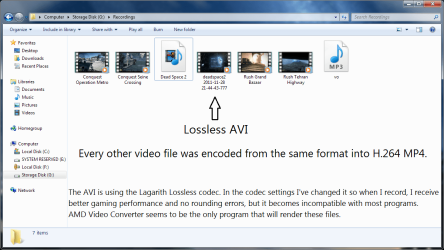
I rendered a recording file into H.264 MP4, but for some reason WMP won't play it. I tried installing Shark007's Windows 7 codec (x32 & x64) and setting both applications to 'Shark007 SUGGESTED settings' but it didn't help.
I recommend you open this: WMP Being weird-capture.png
My System SpecsSystem Spec

29 Nov 2011   #2

Windows 7 Ultimate 64bit
British Columbia, Canada


1st of all, please know, the 64bit app affects playback in Media Center
The 32bit app affects most other players such as the default WMP

If you are not a LiveTV user, I suggest that you disable the Microsoft Video decoder on the SWAP TAB. Test.

The suggested settings disable Media Foundation on the SWAP TAB
This is benificial for M2TS playback but can break MP4 playback.

If the 1st suggestion didnt work, or is not for you,
press [Reset All]
test.
My System SpecsSystem Spec
29 Nov 2011   #3

7 Ultimate x64
On my chair, in my room


None of that helped.
My System SpecsSystem Spec
.


29 Nov 2011   #4

7 Ultimate x64
On my chair, in my room


In fact, it made the situation even worse. Now the AVI file won't play...
My System SpecsSystem Spec
29 Nov 2011   #5

Windows 7 Ultimate 64bit
British Columbia, Canada


In that case, you probably need to update the codecs themselves.
Uninstall current installations. upgrade scenario's often cause problems too.

MajorGeeks is your source for up-to-date releases.
My System SpecsSystem Spec
29 Nov 2011   #6

7 Ultimate x64
On my chair, in my room


Quote   Quote: Originally Posted by Shark007 View Post
In that case, you probably need to update the codecs themselves. Uninstall current installations.
How would I do that? The only codec I've installed apart from the ones that are integrated with Windows is the Lagarith Lossless Codec.
My System SpecsSystem Spec
29 Nov 2011   #7

Windows 7 Ultimate 64bit
British Columbia, Canada


Quote   Quote: Originally Posted by MadSupra354 View Post
Quote   Quote: Originally Posted by Shark007 View Post
In that case, you probably need to update the codecs themselves. Uninstall current installations.
How would I do that? The only codec I've installed apart from the ones that are integrated with Windows is the Lagarith Lossless Codec.
Quote   Quote: Originally Posted by MadSupra354 View Post
I tried installing Shark007's Windows 7 codec (x32 & x64)
In the installed Settings Applications (there are 2, one for 32bit players and another for 64bit players)
Go to the Help TAB, press the button [UNINSTALL]

Get new releases here . . . Win7codecs - x64Components addon
My System SpecsSystem Spec
29 Nov 2011   #8

7 Ultimate x64
On my chair, in my room


Sorry, I was just about to come back here to update my last post. I think the legendary file (.avi file) was corrupt/damaged.
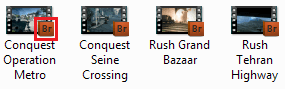
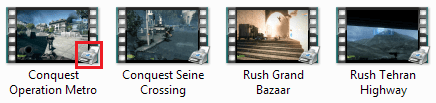
But this is something else that's weird that only happened when I uninstalled the Windows 7 codecs:
Name:  1.PNG
Views: 96
Size:  13.4 KB
WMP Being weird-2.png
WMP Being weird-capture.png
This is with every single video file btw.
My System SpecsSystem Spec
29 Nov 2011   #9

Windows 7 Ultimate 64bit
British Columbia, Canada


the graphic in the righthand lower corner represents the program you have associated that filetype to open with. It has nothing to do with codecs.
My System SpecsSystem Spec
Reply

 WMP Being weird problems?


Thread Tools


Similar help and support threads for: WMP Being weird
Thread Forum
This is weird . . . General Discussion
Series of weird events, now some of my games are acting weird Gaming
Weird system error after weird BSOD BSOD Help and Support
Weird HDD Hardware & Devices
weird :S :S Gaming


All times are GMT -5. The time now is 10:07 PM.


Windows 7 Forums is an independent web site and has not been authorized,
sponsored, or otherwise approved by Microsoft Corporation.
"Windows 7" and related materials are trademarks of Microsoft Corp.
© Designer Media Ltd