|
Welcome to Windows 7 Forums. Our forum is dedicated to helping you find solutions with any problems, errors or issues you are experiencing with Windows 7. The Windows 7 forum also covers news and updates and has an extensive Windows 7 tutorial section that covers a wide range of tips and tricks.
Windows 7 - Picture folder/gallery |
12-24-2011
|
#1 | | Windows 7 Home Premium 64bit |
Picture folder/gallery Well my picture folder is loading very slow. Whenever i am about to open picture it takes very long to load and become not responding. How can i solve this problem?
| My System Specs | | OS Windows 7 Home Premium 64bit |
12-24-2011
|
#2 | | windows 7 Home Premium 64 Bit SP 1 |
How huge your picture folder is .... and what is the volume of your RAM ?
It depends on the both . | My System Specs | | System Manufacturer/Model Number Self Assembled OS windows 7 Home Premium 64 Bit SP 1 CPU Intel Core i3 Motherboard Intel DH55TC Media Series Memory Corsair 2GB x2 Graphics Card Onboard Sound Card Onboard Monitor(s) Displays LG Flatron E2040T Screen Resolution 1600x900 Keyboard iBall Mouse Logitech Case iBall Hard Drives Western Digital 1 TB
Seagate 500 GB Internet Speed BSNL Broadband Other Info Dell Studio 15" Laptop |
12-25-2011
|
#3 | | Windows 7 Home Premium 64bit |
My picture folder has very little pictures and files. RAM is 4GB. | My System Specs | | OS Windows 7 Home Premium 64bit |
12-25-2011
|
#4 | | |
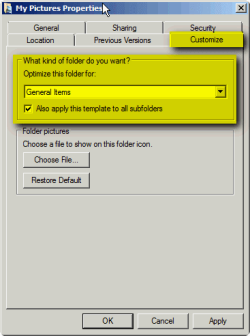
Windows Explorer can read Pictures and Videos folders faster if folder type is set to General Items instead of Pictures or Videos:
Kari | My System Specs | | System Manufacturer/Model Number HP ENVY 17-1150eg OS Windows 7 x64 Ultimate CPU 1.6 GHz Intel Core i7-720QM Processor Memory 6 GB Graphics Card ATI Mobility Radeon HD 5850 Graphics Sound Card Beats sound system with integrated subwoofer Monitor(s) Displays 17" laptop display, 22" LCD and 32" Full HD TV through HDMI Screen Resolution 1600*900, 1680*1050 and 1920*1080 Keyboard Logitech diNovo Media Desktop Laser (bluetooth) Mouse Logitech MX1000 Laser (Bluetooth) Hard Drives Internal: 2 x 500 GB SATA Hard Disk Drive 7200 rpm
External: 2TB for backups, 3TB USB3 network drive for media Internet Speed 50/10 Mbps VDSL Other Info Windows 7 Ultimate Retail Full in English, additional Guest-user accounts in Finnish, German and Swedish (Working languages English & Swedish, Family language German, my own language, mother tongue, Finnish. I really need Ultimate to get to use Language Packs!) |
01-03-2012
|
#5 | | Windows 7 Home Premium (64 bit) |

Quote: Originally Posted by Kari Windows Explorer can read Pictures and Videos folders faster if folder type is set to General Items instead of Pictures or Videos: Attachment 189862
Kari Thanks for the tip but I suppose no thumbnails is the price you pay for speed :P | My System Specs | | System Manufacturer/Model Number Self Built OS Windows 7 Home Premium (64 bit) CPU Intel I5 2500K 3.3Ghz Stock Motherboard Asus P8H 61-M LE USB 3 Memory 8Gig Kingston DDRIII HyperX Blue 1333 Mhz Graphics Card Gigabyte Nvidia GTX 460 OC Sound Card Creative Fatality Pro Monitor(s) Displays 23" LG LCD Screen Resolution 1920X1080 Keyboard Some Logitech type. Mouse Logitech MX518 PSU 700W Coolermaster Stealth Pro etc Case Coolermaster Scout Cooling Some fans Hard Drives 1 x OCZ Agility 3 120GB SSD
1 x Seagate 250GB
1 x Toshiba 1000GB
1 x Western Digital 1000GB Internet Speed Wireless 8mb Other Info Canon Scanner
Epson Printer
Nikon DSLR 3000
Wacom Tablet |
01-03-2012
|
#6 | | |
I still get thmbs for all picture/vid file types using the general setting | My System Specs | | OS Windows 7 Ultimate x64 |
01-03-2012
|
#7 | | Vista and Windows7, sometimes Ubuntu and Fedora |

Quote: Originally Posted by Julian Strange I still get thmbs for all picture/vid file types using the general setting Maybe this help: | My System Specs | | System Manufacturer/Model Number HP, Dell, Gateway - 2 laptops and 2 desktops OS Vista and Windows7, sometimes Ubuntu and Fedora CPU from 1.6GHz Duo to 2.5GHz Quad Monitor(s) Displays 2x HP w2207 Keyboard with trackball - no mices Mouse terrible devices, who wants them Hard Drives 5x HDD, 2x SSD, 6x Externals Internet Speed DSL 6000 |
01-03-2012
|
#8 | | Windows 7 Home Premium 64bit |

Quote: Originally Posted by Kari Windows Explorer can read Pictures and Videos folders faster if folder type is set to General Items instead of Pictures or Videos: Attachment 189862
Kari Hi, how do you get to this area(My Picture Properties)?
Thx | My System Specs | | OS Windows 7 Home Premium 64bit |
01-04-2012
|
#9 | | |
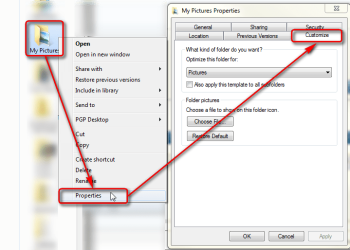
From folder's context menu > Properties:
Kari | My System Specs | | System Manufacturer/Model Number HP ENVY 17-1150eg OS Windows 7 x64 Ultimate CPU 1.6 GHz Intel Core i7-720QM Processor Memory 6 GB Graphics Card ATI Mobility Radeon HD 5850 Graphics Sound Card Beats sound system with integrated subwoofer Monitor(s) Displays 17" laptop display, 22" LCD and 32" Full HD TV through HDMI Screen Resolution 1600*900, 1680*1050 and 1920*1080 Keyboard Logitech diNovo Media Desktop Laser (bluetooth) Mouse Logitech MX1000 Laser (Bluetooth) Hard Drives Internal: 2 x 500 GB SATA Hard Disk Drive 7200 rpm
External: 2TB for backups, 3TB USB3 network drive for media Internet Speed 50/10 Mbps VDSL Other Info Windows 7 Ultimate Retail Full in English, additional Guest-user accounts in Finnish, German and Swedish (Working languages English & Swedish, Family language German, my own language, mother tongue, Finnish. I really need Ultimate to get to use Language Packs!) |
01-05-2012
|
#10 | | Windows 7 Home Premium 64bit |

Quote: Originally Posted by Kari From folder's context menu > Properties: Attachment 191415
Kari I cannot get to the 2nd part. This is what i got. | My System Specs | | OS Windows 7 Home Premium 64bit Picture folder/gallery problems? All times are GMT -5. The time now is 03:17 PM. |  |