|
Welcome to Windows 7 Forums. Our forum is dedicated to helping you find solutions with any problems, errors or issues you are experiencing with Windows 7. The Windows 7 forum also covers news and updates and has an extensive Windows 7 tutorial section that covers a wide range of tips and tricks.
Windows 7 - Windows Media Player adds stuff to library without being asked. |
01-20-2012
|
#1 | | |
Windows Media Player adds stuff to library without being asked. I just noticed Windows Media Player is adding all the podcasts I download to its playlists. And I don't want it to do that.
I'm not using WMP so I don't see why it should do that.
Nor do I understand how it finds them. I don't download my podcasts to any of the Windows 7 special folders or libraries.
Any ideas on how I turn this off?
| My System Specs | | OS Windows 7 Professional |
01-20-2012
|
#2 | | Microsoft Windows 7 Home Premium 64-bit 7600 |
wmp updates itself from the music library, if you put the podcasts in a different location that is not included in the library then wmp cant update from that folder/file | My System Specs | | System Manufacturer/Model Number Hewlett packard/p6512uk OS Microsoft Windows 7 Home Premium 64-bit 7600 CPU IIx4 amd athelon 635 processor Motherboard FOXCONN 2AA9 Memory 2x2gb Graphics Card ati radeon HD 5450 Sound Card (1) Realtek High Definition Audio (2) AMD High Definition Monitor(s) Displays samsung lcd tv 32" Screen Resolution 1360x 768 Keyboard wireless hp Mouse wireless Hp,optical PSU ? Cooling air! Hard Drives (1) WDC WD10 01FAES-60Z2A0 SATA Disk Device (2) Maxtor OneTouch USB Device (3) ST310003 33AS USB Device (4) WD My Book 1111 USB Device Internet Speed 1.10mb/s Other Info at last i got a decent off the shelf upgrade, haha i dont even know what a psu is,
UPDATE: of course now im a guru i know its a power supply unit! |
01-20-2012
|
#3 | | |

Quote: Originally Posted by boohbah wmp updates itself from the music library, if you put the podcasts in a different location that is not included in the library then wmp cant update from that folder/file Then how do they appear there? | My System Specs | | OS Windows 7 Professional |
01-20-2012
|
#4 | | Microsoft Windows 7 Home Premium 64-bit 7600 |
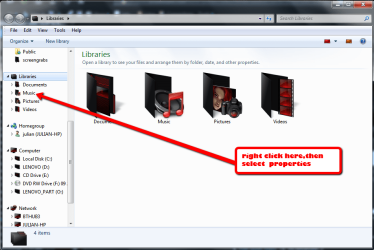
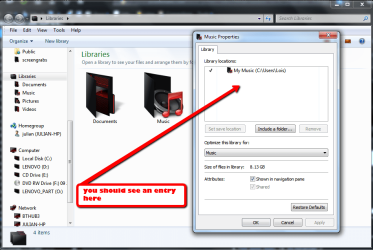
where are you downloading or storing the podcasts. right clicking the music library and selecting properties will show you what folders you have synced to the music library. make sure that the podcasts folder is in a location different to those in the library ,also you may need to then delete the podcasts from wmp.
NOTE, check the setting in options in wmp so that when you delete from wmp it DOESN'T delete from the computer.there is a checkbox | My System Specs | | System Manufacturer/Model Number Hewlett packard/p6512uk OS Microsoft Windows 7 Home Premium 64-bit 7600 CPU IIx4 amd athelon 635 processor Motherboard FOXCONN 2AA9 Memory 2x2gb Graphics Card ati radeon HD 5450 Sound Card (1) Realtek High Definition Audio (2) AMD High Definition Monitor(s) Displays samsung lcd tv 32" Screen Resolution 1360x 768 Keyboard wireless hp Mouse wireless Hp,optical PSU ? Cooling air! Hard Drives (1) WDC WD10 01FAES-60Z2A0 SATA Disk Device (2) Maxtor OneTouch USB Device (3) ST310003 33AS USB Device (4) WD My Book 1111 USB Device Internet Speed 1.10mb/s Other Info at last i got a decent off the shelf upgrade, haha i dont even know what a psu is,
UPDATE: of course now im a guru i know its a power supply unit! |
01-20-2012
|
#5 | | |

Quote: Originally Posted by boohbah where are you downloading or storing the podcasts. A folder I call Podcasts, on a drive with the letter H: 
Quote: Originally Posted by boohbah right clicking the music library and selecting properties Where is this I should right click? In windows media player (in library mode) in the left pane there is something called "Library" but it is faded and can't be right clicked. 
Quote: Originally Posted by boohbah will show you what folders you have synced to the music library. I have not explicitly selected anything to be synced. 
Quote: Originally Posted by boohbah make sure that the podcasts folder is in a location different to those in the library ,also you may need to then delete the podcasts from wmp.
NOTE, check the setting in options in wmp so that when you delete from wmp it DOESN'T delete from the computer.there is a checkbox Yes, I have now deleted all - making sure it wasn't the file it removed only the info in the library, but one which just downloaded just showed up... | My System Specs | | OS Windows 7 Professional |
01-20-2012
|
#6 | | Microsoft Windows 7 Home Premium 64-bit 7600 |
ok, libraries are where you can collect different folders in different locations,ie different hard drives and then view them in one place, so open a window and look on the left hand side and see the libraries tree
this quote is taken from one of brinks tutorials and explains it better than i can Quote: BRINK:Libraries let you access and arrange items from one or more folders quickly without moving them from their original location. Libraries themselves don't store your files or folders. Instead, they point to different locations on a hard disk or external drive attached to your computer. This gives you easy access to a category of files no matter where they are stored. For instance, if you have music files on your hard disk and on an external drive, you can access all of your music files from within the "Music" library. | My System Specs | | System Manufacturer/Model Number Hewlett packard/p6512uk OS Microsoft Windows 7 Home Premium 64-bit 7600 CPU IIx4 amd athelon 635 processor Motherboard FOXCONN 2AA9 Memory 2x2gb Graphics Card ati radeon HD 5450 Sound Card (1) Realtek High Definition Audio (2) AMD High Definition Monitor(s) Displays samsung lcd tv 32" Screen Resolution 1360x 768 Keyboard wireless hp Mouse wireless Hp,optical PSU ? Cooling air! Hard Drives (1) WDC WD10 01FAES-60Z2A0 SATA Disk Device (2) Maxtor OneTouch USB Device (3) ST310003 33AS USB Device (4) WD My Book 1111 USB Device Internet Speed 1.10mb/s Other Info at last i got a decent off the shelf upgrade, haha i dont even know what a psu is,
UPDATE: of course now im a guru i know its a power supply unit! |
01-20-2012
|
#7 | | |
Ah, very helpful instructions. Thanks.
Mine looks like in the picture except with my user name. There are no additional libraries.
There were a lot of playlists in the playlists folder, but I haven't made them (not deliberately anyway). | My System Specs | | OS Windows 7 Professional |
01-20-2012
|
#8 | | Microsoft Windows 7 Home Premium 64-bit 7600 |
do you store the podcasts in the my music folder then ,because if you do that is why wmp is loading them if you change the location of the podcasts folder so it is not in my music folder then wmp cant load them as it is only monitoring changes in the my music folder. create a folder for them in your users folder or move the folder to your users folder ,
once you have moved it ,again delete the podcasts from wmp making sure it doesnt delete from computer and then the next time you open wmp it should/will not load the podcasts | My System Specs | | System Manufacturer/Model Number Hewlett packard/p6512uk OS Microsoft Windows 7 Home Premium 64-bit 7600 CPU IIx4 amd athelon 635 processor Motherboard FOXCONN 2AA9 Memory 2x2gb Graphics Card ati radeon HD 5450 Sound Card (1) Realtek High Definition Audio (2) AMD High Definition Monitor(s) Displays samsung lcd tv 32" Screen Resolution 1360x 768 Keyboard wireless hp Mouse wireless Hp,optical PSU ? Cooling air! Hard Drives (1) WDC WD10 01FAES-60Z2A0 SATA Disk Device (2) Maxtor OneTouch USB Device (3) ST310003 33AS USB Device (4) WD My Book 1111 USB Device Internet Speed 1.10mb/s Other Info at last i got a decent off the shelf upgrade, haha i dont even know what a psu is,
UPDATE: of course now im a guru i know its a power supply unit! |
01-21-2012
|
#9 | | |
No. As I have said, I don't use that. I don't use libraries, I don't use the microsoft forced folders, I almost never use WMP (but vlc) and I have created a folder on my H drive for podcasts. | My System Specs | | OS Windows 7 Professional Windows Media Player adds stuff to library without being asked. problems? All times are GMT -5. The time now is 03:23 PM. |  |