| Windows 7: how to change background colour in video slides |
13 Feb 2012
|
#1 | | Windows 7 Home Premium 64-bit, SP1 |
how to change background colour in video slides The following is an example. I am looking for a way to change the background from black. Screenshot expalins it all..... | My System Specs |
| System Manufacturer/Model Number Acer Aspire 7741Z OS Windows 7 Home Premium 64-bit, SP1 CPU Intel Pentium P6200, Cores 2, 2.13 GHz Memory 4 GB Graphics Card Intel HD Sound Card unknown Monitor(s) Displays 17.3 inches Screen Resolution 1600 x 900 Hard Drives 640 GB, 5400 PRM |
13 Feb 2012
|
#2 | | Win 7 Home Premium 64bit Ver 6.1.7600 Build 7601 - SP1 Central Pa. |
I have looked around and could not find any way to do that in WLMM, you can change the backgrounds in the beginning, and end titles, but not the individual slides.
I did find however, that it might be doable in Windows Movie Maker 6.0 - Install on Windows 7, but I do not know personally because I do not have any experience with it. Read some of the replies below tutorial.
You may not have to install WMM 6.0 over WLMM.
This link: Blaine's Movie Maker Blog: WMM 6.0 on Windows 7 offers downloads for WMM 6.0 in 32, and 64bit flavors.
Blaine is considerate guy here: Movie Maker Forums
I have posted a Help Query at Windows Movie Maker 6.0 - Install on Windows 7, hopefully another member will reply with a better answer.
Another Tutorial: Windows Movie Maker Manual - Windows Movie Maker | My System Specs | | Computer type PC/Desktop System Manufacturer/Model Number Gateway DX4831e (Mid-Tower Desktop) OS Win 7 Home Premium 64bit Ver 6.1.7600 Build 7601 - SP1 CPU Intel i3 530 2.93GHz, 2933MHz 2 Cores 4 Logical Processors Motherboard Gateway H57M01 133 megahertz Memory 6GB of 1,333MHz DDR3 SDRAM Graphics Card 32MB Intel Graphics Media Accelerator HD IGChip Sound Card Realtek High Definition Audio Monitor(s) Displays Gateway HX2000 20inch TFT active matrix TN Screen Resolution 1600 x 900 x 59 hertz Keyboard MS 'Natural' Standard PS/2 Enhanced 101-102 Key Mouse Gateway USB wired optical PSU 300watts. Case Mid-Tower Desktop Cooling Stock from Gateway Hard Drives WDC WD10EADS-00M2B0 [HDD] (1000.20 GB) -- drive 0,
HL-DT-ST DVDRAM GH41N [CD-ROM dr]
HP Photosmart Plus B210a e_series AIO Printer
Four card readers, and Four USB 2.0 Internet Speed Verizon FIOS 24.57Mbps Down - 5.68Mbps up Antivirus MSE Browser IE9.0.8112.16421-Upd ver 9.0.13, FireFox 19.2, Opera 12.14 Other Info BIOS: American Megatrends Inc. P01-A0 11/17/2009
System Specs by Belarc.
Join Date March 27th 2010 at 10:44:15 AM. |
13 Feb 2012
|
#3 | | Windows 7 Home Premium 64-bit, SP1 |
Yes, I used to have Vista with Windows Movie Maker 6.0
I do know how to change the background to any colour I prefer with WMM 6.0.
Problem is I can't do the same in WLMM.
The background color option is there but grayed out. There must be a way to " activate " what are grayed out under VideoTool - Edit option.
In fact, everything under Video Tool - Edit tab is gayed out except one, Duration. | My System Specs | | System Manufacturer/Model Number Acer Aspire 7741Z OS Windows 7 Home Premium 64-bit, SP1 CPU Intel Pentium P6200, Cores 2, 2.13 GHz Memory 4 GB Graphics Card Intel HD Sound Card unknown Monitor(s) Displays 17.3 inches Screen Resolution 1600 x 900 Hard Drives 640 GB, 5400 PRM |
13 Feb 2012
|
#4 | | Windows 7 Home Premium 64-bit, SP1 |
Update ................
Installing WMM 6.0 is a breeze. Shockingly easy and FAST.
However, it does not help my issue.
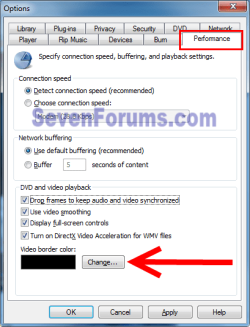
I can change the video " border " colour via Windows Media Player ( video is played in media player ), but not the black background of each slide.
see screenshot : | My System Specs | | System Manufacturer/Model Number Acer Aspire 7741Z OS Windows 7 Home Premium 64-bit, SP1 CPU Intel Pentium P6200, Cores 2, 2.13 GHz Memory 4 GB Graphics Card Intel HD Sound Card unknown Monitor(s) Displays 17.3 inches Screen Resolution 1600 x 900 Hard Drives 640 GB, 5400 PRM |
13 Feb 2012
|
#5 | | Win 7 Home Premium 64bit Ver 6.1.7600 Build 7601 - SP1 Central Pa. |
This is my personal opinion, but I like your second try at framing that wolves slide!
That narrow bit of black with the off white in the middle to gray to black gradient looks sharp! It draws the eye to the center of the slide.
To me it is an improvement to how WLMM handled your first attempt.
With WLMM I did a Christmas movie with carols, and I did not know better so I left the pixs there in the center with the large black boarders to the left, and right.
There is one more way I might get help in the "More help requested" thread in the VIP Forum, hang in there. | My System Specs | | Computer type PC/Desktop System Manufacturer/Model Number Gateway DX4831e (Mid-Tower Desktop) OS Win 7 Home Premium 64bit Ver 6.1.7600 Build 7601 - SP1 CPU Intel i3 530 2.93GHz, 2933MHz 2 Cores 4 Logical Processors Motherboard Gateway H57M01 133 megahertz Memory 6GB of 1,333MHz DDR3 SDRAM Graphics Card 32MB Intel Graphics Media Accelerator HD IGChip Sound Card Realtek High Definition Audio Monitor(s) Displays Gateway HX2000 20inch TFT active matrix TN Screen Resolution 1600 x 900 x 59 hertz Keyboard MS 'Natural' Standard PS/2 Enhanced 101-102 Key Mouse Gateway USB wired optical PSU 300watts. Case Mid-Tower Desktop Cooling Stock from Gateway Hard Drives WDC WD10EADS-00M2B0 [HDD] (1000.20 GB) -- drive 0,
HL-DT-ST DVDRAM GH41N [CD-ROM dr]
HP Photosmart Plus B210a e_series AIO Printer
Four card readers, and Four USB 2.0 Internet Speed Verizon FIOS 24.57Mbps Down - 5.68Mbps up Antivirus MSE Browser IE9.0.8112.16421-Upd ver 9.0.13, FireFox 19.2, Opera 12.14 Other Info BIOS: American Megatrends Inc. P01-A0 11/17/2009
System Specs by Belarc.
Join Date March 27th 2010 at 10:44:15 AM. |
13 Feb 2012
|
#6 | | Windows 7 Home Premium 64-bit, SP1 |
>>>To me it is an improvement to how WLMM handled your first attempt.
I was not careful when I posted my last reply.
About the 2nd screenshot which you claimed an improvement from the 1st one......
It has nothing to do with using WLMM or WMM.
The white " border on the left and right was the result of me changing the border colour of my Windows Media Player.
Open WMP > Organize > Options > Performance tab > Video border color, click Change button > select the color (I selected " white " ) > OK.
As you can see, that did not help me from removing the black strips left and right of the slide. I have one that has black strips at the top and the bottom.
That means that the location of the black strips depends on the size of the picture, the dimension.
So much is obvious.
There is no way I could re-size each picture. I could do that in powerpoint, not in movie maker. | My System Specs | | System Manufacturer/Model Number Acer Aspire 7741Z OS Windows 7 Home Premium 64-bit, SP1 CPU Intel Pentium P6200, Cores 2, 2.13 GHz Memory 4 GB Graphics Card Intel HD Sound Card unknown Monitor(s) Displays 17.3 inches Screen Resolution 1600 x 900 Hard Drives 640 GB, 5400 PRM |
13 Feb 2012
|
#7 | | Windows 7 Ultimate X64 SP1 Mt. Crumpit/Whoville |
First let me say I have no experience with WLMM or WMM 6.0.
You could try to change the Desktop Background color.
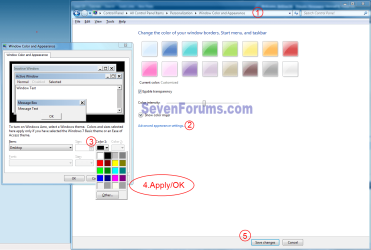
Go to Control Panel\All Control Panel Items\Personalization\Window Color and Appearance and click Advanced Appearance settings. Click the Desktop color box and pick a color. Apply/OK/Save changes. That may help, the desktop color is used throughout Windows in various places.
Otherwise I think you will need to edit each slide so it has its own "background", enlarge each side of the slide and make it any color. I suspect WLMM is adding the black part to fill its frame and by enlarging a pic to that dimension will make it display right. | My System Specs | | Computer type PC/Desktop System Manufacturer/Model Number Home Built Desktop By DataTech OS Windows 7 Ultimate X64 SP1 CPU Intel i5-2550K, Differing ~4.4-4.8GHz No built in GPU Motherboard ASUS P8Z68-V PRO/GEN3 Memory 16GB G.Skill Sniper 2133MHz 4x4GB Graphics Card ASUS ENGTX460 DirectCU/2DI/1GD5 GeForce GTX 460 Sound Card Onboard Realtek 5-1 Monitor(s) Displays Samsung P2570HD Screen Resolution 1920x1080 Keyboard Old, beat-up Dell USB From 10 yrs Ago Mouse Gigabyte m6900 wired PSU Corsair HX650W Case Inwin Dragon Rider Cooling Hyper 212 EVO w/two Noctua fans, push-pull, @1300 RPM Hard Drives Crucial M4 128GB for OS, 750GB Seagate MomentusXT for data, 500GB Seagate Constellation for storage Internet Speed 8-19 Mbs down, 3-4 Mbs up Comcast Cable Antivirus Norton Internet Security Browser IE 9, Opera when needed Other Info 4 case fans, LG BluRay-RE, ASUS DVD-RW, Mr. Fusion power generator with flux capacitor, 1.21 gigawatts. |
14 Feb 2012
|
#8 | | Windows 7 Home Premium 64-bit, SP1 |
No, that's not it.
Thank you.
t-4-2 | My System Specs | | System Manufacturer/Model Number Acer Aspire 7741Z OS Windows 7 Home Premium 64-bit, SP1 CPU Intel Pentium P6200, Cores 2, 2.13 GHz Memory 4 GB Graphics Card Intel HD Sound Card unknown Monitor(s) Displays 17.3 inches Screen Resolution 1600 x 900 Hard Drives 640 GB, 5400 PRM |
14 Feb 2012
|
#9 | | Win 7 Home Premium 64bit Ver 6.1.7600 Build 7601 - SP1 Central Pa. |

Quote: Originally Posted by t-4-2 >>>To me it is an improvement to how WLMM handled your first attempt.
I was not careful when I posted my last reply.
About the 2nd screenshot which you claimed an improvement from the 1st one......
It has nothing to do with using WLMM or WMM.
The white " border on the left and right was the result of me changing the border colour of my Windows Media Player.
Open WMP > Organize > Options > Performance tab > Video border color, click Change button > select the color (I selected " white " ) > OK.
As you can see, that did not help me from removing the black strips left and right of the slide. I have one that has black strips at the top and the bottom.
That means that the location of the black strips depends on the size of the picture, the dimension.
So much is obvious.
There is no way I could re-size each picture. I could do that in powerpoint, not in movie maker. I did feel a sense of ambiguity when I posted that, I was hoping to maintain a positive attitude.
What you need is someone that can confirm whether or not it is possible to do what you are trying to do. | My System Specs | | Computer type PC/Desktop System Manufacturer/Model Number Gateway DX4831e (Mid-Tower Desktop) OS Win 7 Home Premium 64bit Ver 6.1.7600 Build 7601 - SP1 CPU Intel i3 530 2.93GHz, 2933MHz 2 Cores 4 Logical Processors Motherboard Gateway H57M01 133 megahertz Memory 6GB of 1,333MHz DDR3 SDRAM Graphics Card 32MB Intel Graphics Media Accelerator HD IGChip Sound Card Realtek High Definition Audio Monitor(s) Displays Gateway HX2000 20inch TFT active matrix TN Screen Resolution 1600 x 900 x 59 hertz Keyboard MS 'Natural' Standard PS/2 Enhanced 101-102 Key Mouse Gateway USB wired optical PSU 300watts. Case Mid-Tower Desktop Cooling Stock from Gateway Hard Drives WDC WD10EADS-00M2B0 [HDD] (1000.20 GB) -- drive 0,
HL-DT-ST DVDRAM GH41N [CD-ROM dr]
HP Photosmart Plus B210a e_series AIO Printer
Four card readers, and Four USB 2.0 Internet Speed Verizon FIOS 24.57Mbps Down - 5.68Mbps up Antivirus MSE Browser IE9.0.8112.16421-Upd ver 9.0.13, FireFox 19.2, Opera 12.14 Other Info BIOS: American Megatrends Inc. P01-A0 11/17/2009
System Specs by Belarc.
Join Date March 27th 2010 at 10:44:15 AM. |
14 Feb 2012
|
#10 | | Windows 7 Ultimate X64 SP1 Mt. Crumpit/Whoville |
I found the background color setting for WMP in Options/Performance. Does WLMM something similar?
In the View tab of WLMM see if there is a Show menu bar and click either View or Tools. Try a search for Border color. 
Sorry, I see you found that option.
Is there a Video size option in WLMM? | My System Specs | | Computer type PC/Desktop System Manufacturer/Model Number Home Built Desktop By DataTech OS Windows 7 Ultimate X64 SP1 CPU Intel i5-2550K, Differing ~4.4-4.8GHz No built in GPU Motherboard ASUS P8Z68-V PRO/GEN3 Memory 16GB G.Skill Sniper 2133MHz 4x4GB Graphics Card ASUS ENGTX460 DirectCU/2DI/1GD5 GeForce GTX 460 Sound Card Onboard Realtek 5-1 Monitor(s) Displays Samsung P2570HD Screen Resolution 1920x1080 Keyboard Old, beat-up Dell USB From 10 yrs Ago Mouse Gigabyte m6900 wired PSU Corsair HX650W Case Inwin Dragon Rider Cooling Hyper 212 EVO w/two Noctua fans, push-pull, @1300 RPM Hard Drives Crucial M4 128GB for OS, 750GB Seagate MomentusXT for data, 500GB Seagate Constellation for storage Internet Speed 8-19 Mbs down, 3-4 Mbs up Comcast Cable Antivirus Norton Internet Security Browser IE 9, Opera when needed Other Info 4 case fans, LG BluRay-RE, ASUS DVD-RW, Mr. Fusion power generator with flux capacitor, 1.21 gigawatts. how to change background colour in video slides problems? All times are GMT -5. The time now is 03:43 AM. | |