| Windows 7: I want my MS Photo Editor back! |
29 Mar 2012
|
#1 | | Windows 7 Home Premium 64bit |
I want my MS Photo Editor back! Let me start by saying
I detest all photo programs other than the old MS Photo Editor. I managed to migrate it thru to my Vista computer but, now I am using Win 7 x64 and it just won't work. Does anyone know a work around for this? I've read that it can be used on x32. I've got the exe file in a folder in Program Files and I've changed compatibility to Win 7 but, still doesn't recognize file types.
I guess I shouldn't be too surprised the knuckleheads at MS took away everyone's favorite photo editor. I don't need to organize, sort, search, file, send, resend, forward ANY picture on my computer. I need some quick necessary editing on occasion. Photo Editor was perfect!
End of Rant
So, does anyone know how I can get this to work without overtaxing my mediocre computer skills? | My System Specs |
| System Manufacturer/Model Number Acer AM3970-UR11P OS Windows 7 Home Premium 64bit CPU PC Intel Core i5 2320(3.00GHz) 64 bit Quad-Core Processor Motherboard Intel H67 Memory 8GB DDR3 Graphics Card AMD Radeon HD 6450 1GB PSU 300w Hard Drives 1TB SATA |
29 Mar 2012
|
#2 | | |
right click on the photo, then left click on edit. | My System Specs | | |
30 Mar 2012
|
#3 | | MS Windows 7 Ultimate SP1 64-bit Austin, Texas |
Rt-clk on file | choose Open with | do you see your desired photo editor? | My System Specs | | System Manufacturer/Model Number Toshiba Satellite S875D-S7239 laptop OS MS Windows 7 Ultimate SP1 64-bit CPU AMD A10-4600M Motherboard AMD Pumori (Socket FT1) Memory 6.00 GB Dual-Channel DDR3 @ 798MHz (11-11-12-28) Graphics Card AMD Radeon HD 7660G Sound Card High Definition Audio Device Monitor(s) Displays Generic PnP Monitor (1600x900@60Hz) Screen Resolution 1600x900@60Hz Keyboard Standard PS/2 Keyboard Mouse HP Wireless Optical Mobile Mouse Model FHA-3410 Hard Drives SSD 119GB Corsair CSSD-V128GB2 ATA Device Internet Speed What the local pub, local coffee shop offers. Other Info Optical Drive:MATSHITA BD-CMB UJ160B ATA Device
Also have an Asus ha1002xp netbook with Win 7 Ultimate installed. |
05 Apr 2012
|
#4 | | Vista 64 bit and 32 bit (SP2) Los Angeles, California + Milwaukee, Wis |
Totally agree --- Photo Editor is/was the best! I also managed to download it onto my Vista --- let's see if this same download link will work for your Win 7.
Fingers crossed! MS Photo Editor download link: http://sites.google.com/site/probeit/MicrosoftPhotoEditor.exe?attredirects=0 Credit goes to "Computing.net Toms Guide" (Download for the old Microsoft Photo Editor and the download link is in a poster's response, who said, "Try here" http://www.ceveni.com/2008/04/micro... I did, it downloaded perfectly, and Voila! | My System Specs | | System Manufacturer/Model Number HP Pavillion dv5t (generation 1) OS Vista 64 bit and 32 bit (SP2) CPU Intel(R) Core(TM)2 Duo Processor T9400 (2.53 GHz Memory 4GB DDR2 System Memory (2 Dimm) Graphics Card 512 MB NVIDIA GeForce 9600M GT Monitor(s) Displays 15.4" diagonal WSXGA+ High-Definition HP BrightView Widescre Screen Resolution 1680 x 1050 Keyboard Built-in HP Mouse Built in - Synaptics TouchPad V6.5 on PS/2 Port Hard Drives 320GB 5400RPM SATA Hard Drive with HP ProtectSmart Hard Drive Protection Internet Speed Max Other Info ~ Intel Next-Gen Wireless-N Mini-card w/Bluetooth ~ Blu-Ray ROM DVD+/-R/RW ~ Integ. HDTV Hybrid Tuner ~ 12 Cell Battery ~ MS Office (Home Premium) 2007 ~ |
05 Apr 2012
|
#5 | | Windows 7 Ultimate SP1 64-Bit Peterborough, England |
Out of sheer interest, I tried the MS Photo Editor link (the first one in the above quote) and it installs just fine under Windows 7 64-bit. | My System Specs | | System Manufacturer/Model Number HP Pavilion Elite 495UK OS Windows 7 Ultimate SP1 64-Bit CPU Intel Core i7 870 @ 2.93GHz Motherboard MSI 2A9C (CPU1) Memory 8Gb Dual-Channel DDR3 @ 664MHz Graphics Card nVidia GeForce GTX 460 1024MB dedicated RAM Sound Card Realtek HD Audio Monitor(s) Displays HP2310i Screen Resolution 1920 x 1080 Keyboard Logitech K750 solar-powered keyboard Mouse Logitech Wireless M180 mouse PSU 460W Case HP Elite Cooling Air cooled Hard Drives 1x1954GB Hitachi HDS22020ALA 330 (RAID), 1x1954GB Hitachi External for backup and storage Internet Speed 2Mb Other Info Pure Avanti Flow Internet Radio with iPod Dock, 64Gb iPod, HP USB Speakers, Sony MDR-V500 Headphones, Sony Vaio F-Series Laptop |
05 Apr 2012
|
#6 | | Microsoft Windows 7 Home Premium 64-bit 7600 cornwall UK |
if you download windows live essentials then leave all the other programs unchecked for install except windows live photo gallery ( i think thats what its called) then you will have your old photo viewer / editor, set it as default for opening photos and your good to go Windows Live Essentials: Photo Gallery
its even better than before. | My System Specs | | System Manufacturer/Model Number Hewlett packard/p6512uk OS Microsoft Windows 7 Home Premium 64-bit 7600 CPU IIx4 amd athelon 635 processor Motherboard FOXCONN 2AA9 Memory 2x2gb Graphics Card ati radeon HD 5450 Sound Card (1) Realtek High Definition Audio (2) AMD High Definition Monitor(s) Displays samsung lcd tv 32" Screen Resolution 1360x 768 Keyboard wireless hp Mouse wireless Hp,optical PSU ? Cooling air! Hard Drives (1) WDC WD10 01FAES-60Z2A0 SATA Disk Device (2) Maxtor OneTouch USB Device (3) ST310003 33AS USB Device (4) WD My Book 1111 USB Device Internet Speed 1.10mb/s Antivirus MSE Browser Firefox |
05 Apr 2012
|
#7 | | Windows 7 Home Premium 64bit |

Quote: Originally Posted by seavixen32 Out of sheer interest, I tried the MS Photo Editor link (the first one in the above quote) and it installs just fine under Windows 7 64-bit. I installed it just fine. Getting it to work is another story. Does it open pics for you? When I open Photo Editor I get: 'No file format information can be found in the Registry'. So you know of some other setting I should try? Thanks. | My System Specs | | System Manufacturer/Model Number Acer AM3970-UR11P OS Windows 7 Home Premium 64bit CPU PC Intel Core i5 2320(3.00GHz) 64 bit Quad-Core Processor Motherboard Intel H67 Memory 8GB DDR3 Graphics Card AMD Radeon HD 6450 1GB PSU 300w Hard Drives 1TB SATA |
05 Apr 2012
|
#8 | | Windows 7 Ultimate SP1 64-Bit Peterborough, England |
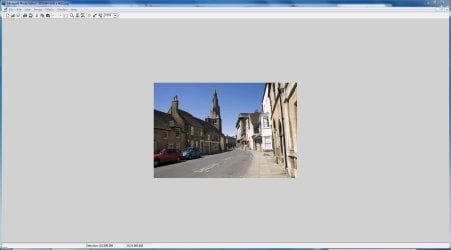
It opened images without any difficulty as per this screenshot.
You might want to run a system file check as it would appear your system registry is corrupted, which is not really a Microsoft Photo Editor problem.
Have a read through this tutorial: SFC /SCANNOW Command - System File Checker
Just out of interest, what image type are you trying to open? | My System Specs | | System Manufacturer/Model Number HP Pavilion Elite 495UK OS Windows 7 Ultimate SP1 64-Bit CPU Intel Core i7 870 @ 2.93GHz Motherboard MSI 2A9C (CPU1) Memory 8Gb Dual-Channel DDR3 @ 664MHz Graphics Card nVidia GeForce GTX 460 1024MB dedicated RAM Sound Card Realtek HD Audio Monitor(s) Displays HP2310i Screen Resolution 1920 x 1080 Keyboard Logitech K750 solar-powered keyboard Mouse Logitech Wireless M180 mouse PSU 460W Case HP Elite Cooling Air cooled Hard Drives 1x1954GB Hitachi HDS22020ALA 330 (RAID), 1x1954GB Hitachi External for backup and storage Internet Speed 2Mb Other Info Pure Avanti Flow Internet Radio with iPod Dock, 64Gb iPod, HP USB Speakers, Sony MDR-V500 Headphones, Sony Vaio F-Series Laptop |
05 Apr 2012
|
#9 | | Windows 7 Home Premium 64bit |

Quote: Originally Posted by seavixen32 It opened images without any difficulty as per this screenshot. Attachment 205918
You might want to run a system file check as it would appear your system registry is corrupted, which is not really a Microsoft Photo Editor problem.
Have a read through this tutorial: SFC /SCANNOW Command - System File Checker
Just out of interest, what image type are you trying to open? Mostly jpegs. I'm going to try the system file checker. Thanks so much! And to think I've only had this new computer for less than a month
Just ran system file checker and everything was ok. Ran it as admin but path was C:\users\me> instead of C:\Windows\system32> like in the tutorial. The 'target' and 'start in' paths were correct according to tutorial. Shame I'm totally obsessed with this now....
Last edited by MissMinerva; 05 Apr 2012 at 07:38 PM..
Reason: add info
| My System Specs | | System Manufacturer/Model Number Acer AM3970-UR11P OS Windows 7 Home Premium 64bit CPU PC Intel Core i5 2320(3.00GHz) 64 bit Quad-Core Processor Motherboard Intel H67 Memory 8GB DDR3 Graphics Card AMD Radeon HD 6450 1GB PSU 300w Hard Drives 1TB SATA |
05 Apr 2012
|
#10 | | MS Windows 7 Ultimate SP1 64-bit Austin, Texas |
| My System Specs | | System Manufacturer/Model Number Toshiba Satellite S875D-S7239 laptop OS MS Windows 7 Ultimate SP1 64-bit CPU AMD A10-4600M Motherboard AMD Pumori (Socket FT1) Memory 6.00 GB Dual-Channel DDR3 @ 798MHz (11-11-12-28) Graphics Card AMD Radeon HD 7660G Sound Card High Definition Audio Device Monitor(s) Displays Generic PnP Monitor (1600x900@60Hz) Screen Resolution 1600x900@60Hz Keyboard Standard PS/2 Keyboard Mouse HP Wireless Optical Mobile Mouse Model FHA-3410 Hard Drives SSD 119GB Corsair CSSD-V128GB2 ATA Device Internet Speed What the local pub, local coffee shop offers. Other Info Optical Drive:MATSHITA BD-CMB UJ160B ATA Device
Also have an Asus ha1002xp netbook with Win 7 Ultimate installed. I want my MS Photo Editor back! problems? All times are GMT -5. The time now is 05:00 AM. | |