Windows 7 Forums


Windows 7: Missing file miniatures in Explorer

01 Apr 2012   #1

Windows 7 Home Premium x64
 
 
Missing file miniatures in Explorer

Hi, today's problem is:
I can't see movie miniatures any more. Also: there's no avi in Default Programs in Control Panel. Is it possible it's because I uninstalled Windows' 7 crapware like Silverlight, .NET Framework and Visual C++? If so - which one of them should I reinstall. Also: maybe reinstalling VLC will simply help? I'll check, wait a minute. Ok, it didn't help, now I'll restart my computer and see again...


>>EDIT:
No, it didn't help. I mean now I have at least avi in Default Programs, but still - no miniatures.

Last edited by Wercik; 01 Apr 2012 at 01:38 PM.. Reason: Update
My System SpecsSystem Spec

01 Apr 2012   #2

Windows 7 Home Premium 64 Bit SP 1


Hello !
Do you mean video thumbnails ? If so, download and install Shark007's FREE Codec solutions - Windows 7 codecs . When installed, run the program, and check "Shark007 SUGGESTED settings". It will generate all the thumbnails again.
My System SpecsSystem Spec
01 Apr 2012   #3

Windows 7 Home Premium x64


I have no idea what thumbnails are (besides these on my thumbs), the translation is miniatures. What I mean are the little pictures of (usually) the first frames of movies, which are usually shown instead of pictures of icons.
If we are not talking about it, I could not care less about codecs, I have not used crapware since 2007 and I would not like to start now, just because I do not have miniatures. Although I would really much like to have them.
My System SpecsSystem Spec
.


01 Apr 2012   #4

Windows 7 Home Premium 64 Bit SP 1


Quote   Quote: Originally Posted by Wercik View Post
I have no idea what thumbnails are (besides these on my thumbs), the translation is miniatures. What I mean are the little pictures of (usually) the first frames of movies, which are usually shown instead of pictures of icons.
That is what called thumbnail . Not miniature.

Quote   Quote: Originally Posted by Wercik View Post
If we are not talking about it, I could not care less about codecs, I have not used crapware since 2007 and I would not like to start now, just because I do not have miniatures. Although I would really much like to have them.
If thumbnail preview is not disabled there in your machine (check it; if disabled, use Thumbnail Previews - Enable or Disable to enable it) and still those are not showing, you are to upgrade codecs.
My System SpecsSystem Spec
01 Apr 2012   #5

Windows7 Pro 64bit SP-1; Windows XP Pro 32bit
Grafton,IL


Quote   Quote: Originally Posted by Wercik View Post
Hi, today's problem is:
I can't see movie miniatures any more. Also: there's no avi in Default Programs in Control Panel. Is it possible it's because I uninstalled Windows' 7 crapware like Silverlight, .NET Framework and Visual C++? If so - which one of them should I reinstall. Also: maybe reinstalling VLC will simply help? I'll check, wait a minute. Ok, it didn't help, now I'll restart my computer and see again...

>>EDIT:
No, it didn't help. I mean now I have at least avi in Default Programs, but still - no miniatures.
You might want to re install what you call "crapware".
They are essential for operation of other programs besides videos.

Of course it is your choice.
Good luck.
My System SpecsSystem Spec
01 Apr 2012   #6
whs

Vista, Windows7, Mint Mate, Zorin, Windows 8
Florida in winter, Black Forest/Germany


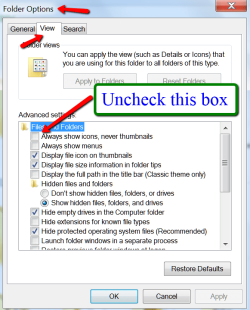
Try this setting:
Attached Thumbnails
Missing file miniatures in Explorer-2012-04-01_1243.png  
My System SpecsSystem Spec
01 Apr 2012   #7

Windows 7 Home Premium x64


Quote   Quote: Originally Posted by Hopalong X View Post
You might want to re install what you call "crapware".
They are essential for operation of other programs besides videos.

Of course it is your choice.
Good luck.
Oh but I did, it was the first thing I did after I read about codecs and almost smiled. Didn't help. Oh, and another symptom:
<-- these are from the same folder at the same time ofc.

WHS, checked this setting already, sorry.

>>UPDATE: Looks like only newly created files lack thumbnails...

Last edited by Wercik; 01 Apr 2012 at 01:37 PM.. Reason: update
My System SpecsSystem Spec
01 Apr 2012   #8
whs

Vista, Windows7, Mint Mate, Zorin, Windows 8
Florida in winter, Black Forest/Germany


Hmm, the following might have happened.

Originally .avi as assocoiated to WMP which would show thumbnails. Then you installed VLC and it associated .avi to VLC which only shows the traffic cone.

Is that possible? If yes, all you have to do is to change the file association back to WMP.
My System SpecsSystem Spec
01 Apr 2012   #9

Windows 7 Pro-x64
South Texas


Never seen the cone before nor do I know what it means other than maybe "under construction". Do you have custom software to organize libraries or folders? Or maybe a custom indexer? On what screen are you viewing the thumbnails?
My System SpecsSystem Spec
01 Apr 2012   #10
whs

Vista, Windows7, Mint Mate, Zorin, Windows 8
Florida in winter, Black Forest/Germany


Quote   Quote: Originally Posted by carwiz View Post
Never seen the cone before nor do I know what it means other than maybe "under construction". Do you have custom software to organize libraries or folders? Or maybe a custom indexer? On what screen are you viewing the thumbnails?
VLC uses the cone for all filetypes. Here I have a mixure of .flv files that are associated to VLC and .wmv files that are associated to WMP.
Attached Thumbnails
Missing file miniatures in Explorer-2012-04-01_1511.png  
My System SpecsSystem Spec
Reply

 Missing file miniatures in Explorer problems?


Thread Tools


Similar help and support threads for: Missing file miniatures in Explorer
Thread Forum
Missing icons in Win Explorer General Discussion
my desktop on explorer is missing Music, Pictures & Video
Win Explorer arrows missing, cursor spinning, libraries missing General Discussion
Info bar missing in explorer Installation & Setup
Search field missing from explorer Installation & Setup


All times are GMT -5. The time now is 01:26 AM.


Windows 7 Forums is an independent web site and has not been authorized,
sponsored, or otherwise approved by Microsoft Corporation.
"Windows 7" and related materials are trademarks of Microsoft Corp.
© Designer Media Ltd