Windows 7 Forums


Windows 7: .gif and picture fax viewer

06 Sep 2009   #1

Win7 64bit Ultimate
 
 
.gif and picture fax viewer

Here is the solution:


http://www.sevenforums.com/tutorials...f-preview.html

Last edited by Corpsecrank; 06 Jan 2012 at 12:48 AM.. Reason: Solution
My System SpecsSystem Spec

06 Sep 2009   #2


Default gif viewer is IE...
My System SpecsSystem Spec
07 Sep 2009   #3

Windows 7 Home Premium [64-Bit]
Bulgaria/EU


I use Microsoft Office Picture Manager for the JPEG, PNG, TIFF and BMP format, it works awesome, and I love the built in Edit feature, you can crop and resize instantly. For the GIF's I Use chrome, it's okay.
My System SpecsSystem Spec
.


07 Sep 2009   #4

Win7 64bit Ultimate


Even when I set the windows photo viewer to default it will not work properly.

When I double click a gif to open it it still asks what program to open it with but it should use the photo viewer since i set it as default.
My System SpecsSystem Spec
08 Sep 2009   #5

Windows 7 Home Premium [64-Bit]
Bulgaria/EU


Quote   Quote: Originally Posted by Corpsecrank View Post
Even when I set the windows photo viewer to default it will not work properly.

When I double click a gif to open it it still asks what program to open it with but it should use the photo viewer since i set it as default.
Start Menu>Default Programs>Set your Default Programs>Windows Photo Viewer>Choose Defaults for this Program. A small list will appear. Check the file formats you'd like to set as default for this program.
My System SpecsSystem Spec
10 Sep 2009   #6

Win7 64bit Ultimate


That is exactly what I did however it still asks me what to open it with when I click the file. This is why I have a problem.
My System SpecsSystem Spec
10 Sep 2009   #7

Windows 7 Home Premium [64-Bit]
Bulgaria/EU


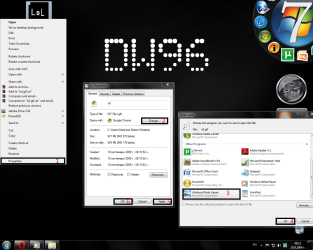
Did you try this:
.gif and picture fax viewer-lol.png
My System SpecsSystem Spec
10 Sep 2009   #8

Win7 64bit Ultimate


I did and I can't find the windows photo viewer so I am using explorer. It's not what i want but it works for now.
My System SpecsSystem Spec
11 Sep 2009   #9

Windows 7 Ultimate x64 SP1
Somewhere on the 3rd rock from the sun.


The easiest way to find a program is to find it in the start menu and then right click and select open file location.

On my system, it is in C:\Windows\system32\WFS.exe
My System SpecsSystem Spec
12 Sep 2009   #10

Windows 7 Home Premium [64-Bit]
Bulgaria/EU


Quote   Quote: Originally Posted by johngalt View Post
The easiest way to find a program is to find it in the start menu and then right click and select open file location.

On my system, it is in C:\Windows\system32\WFS.exe
I can't believe it! I thought of the same thing and now you post it first!
----------------------------------------
Just kidding! [lulz]
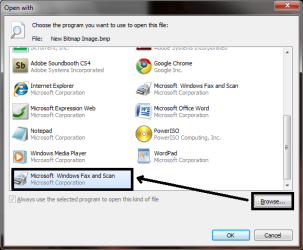
And yes, what he said, using the browse you can choose it yourself.
Point to the location he said and it should show up.
.gif and picture fax viewer-untitled.png
My System SpecsSystem Spec
Reply

 .gif and picture fax viewer problems?


Thread Tools


Similar help and support threads for: .gif and picture fax viewer
Thread Forum
Picture Viewer Music, Pictures & Video
Picture Viewer? Software
Help about Picture Viewer Music, Pictures & Video
win 7 default Picture Viewer Music, Pictures & Video
Bug in picture viewer. Music, Pictures & Video


All times are GMT -5. The time now is 02:58 AM.


Seven Forums Android App Seven Forums IOS App Follow us on Facebook

Windows 7 Forums is an independent web site and has not been authorized,
sponsored, or otherwise approved by Microsoft Corporation.
"Windows 7" and related materials are trademarks of Microsoft Corp.
© Designer Media Ltd
  

1 2 3 4 5 6 7 8 9 10 11 12 13 14 15 16 17 18 19 20 21 22 23 24 25 26 27 28 29 30 31 32