Windows 7 Forums


Windows 7: How do I intersort pictures from two cameras by date and time

14 Jul 2012   #1

Windows 7 Home Premium 32bit
 
 
How do I intersort pictures from two cameras by date and time

When traveling my wife and I take pictures with our two cameras. When we get home I want to sort them together by date and time taken in order to make a slideshow. I could do this with Windows XP but haven't figured out how to do so with Windows 7. So far I have been able to sort pictures of each camera by date taken but have not been able to intersort the pictures of the two cameras together.

My System SpecsSystem Spec

14 Jul 2012   #2

Windows 7 x64 Ultimate
A Finnish immigrant in Leipzig, Germany


Hi Ron, welcome to the Seven Forums.

This should be quite straight forward procedure.

First, copy pics from both cameras to same folder.

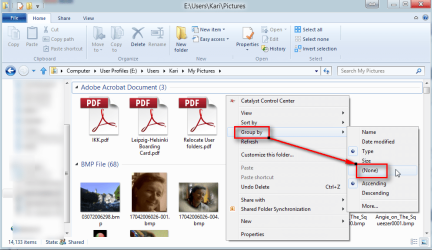
Right click an empty spot in folder to open context menu, select Group by > None:

How do I intersort pictures from two cameras by date and time-sort_1.png

Notice: If Group by: None is already selected, this option is not visible.

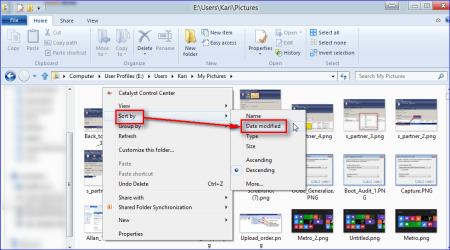
Again context menu, select Sort by > Date Modified:

How do I intersort pictures from two cameras by date and time-sort_2.png

That should do it.

Kari
My System SpecsSystem Spec
14 Jul 2012   #3

Microsoft Windows 7 Home Premium 64-bits 7601 Multiprocessor Free Service Pack 1
SecretCity


Quote   Quote: Originally Posted by Kari View Post
Hi Ron, welcome to the Seven Forums.

This should be quite straight forward procedure.

First, copy pics from both cameras to same folder.

Right click an empty spot in folder to open context menu, select Group by > None:

Attachment 221551

Notice: If Group by: None is already selected, this option is not visible.

Again context menu, select Sort by > Date Modified:

Attachment 221550

That should do it.

Kari
Sort by > Date Taken
My System SpecsSystem Spec
.


15 Jul 2012   #4

Windows 7 x64 Ultimate
A Finnish immigrant in Leipzig, Germany


That's true, it needs to be Date Taken. Thanks for correcting.

If the option Date Taken is not visible in context menu, you find it under menu option More.

Date Modified works only as long as you have not edited / modified your pictures. As soon as you edit a picture, its Date Modified is no longer the same than the date it was copied to folder so the sort order changes.

My mistake.

Kari
My System SpecsSystem Spec
15 Jul 2012   #5

Microsoft Windows 7 Home Premium 64-bits 7601 Multiprocessor Free Service Pack 1
SecretCity


And both cameras must have the correct time at the moment the pictures were taken.
My System SpecsSystem Spec
15 Jul 2012   #6

Windows 7 Ultimate x64
Solo.


Additional option (If you have ACDSee installed)

Once placed in the same folder you can sort the pictures by camera date/time, select all, and batch rename.
(Exp. Pictures - ###)

Kevin
My System SpecsSystem Spec
15 Jul 2012   #7

Windows 7 Ultimate 64bit
Norfolk, VA


Quote   Quote: Originally Posted by Kaktussoft View Post
And both cameras must have the correct time at the moment the pictures were taken.
If you are on vacation in another time zone, does it have to be the local time zone or your home time zone?
My System SpecsSystem Spec
07 Sep 2012   #8

Windows 7 32 bits
 
 
PhotosMixerRenamer

My System SpecsSystem Spec
Reply

 How do I intersort pictures from two cameras by date and time problems?


Thread Tools


Similar help and support threads for: How do I intersort pictures from two cameras by date and time
Thread Forum
Time and Date issue - BIOS time and date reset after change in Win7 General Discussion
Date/Time jumps after correct setting of date/time/timezone? General Discussion
Solved Time stamp missing from Date and Time column - Event Viewer Performance & Maintenance
Say the Time Date/Time Field in Task Tray Doesn't Launch Menu Hardware & Devices
Finding pictures on a specific date Music, Pictures & Video


All times are GMT -5. The time now is 06:55 AM.


Seven Forums Android App Seven Forums IOS App Follow us on Facebook

Windows 7 Forums is an independent web site and has not been authorized,
sponsored, or otherwise approved by Microsoft Corporation.
"Windows 7" and related materials are trademarks of Microsoft Corp.
© Designer Media Ltd
  

1 2 3 4 5 6 7 8 9 10 11 12 13 14 15 16 17 18 19 20 21 22 23 24 25 26 27 28 29 30 31 32