Windows 7 Forums


Windows 7: playing files in a folder by specific player

13 Aug 2012   #1

windows 7 ultimate x64
 
 
playing files in a folder by specific player

hi
my default player is windows media player.
but is there a way to play files in a specific folder by kmplayer?(only files in this folder open with km player)

My System SpecsSystem Spec

13 Aug 2012   #2

Windows 7 Ultimate 64 bit
NC


Try setting it as your default player. Click start orb, default programs tab, set your default program.
My System SpecsSystem Spec
13 Aug 2012   #3

windows 7 ultimate x64


thank you my friend but i do not want to set kmplayer as my default program.
i just want to play files in a specific folder by km player(without right click on it and open bye kmplayer becausethere is many files and it is boring to me)
My System SpecsSystem Spec
.


13 Aug 2012   #4

Windows 7 Home Premium x64


Make a shortcut to kmplayer on the desktop/taskbar. Make a shortcut to the specific music folder on the desktop. When it pleases you, drag the folder shortcut onto the kmplayer shortcut. Voila!

If you prefer a clean desktop, then pin the parent folder of the specific music folder to the taskbar. Rt-click to open explorer/parent folder and drag music folder to kmplayer shortcut.

My System SpecsSystem Spec
13 Aug 2012   #5

windows 7 ultimate x64


thank you my friends.
i have another question , when i want to open a file for exampple with km player.
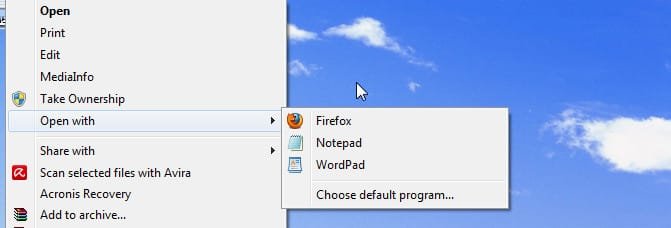
right click on it and in "open with: menu if the km player was not there i should use "choose default program" and when i choose default program all file with that formatt open with kmplayer.
it is a small problem but was my old question that if i want to open a file with a program that is not listed in"open with" menu i always should use "choose default program" like picture below:
Attached Thumbnails
playing files in a folder by specific player-snap2.jpg  
My System SpecsSystem Spec
13 Aug 2012   #6

Windows 7 Home Premium x64


If I understand your followup question correctly, clicking on "choose default program" will present a dialog box from which a program (kmplayer) is searched for and selected to open the particular file.

On the left side of the dialog box is a tick box in which a choice can be made to associate the selected program (kmplayer) to that file's extension/format.

Leave it unticked when using kmplayer and WMP will continue to be associated with that file's format/extension.
My System SpecsSystem Spec
13 Aug 2012   #7

windows 7 ultimate x64


thank you very musch gigagiggles...it worked.
My System SpecsSystem Spec
Reply

 playing files in a folder by specific player problems?


Thread Tools


Similar help and support threads for: playing files in a folder by specific player
Thread Forum
Solved put files in folder in a specific place General Discussion
Media Player not playing temp. music files from web Music, Pictures & Video
Could Not Find This Item error when moving files from specific folder General Discussion
Need help on playing FLV files using VLC media player. Music, Pictures & Video
playing Audible .aa files in Windows media player Sound & Audio


All times are GMT -5. The time now is 01:20 AM.


Seven Forums Android App Seven Forums IOS App Follow us on Facebook

Windows 7 Forums is an independent web site and has not been authorized,
sponsored, or otherwise approved by Microsoft Corporation.
"Windows 7" and related materials are trademarks of Microsoft Corp.
© Designer Media Ltd
  

1 2 3 4 5 6 7 8 9 10 11 12 13 14 15 16 17 18 19 20 21 22 23 24 25 26 27 28 29 30 31 32