
Hey guys,
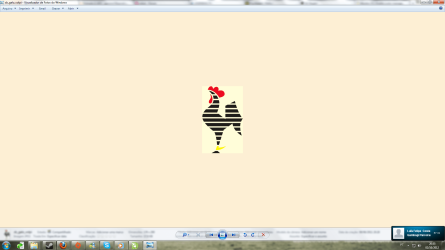
When I open a picture in my computer using the default picture manager it has a strange color as background, it should be white... and the pictures kinda doesn't have the true color.
Using softwares like Photoshop or Corel Draw I can notice a slightly difference between them.
How can I fix that?
Thank you for your help...
When I open a picture in my computer using the default picture manager it has a strange color as background, it should be white... and the pictures kinda doesn't have the true color.
Using softwares like Photoshop or Corel Draw I can notice a slightly difference between them.
How can I fix that?
Thank you for your help...
Attachments
My Computer
At a glance
Microsoft Windows 7 Ultimate 64-bit 7601 Mult...Intel(R) Core(TM)2 Quad CPU Q8400 @ 2.66GHz4,00 GBNVIDIA GeForce GTX 460
- OS
- Microsoft Windows 7 Ultimate 64-bit 7601 Multiprocessor Free Service Pack 1
- CPU
- Intel(R) Core(TM)2 Quad CPU Q8400 @ 2.66GHz
- Motherboard
- ASUSTeK Computer INC. P5QPL-AM
- Memory
- 4,00 GB
- Graphics Card(s)
- NVIDIA GeForce GTX 460
- Sound Card
- (1) NVIDIA High Definition Audio (2) NVIDIA High Definitio
- Monitor(s) Displays
- AOC 511Vwb
- Screen Resolution
- 1920 x 1080 x 32 bits (4294967296 colors) @ 60 Hz
- Hard Drives
- (1) SAMSUNG HD250HJ ATA Device (2) ST1000DM003-9YN162 ATA Device

 Happy to help!

