Windows 7 Forums


Windows 7: How can I have Media Player 12 open in full screen as default?

15 Oct 2012   #1

Windows Home Premium 64bit
 
 
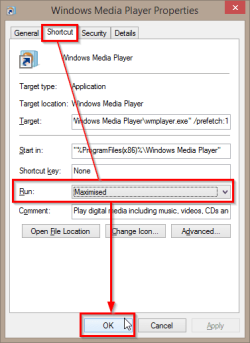
How can I have Media Player 12 open in full screen as default?

I can't find a way to have Media Player 12 open in full screen every time I open a video, mp3, wmv or whatever. I don't want to mess with the registry. Is there a setting that I am missing somewhere?
System is Windows 7, Home edition 64bit, 12GB ram, Intel i7 6-core 3.2GHz, 2TB hard drive, ATI Radeon HD5570 graphics.

My System SpecsSystem Spec

15 Oct 2012   #2

Windows 8 Pro 64-Bit
Pargas, Finland


Try this fix; http://dead-code.org/download/download_wmp12fix.php
It's an installer, just install and try to open Media Player. See if it works.

Tell me how you get on!
Thanks!
My System SpecsSystem Spec
Reply

 How can I have Media Player 12 open in full screen as default? problems?


Thread Tools


Similar help and support threads for: How can I have Media Player 12 open in full screen as default?
Thread Forum
Windows Media Player not full screen Media Center
Solved Windows Media Player 12 full screen problem Media Center
media player full screen problem Music, Pictures & Video
unwanted full screen media player toggle Music, Pictures & Video
Windows Media player 12 full screen problem Media Center


All times are GMT -5. The time now is 08:59 PM.


Seven Forums Android App Seven Forums IOS App Follow us on Facebook

Windows 7 Forums is an independent web site and has not been authorized,
sponsored, or otherwise approved by Microsoft Corporation.
"Windows 7" and related materials are trademarks of Microsoft Corp.
© Designer Media Ltd
  

1 2 3 4 5 6 7 8 9 10 11 12 13 14 15 16 17 18 19 20 21 22 23 24 25 26 27 28 29 30 31 32