| Windows 7: How do I change the thumbnail on my videos to show a picture? |
04 Nov 2012
|
#1 | | |
How do I change the thumbnail on my videos to show a picture? Ever since I recorded a video file- WMV to be exact, the other videos that I record that are AVCHD seem to not show a thumbnail anymore. I can't figure out why this is. I'm at a loss at how to fix this because I'm a visual person and need to know which one of my videos is which from the thumbnail and now they all just look like this: 
^Problem
Anyone who knows how to put image/thumbnails back onto videos would help me out a ton! thnks | My System Specs |
| |
04 Nov 2012
|
#2 | | Win 7 Home Premium 64bit Ver 6.1.7600 Build 7601 - SP1 Central Pa. |
Hi Reckless, welcome to 7F!
It could be as simple as clearing your thumbnail cache.
See for how to: Thumbnail Cache - Clear and Reset
Be warned though, it will take a while to rebuild the cache, it depends on how often you use your machine. | My System Specs | | Computer type PC/Desktop System Manufacturer/Model Number Gateway DX4831e (Mid-Tower Desktop) OS Win 7 Home Premium 64bit Ver 6.1.7600 Build 7601 - SP1 CPU Intel i3 530 2.93GHz, 2933MHz 2 Cores 4 Logical Processors Motherboard Gateway H57M01 133 megahertz Memory 6GB of 1,333MHz DDR3 SDRAM Graphics Card 32MB Intel Graphics Media Accelerator HD IGChip Sound Card Realtek High Definition Audio Monitor(s) Displays Gateway HX2000 20inch TFT active matrix TN Screen Resolution 1600 x 900 x 59 hertz Keyboard MS 'Natural' Standard PS/2 Enhanced 101-102 Key Mouse Gateway USB wired optical PSU 300watts. Case Mid-Tower Desktop Cooling Stock from Gateway Hard Drives WDC WD10EADS-00M2B0 [HDD] (1000.20 GB) -- drive 0,
HL-DT-ST DVDRAM GH41N [CD-ROM dr]
HP Photosmart Plus B210a e_series AIO Printer
Four card readers, and Four USB 2.0 Internet Speed Verizon FIOS 24.57Mbps Down - 5.68Mbps up Antivirus MSE Browser IE9.0.8112.16421-Upd ver 9.0.13, FireFox 19.2, Opera 12.14 Other Info BIOS: American Megatrends Inc. P01-A0 11/17/2009
System Specs by Belarc.
Join Date March 27th 2010 at 10:44:15 AM. |
04 Nov 2012
|
#3 | | |
I cleared the cache like the link said, but does it take a long time for it to take effect? The videos still look the same. :/ | My System Specs | | |
04 Nov 2012
|
#4 | | Win 7 Home Premium 64bit Ver 6.1.7600 Build 7601 - SP1 Central Pa. |
It shouldn't take too long, over 30 to 40secs would be excessive.
Do you have your indexing turned on?
In the Menu Bar, at the very beginning of: - Tools
- >Folder Options
- >View Tab
- >In Advanced settings
Make sure Display file icon on thumbnails is unchecked.
Have you tried a system restore? | My System Specs | | Computer type PC/Desktop System Manufacturer/Model Number Gateway DX4831e (Mid-Tower Desktop) OS Win 7 Home Premium 64bit Ver 6.1.7600 Build 7601 - SP1 CPU Intel i3 530 2.93GHz, 2933MHz 2 Cores 4 Logical Processors Motherboard Gateway H57M01 133 megahertz Memory 6GB of 1,333MHz DDR3 SDRAM Graphics Card 32MB Intel Graphics Media Accelerator HD IGChip Sound Card Realtek High Definition Audio Monitor(s) Displays Gateway HX2000 20inch TFT active matrix TN Screen Resolution 1600 x 900 x 59 hertz Keyboard MS 'Natural' Standard PS/2 Enhanced 101-102 Key Mouse Gateway USB wired optical PSU 300watts. Case Mid-Tower Desktop Cooling Stock from Gateway Hard Drives WDC WD10EADS-00M2B0 [HDD] (1000.20 GB) -- drive 0,
HL-DT-ST DVDRAM GH41N [CD-ROM dr]
HP Photosmart Plus B210a e_series AIO Printer
Four card readers, and Four USB 2.0 Internet Speed Verizon FIOS 24.57Mbps Down - 5.68Mbps up Antivirus MSE Browser IE9.0.8112.16421-Upd ver 9.0.13, FireFox 19.2, Opera 12.14 Other Info BIOS: American Megatrends Inc. P01-A0 11/17/2009
System Specs by Belarc.
Join Date March 27th 2010 at 10:44:15 AM. |
04 Nov 2012
|
#5 | | |
I did try System Restore and it didn't fix the problem. :| | My System Specs | | |
04 Nov 2012
|
#6 | | Windows 7 Home Premium x64 SP1 England |
If you cant force windows to show the thumbnails you could try this little program - Media Preview Freeware download and reviews from SnapFiles
I have used it from time to time when windows thumbnails go Awol to force them to show
Danny | My System Specs | | System Manufacturer/Model Number acer aspire 5935g OS Windows 7 Home Premium x64 SP1 CPU intel(R)core(TM)2 duo CPU T6600 @ 2.20GHz Motherboard intel gm45/gm47 revision 07 Memory 3 gb ddr3 Graphics Card ati radeon hd4570/512mb Monitor(s) Displays lop156wh2-tle1 15.3 flat Screen Resolution 1366x768 Mouse Optical Hard Drives OCZ-Agility3 60gig ssd
320gig external hdd
500gig external hdd Internet Speed 30Mbps Down/30Mbps Up |
04 Nov 2012
|
#7 | | |
Thanks! I'll try this out :P
Also- do you know how to upload a signature on here? I just made one in Photoshop but It's not posting properly. :O | My System Specs | | |
04 Nov 2012
|
#8 | | Windows 7 Home Premium x64 SP1 England |
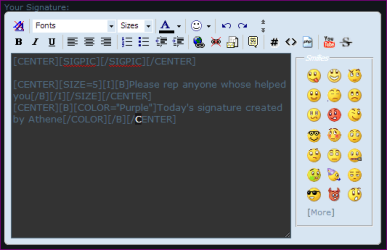
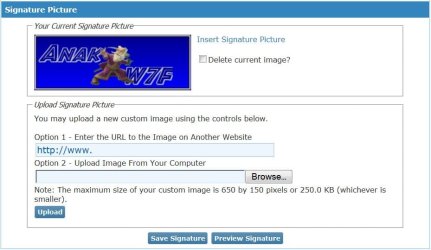
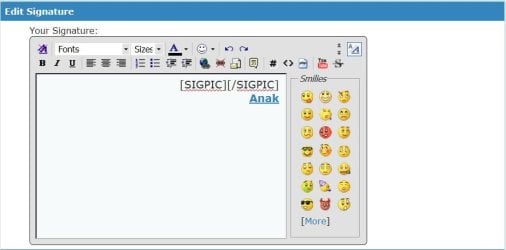
Im no expert on this but I think you need to insert the following code [SIGPIC][/SIGPIC] rather than IMG
Here is a snip of mine
Danny | My System Specs | | System Manufacturer/Model Number acer aspire 5935g OS Windows 7 Home Premium x64 SP1 CPU intel(R)core(TM)2 duo CPU T6600 @ 2.20GHz Motherboard intel gm45/gm47 revision 07 Memory 3 gb ddr3 Graphics Card ati radeon hd4570/512mb Monitor(s) Displays lop156wh2-tle1 15.3 flat Screen Resolution 1366x768 Mouse Optical Hard Drives OCZ-Agility3 60gig ssd
320gig external hdd
500gig external hdd Internet Speed 30Mbps Down/30Mbps Up |
04 Nov 2012
|
#9 | | Win 7 Home Premium 64bit Ver 6.1.7600 Build 7601 - SP1 Central Pa. |

Quote: Originally Posted by Reckless I did try System Restore and it didn't fix the problem. :| Can you answer my other two concerns?
I'm kinda' out of ideas. Hopefully with danny's help we can figure this out.
As in your other two threads it would help greatly if you would fill in your System Specs, see step #7 you can automate the entries. System Info - See Your System Specs
And about your sig: Windows 7 Forums - FAQ: User Profile Features
Here's the Main Page: Windows 7 Forums - FAQ | My System Specs | | Computer type PC/Desktop System Manufacturer/Model Number Gateway DX4831e (Mid-Tower Desktop) OS Win 7 Home Premium 64bit Ver 6.1.7600 Build 7601 - SP1 CPU Intel i3 530 2.93GHz, 2933MHz 2 Cores 4 Logical Processors Motherboard Gateway H57M01 133 megahertz Memory 6GB of 1,333MHz DDR3 SDRAM Graphics Card 32MB Intel Graphics Media Accelerator HD IGChip Sound Card Realtek High Definition Audio Monitor(s) Displays Gateway HX2000 20inch TFT active matrix TN Screen Resolution 1600 x 900 x 59 hertz Keyboard MS 'Natural' Standard PS/2 Enhanced 101-102 Key Mouse Gateway USB wired optical PSU 300watts. Case Mid-Tower Desktop Cooling Stock from Gateway Hard Drives WDC WD10EADS-00M2B0 [HDD] (1000.20 GB) -- drive 0,
HL-DT-ST DVDRAM GH41N [CD-ROM dr]
HP Photosmart Plus B210a e_series AIO Printer
Four card readers, and Four USB 2.0 Internet Speed Verizon FIOS 24.57Mbps Down - 5.68Mbps up Antivirus MSE Browser IE9.0.8112.16421-Upd ver 9.0.13, FireFox 19.2, Opera 12.14 Other Info BIOS: American Megatrends Inc. P01-A0 11/17/2009
System Specs by Belarc.
Join Date March 27th 2010 at 10:44:15 AM. |
04 Nov 2012
|
#10 | | |

Quote: Originally Posted by Anak 
Quote: Originally Posted by Reckless I did try System Restore and it didn't fix the problem. :| Can you answer my other two concerns?
I'm kinda' out of ideas. Hopefully with danny's help we can figure this out.
As in your other two threads it would help greatly if you would fill in your System Specs, see step #7 you can automate the entries. System Info - See Your System Specs
And about your sig: Windows 7 Forums - FAQ: User Profile Features
Here's the Main Page: Windows 7 Forums - FAQ Okay, the System Specs link helped because I didn't know where to look for it manually on my computer.
@xxxdannyxxx - I did manage to see the pictures once again, but the AVCHD video pics refuse to show for some reason (even though I checked all the boxes)
I still can't figure out how to post a signature, and I'm not new to forums (this forums is outdated compared to most I've been on). | My System Specs | | How do I change the thumbnail on my videos to show a picture? problems? All times are GMT -5. The time now is 10:41 PM. | |