| Windows 7: MP3 tags and album art |
11 Nov 2012
|
#1 | | |
MP3 tags and album art Can anyone give me some info on working with tags?
WMP keeps adding artwork to all individual MP3 tracks instead of the 'music note' icon - as a conseqence my single tracks are scattered all over the library and each of these individual tracks, listed as a seperate album.
What I want to do, is put these separate tracks, into their separate 'album' folders (as they are already stored in my library) Simple... or so I thought...
How do I get rid of the artwork tag? Where is it? and why is WMP overwriting the 'icon' and listing it as an album?
Have tried deleting database files and had a go (although I'm no expert and know so little about tags) with a tag editing tool, (Reeza) which had no effect.
Is there a simple guide somewhere - on what tags are and where to locate/alter/delete them?
Thanks | My System Specs |
| System Manufacturer/Model Number HP Pavilion p6-2190ea Desktop, OS W7HP CPU (Intel Core i7-2600 GHz Motherboard ? Memory 8GB RAM, 2TB HDD Graphics Card ? Sound Card ? Monitor(s) Displays DEll PSU ? Case ? Cooling ? Hard Drives ?? |
15 Nov 2012
|
#2 | | Windows 7 Pro x64 (1), Win7 Pro X64 / WinXP Pro x86 on (2) |
Here's my suggestion.
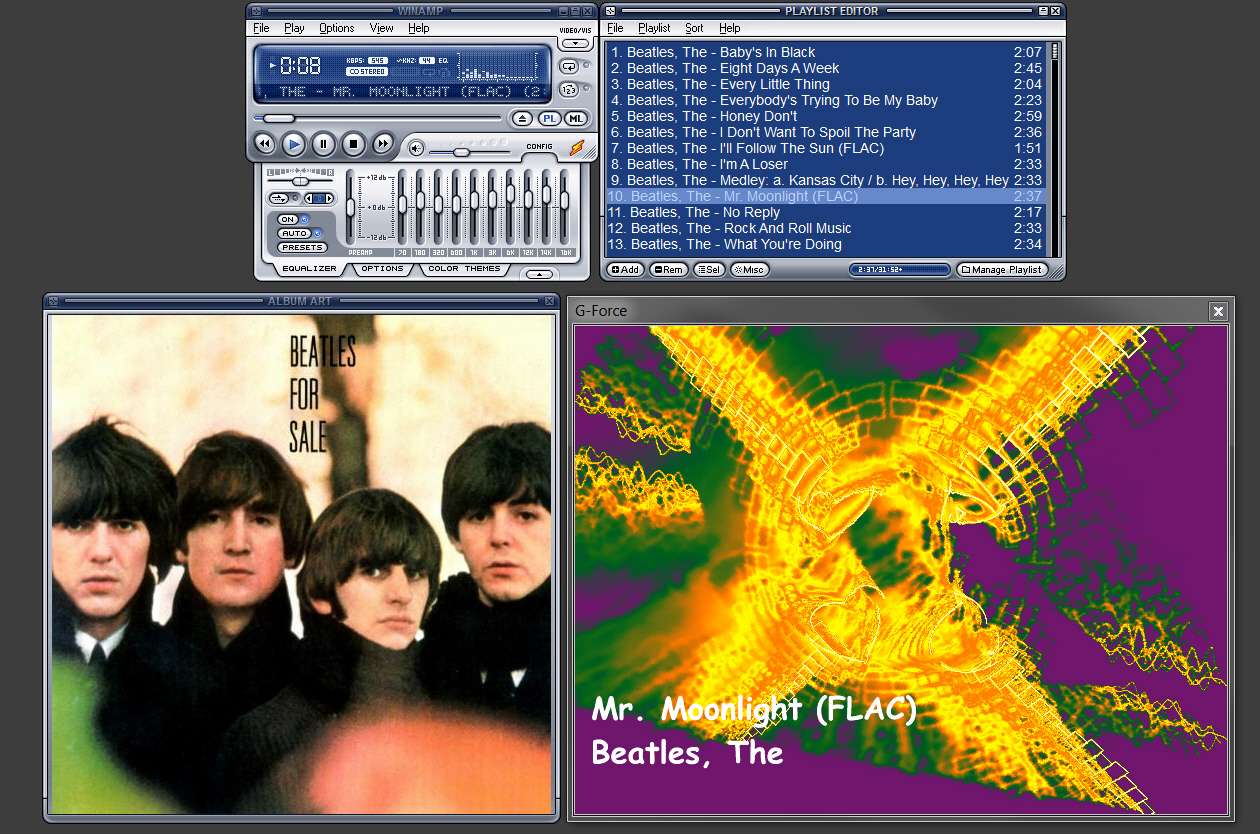
(1) Don't use WMP for music files like MP3 or FLAC. Use a true music player like Winamp.
(2) Use MP3Tag to clean up your music collection. This is a terrific highly regarded program that can tag all types of music files, deal with both imbedded and external album art, etc.
(3) Put all music tracks for a physical album in one physical folder, whose folder name is the album name. You should also collect all your physical folders for albums by a single artist under one single physical folder for that artist.
In other words, your music collection should be organized as x:\Music\Artist\Album
(4) Remove all internally imbedded duplicate album art JPG's inside your MP3/FLAC file tags in each music file using MP3Tag, putting just one of those JPG's into the one physical album folder for that album in which all of the music files from that album file live. Name that one JPG as "cover.jpg".
This one "cover.jpg" external album art JPG will now be used by Winamp to display as the album cover art when ANY of the music files in that physical folder is played. This makes intuitive sense, as it's one album, should have one album art image, and should be displayed whenever any of the music files from that album are played.
Winamp has an "Album Art" window in which the album art for a music file will be presented. If there is an imbedded internal JPG in that music file's tag then it will be displayed. But if there is no imbedded JPG (as I'm recommending), then the external "cover.jpg" image in the host physical [album] folder is presented instead.
(5) Winamp will display the internal tag values for (a) song title, (b) artist, and (c) album title in its player and playlist windows. To avoid confusion your external physical album folders and physical artist folders should have the same names.
==> The use of a single physical folder corresponding to an album is the recommended organizational method. The external physical name of that folder should be identical to the internal "album" value in tags for each of the music files stored within that folder, to avoid confusion as to whether you're looking at internal or external "album" value. If they're both identical, it really doesn't matter which is being displayed (but I'm telling you it's the internal tag field value which is being displayed).
==> You should not imbed album art within tag data of music files, as it's unnecessary duplication and wasteful as each music file for the same album will have the identical imbedded JPG. Why do that? If you already have a collection that has albums as your lowest-level physical folder anyway, just eliminate all imbedded album art JPG in tags and instead put one single album art JPG in that folder along with the music files, with that JPG file named as "cover.jpg". Winamp understands what "cover.jpg" means and uses it exactly as I've described above. | My System Specs | | System Manufacturer/Model Number Home-built, two systems (1) and (2) OS Windows 7 Pro x64 (1), Win7 Pro X64 / WinXP Pro x86 on (2) CPU i5-3350p 3.1Ghz/6MB-cache (1); E8400 3.0Ghz/6MB-cache (2) Motherboard ASUS P8Z77-V Pro (1); ASUS P5Q3 (2) Memory 8GB PC3-12800 DDR3 (1); 4GB PC3-10600 DDR3 (2) Graphics Card ATI HD5770 dual-DVI (1), (see TV cards); ATI HD4850 (2) Sound Card Realtek ALC892 HD Audio (1); Realtek ALC1200 HD Audio (2) Monitor(s) Displays Eizo HD2441W LCD, Eizo S2433W (1); Eizo 24" S2433W (2) Screen Resolution 1920x1200, 1920x1200 (1); 1920x1200 (2) Keyboard IBM PS/2 (1) and (2) Mouse Logitech MX Revolution wireless (1); Microsoft wired (2) PSU Nesteq ECS-6001 600W (1); Nesteq ECS-5001 500W (2) Case Acousti-Case 360 (1) and (2) Cooling Noctua NH-U12P SE2 for CPU, 2x120mm case fans (1) and (2) Hard Drives (1) 1TB SATA-II (7200RPM), 2TB SATA-II (7200RPM), 2TB SATA-III (7200RPM), 250GB SATA-III (10000RPM) for OS;
(2) 320GB SATA-II (7200RPM), 750GB SATA-II (7200RPM), 150GB SATA-II (10000RPM) for OS Internet Speed 15mbps down / 2mbps up Other Info Ceton InfiniTV 4-tuner cablecard-enabled TV card as well as Hauppauge HVR-2250 OTA/ATSC 2-tuner TV card in (1), running under Win7 WMC |
15 Nov 2012
|
#3 | | Windows 7 Pro x64 (1), Win7 Pro X64 / WinXP Pro x86 on (2) |
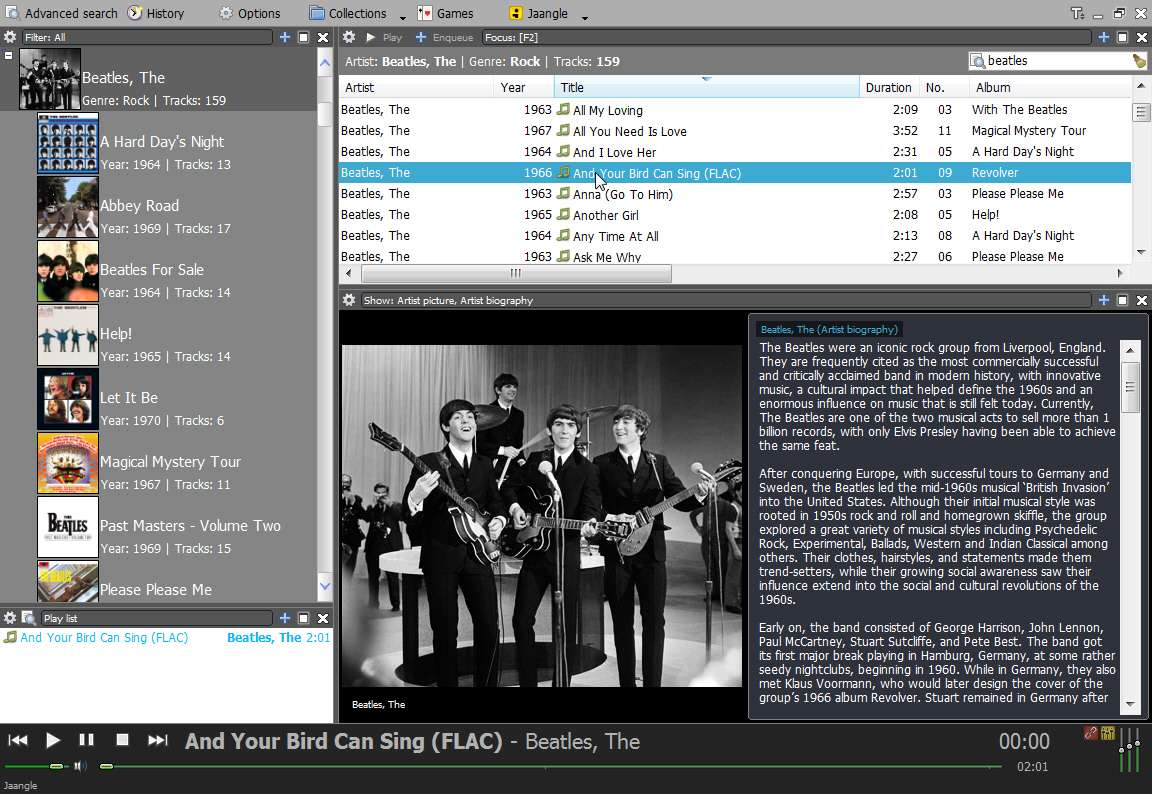
In passing, I mention that if you really have a significant music collection that you're proud of and are looking for an excellent organizer/player, I highly recommend Jaangle (which is free).
Note that Jaangle also understands the same "cover.jpg" external image file approach for album art as Winamp does, as a single album art image file named "cover.jpg" in a single physical album folder containing music files from that album which themselves do not contain imbedded album art JPG's in their tags.
Winamp is an excellent music player, but it's not the same kind of organizer as Jaangle is. | My System Specs | | System Manufacturer/Model Number Home-built, two systems (1) and (2) OS Windows 7 Pro x64 (1), Win7 Pro X64 / WinXP Pro x86 on (2) CPU i5-3350p 3.1Ghz/6MB-cache (1); E8400 3.0Ghz/6MB-cache (2) Motherboard ASUS P8Z77-V Pro (1); ASUS P5Q3 (2) Memory 8GB PC3-12800 DDR3 (1); 4GB PC3-10600 DDR3 (2) Graphics Card ATI HD5770 dual-DVI (1), (see TV cards); ATI HD4850 (2) Sound Card Realtek ALC892 HD Audio (1); Realtek ALC1200 HD Audio (2) Monitor(s) Displays Eizo HD2441W LCD, Eizo S2433W (1); Eizo 24" S2433W (2) Screen Resolution 1920x1200, 1920x1200 (1); 1920x1200 (2) Keyboard IBM PS/2 (1) and (2) Mouse Logitech MX Revolution wireless (1); Microsoft wired (2) PSU Nesteq ECS-6001 600W (1); Nesteq ECS-5001 500W (2) Case Acousti-Case 360 (1) and (2) Cooling Noctua NH-U12P SE2 for CPU, 2x120mm case fans (1) and (2) Hard Drives (1) 1TB SATA-II (7200RPM), 2TB SATA-II (7200RPM), 2TB SATA-III (7200RPM), 250GB SATA-III (10000RPM) for OS;
(2) 320GB SATA-II (7200RPM), 750GB SATA-II (7200RPM), 150GB SATA-II (10000RPM) for OS Internet Speed 15mbps down / 2mbps up Other Info Ceton InfiniTV 4-tuner cablecard-enabled TV card as well as Hauppauge HVR-2250 OTA/ATSC 2-tuner TV card in (1), running under Win7 WMC |
15 Nov 2012
|
#4 | | Microsoft Windows 7 Home Premium 64-bit 7600 cornwall UK |
in addition, when you use mp3tag you can remove embedded artwork on a file. | My System Specs | | System Manufacturer/Model Number Hewlett packard/p6512uk OS Microsoft Windows 7 Home Premium 64-bit 7600 CPU IIx4 amd athelon 635 processor Motherboard FOXCONN 2AA9 Memory 2x2gb Graphics Card ati radeon HD 5450 Sound Card (1) Realtek High Definition Audio (2) AMD High Definition Monitor(s) Displays samsung lcd tv 32" Screen Resolution 1360x 768 Keyboard wireless hp Mouse wireless Hp,optical PSU ? Cooling air! Hard Drives (1) WDC WD10 01FAES-60Z2A0 SATA Disk Device (2) Maxtor OneTouch USB Device (3) ST310003 33AS USB Device (4) WD My Book 1111 USB Device Internet Speed 1.10mb/s Antivirus MSE Browser Firefox |
16 Nov 2012
|
#5 | | |
THANKS - Appreciate the comprehensive advice and recommendations.
I have a 'tidy' music collection (1 folder per album) that has been scrambled by WMP, and immediately imrpoved by downloading Jaangle.
However, just one small problem, when I select 'artist and album' the list shows every 'artist' as a single album.. including all artists on compilations and all artists doing duets
i.e Beyonce & Alicia Keys duet on an Alicia Keys Album, shows up as a separate 'Beyonce & Alicia Keys' album.
Would you know how I get it to show ONLY the albums as per my folders?
Thanks again for all your help | My System Specs | | System Manufacturer/Model Number HP Pavilion p6-2190ea Desktop, OS W7HP CPU (Intel Core i7-2600 GHz Motherboard ? Memory 8GB RAM, 2TB HDD Graphics Card ? Sound Card ? Monitor(s) Displays DEll PSU ? Case ? Cooling ? Hard Drives ?? |
16 Nov 2012
|
#6 | | Microsoft Windows 7 Home Premium 64-bit 7600 cornwall UK |
i use winamp and i dont bother with the winamp library,i have winamp set as my default music player and i choose my music from the explorer library or my music folders direct.
if you open the explorer library for music you can change the view/ arrange by album, this will give you a similar view to wmp without the duplicate covers for compilations etc.
i think for it to display the album art it needs to be embedded ,again use mp3tag for that. | My System Specs | | System Manufacturer/Model Number Hewlett packard/p6512uk OS Microsoft Windows 7 Home Premium 64-bit 7600 CPU IIx4 amd athelon 635 processor Motherboard FOXCONN 2AA9 Memory 2x2gb Graphics Card ati radeon HD 5450 Sound Card (1) Realtek High Definition Audio (2) AMD High Definition Monitor(s) Displays samsung lcd tv 32" Screen Resolution 1360x 768 Keyboard wireless hp Mouse wireless Hp,optical PSU ? Cooling air! Hard Drives (1) WDC WD10 01FAES-60Z2A0 SATA Disk Device (2) Maxtor OneTouch USB Device (3) ST310003 33AS USB Device (4) WD My Book 1111 USB Device Internet Speed 1.10mb/s Antivirus MSE Browser Firefox |
16 Nov 2012
|
#7 | | |
I use WMP and all my files MP3 or CD's are very nicely organized. It requires "work" to organize, I usually go through each MP3 or CD when added and use the "find album info" button to fixed everything.
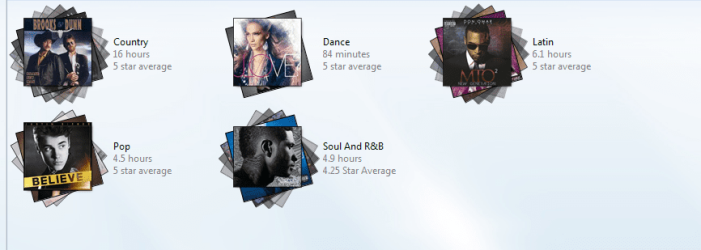
I'm not even embarrassed to show my default window with Justin Bieber.
When I go into each genre, its organized by singer alphabetically by name then by album name.
Best regards,
Eldin | My System Specs | | OS DOS^ Internet Speed VERY FAST>>>!!! |
16 Nov 2012
|
#8 | | |
Thanks for your comments Eldin - but I think the point is not to have to 'work' out the illogical system that Windows seem to think is clever.
My files and folders are organised quite meticulously - If WMP organised them in the same way - none of us would be here.
I expect to see the tracks where I put them, not scattered amongst 6500 other tracks - its not rocket science, and that's how it always used to be (up to Vista where IMHO it went horribly wrong and has been heading downhill ever since) | My System Specs | | System Manufacturer/Model Number HP Pavilion p6-2190ea Desktop, OS W7HP CPU (Intel Core i7-2600 GHz Motherboard ? Memory 8GB RAM, 2TB HDD Graphics Card ? Sound Card ? Monitor(s) Displays DEll PSU ? Case ? Cooling ? Hard Drives ?? |
16 Nov 2012
|
#9 | | |
NP, buddy. I guess what happens in my case, I let WMP organize it for me.
I just insert CD or add downloaded MP3/Album folder to my music folder and after it shows up on WMP I update to find cover etc, it neatly packs everything.
WMP is a must for me, and I too like having everything organize. So just adding to let others read that it is possible to have things very neatly done with WMP. | My System Specs | | OS DOS^ Internet Speed VERY FAST>>>!!! |
17 Nov 2012
|
#10 | | Windows 7 Pro x64 (1), Win7 Pro X64 / WinXP Pro x86 on (2) |

Quote: Originally Posted by mike11 I have a 'tidy' music collection (1 folder per album) that has been scrambled by WMP, and immediately improved by downloading Jaangle.
However, just one small problem, when I select 'artist and album' the list shows every 'artist' as a single album.. including all artists on compilations and all artists doing duets
i.e Beyonce & Alicia Keys duet on an Alicia Keys Album, shows up as a separate 'Beyonce & Alicia Keys' album.
Would you know how I get it to show ONLY the albums as per my folders? Jaangle's "artists" and "albums" are derived from the internal tag field values for those ID3/FLAC tag items. So whatever you've placed in "artists" and "albums" in your tags, that's what the organization will be based around.
You can certainly use MP3Tag to do some forced external file re-naming to conform to tag values, or forced re-tagging to conform to external file names, if you don't want to do manual corrections yourself and if the mass operation is legitimate.
Can you please provide some specific examples and screenshots of the problem you're experiencing. Present what Jaangle shows that you feel is incorrect, and then show what MP3Tag has to say about the music files in that folder.
For example, here's one of my compilation albums as perceived by MP3Tag:
But if you have Jaangle's "mode" set to "Artist - Album", then every one of the individual tracks on this compilation WILL appear as an album entry for that artist. In other words the same compilation album appears indented under each of these artists... but that's because "Artist - Album" does exactly that. It's for collections that are organized that way, with parent folders for each artist and then sub-folders within each artist folder for each album by that artist.
Compilations are a special breed that obviously don't conform to single-artist albums. In this case, a so-called album (by that artist) is really an album on which a track by that artist appears. So you WILL see the same album appear indented for each artist having a track on that compilation album, because that's what "artist - album" means when dealing with a compilation. What else would make more sense than that??
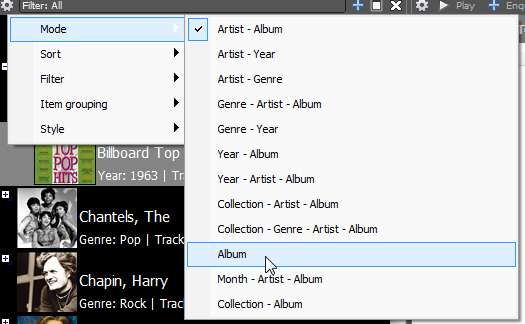
If you would rather just have a "pure album-only" presentation, click on that little gear in the upper-left corner of the upper-left pane, select "mode", and then select "album". This will give you a presentation that is purely by album titles (again, from the internal tag field "album" value and not the external album folder names). | My System Specs | | System Manufacturer/Model Number Home-built, two systems (1) and (2) OS Windows 7 Pro x64 (1), Win7 Pro X64 / WinXP Pro x86 on (2) CPU i5-3350p 3.1Ghz/6MB-cache (1); E8400 3.0Ghz/6MB-cache (2) Motherboard ASUS P8Z77-V Pro (1); ASUS P5Q3 (2) Memory 8GB PC3-12800 DDR3 (1); 4GB PC3-10600 DDR3 (2) Graphics Card ATI HD5770 dual-DVI (1), (see TV cards); ATI HD4850 (2) Sound Card Realtek ALC892 HD Audio (1); Realtek ALC1200 HD Audio (2) Monitor(s) Displays Eizo HD2441W LCD, Eizo S2433W (1); Eizo 24" S2433W (2) Screen Resolution 1920x1200, 1920x1200 (1); 1920x1200 (2) Keyboard IBM PS/2 (1) and (2) Mouse Logitech MX Revolution wireless (1); Microsoft wired (2) PSU Nesteq ECS-6001 600W (1); Nesteq ECS-5001 500W (2) Case Acousti-Case 360 (1) and (2) Cooling Noctua NH-U12P SE2 for CPU, 2x120mm case fans (1) and (2) Hard Drives (1) 1TB SATA-II (7200RPM), 2TB SATA-II (7200RPM), 2TB SATA-III (7200RPM), 250GB SATA-III (10000RPM) for OS;
(2) 320GB SATA-II (7200RPM), 750GB SATA-II (7200RPM), 150GB SATA-II (10000RPM) for OS Internet Speed 15mbps down / 2mbps up Other Info Ceton InfiniTV 4-tuner cablecard-enabled TV card as well as Hauppauge HVR-2250 OTA/ATSC 2-tuner TV card in (1), running under Win7 WMC MP3 tags and album art problems? All times are GMT -5. The time now is 04:11 AM. | |