Windows 7 Forums


Windows 7: windows 7 windows explorer view pane

18 Jan 2013   #1

Windows 7 Pro 64 bit
 
 
windows 7 windows explorer view pane

Good Morning Seven forums,

I recently noticed that at one time I could view a jpg file in windows explorer when I had a foler opened that contained sever jpg images uin the folder set to details view. There was no open preview pane to the right of the details list, I found a place to the right of the button to view details or large icons so I set to larger then clicked the button to the right to open the preview pane, still only find a larger square box with a camera picture in side that was to represent the image selected on the lift, still no image. What have i done wrong?

My System SpecsSystem Spec

18 Jan 2013   #2

64-bit Windows 7 Ultimate SP1 & Windows 8 Enterprise
Texas


Hello Just Married,

Could you post a screenshot showing this to see if it may help betted ID the issue?

In the mean time, double check to make sure that you have thumbnail previews enabled, and that Windows Photo Viewer is set as the default program.

Hope this helps for now,
Shawn
My System SpecsSystem Spec
18 Jan 2013   #3
Arc

Windows 7 Home Premium 64 Bit SP 1


Like your username. I guess you selected the name in Dec 2012, and still carrying the mood. Great

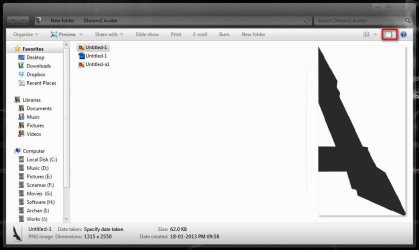
Post a screenshot please, showing the Preview button pressed and a particular picture item selected. Does not it generates a preview, as in the image?
windows 7 windows explorer view pane-2013-01-19_001209.jpg
Edit: Late Follow what Brink suggested
My System SpecsSystem Spec
.


19 Jan 2013   #4

Windows 7 Pro 64 bit
 
 
viewing jpgs in the preview area

Good Morning Seven Forums,

You hit the nail on the head, I forgot to look in FOLDER OPTIONS, just about all the time I do that but missed the very first option that had a check, "Allways view icons instead of images" or something like that. Did that problem solved,

Thanks for the reminder.

Also was going to upload a snipit but tried that in the past, don't think it worked for me.
My System SpecsSystem Spec
19 Jan 2013   #5

64-bit Windows 7 Ultimate SP1 & Windows 8 Enterprise
Texas


That's great news Just Married.

The tutorial below can help show you how to upload and attach screenshots here at Seven Forums.

Screenshots and Files - Upload and Post in Seven Forums
My System SpecsSystem Spec
Reply

 windows 7 windows explorer view pane problems?


Thread Tools


Similar help and support threads for: windows 7 windows explorer view pane
Thread Forum
Windows Explorer: Tree View/Navigation Pane problem Performance & Maintenance
can't view album art in windows explorer in thumbnail view General Discussion
Access2007 Navigation Pane gone in Windows 7-only View tab Microsoft Office
Solved Change/remove entries in "Folder view" pane (left side of Explorer) General Discussion
Blank Windows Explorer Pane General Discussion


All times are GMT -5. The time now is 10:20 AM.


Seven Forums Android App Seven Forums IOS App Follow us on Facebook

Windows 7 Forums is an independent web site and has not been authorized,
sponsored, or otherwise approved by Microsoft Corporation.
"Windows 7" and related materials are trademarks of Microsoft Corp.
© Designer Media Ltd
  

1 2 3 4 5 6 7 8 9 10 11 12 13 14 15 16 17 18 19 20 21 22 23 24 25 26 27 28 29 30 31 32