Windows 7 Forums


Windows 7: Complete address to properties of photos

23 Jan 2013   #1

Wnidows 7 Home Premium
 
 
Complete address to properties of photos

I'm trying to get the complete address to photos. All I get is not complete and I'm finding it impossible to find some photos which have very long addresses.

My System SpecsSystem Spec

23 Jan 2013   #2

Windows 7 Home Premium 64 Bit
Manchester, England


Can you please let us know more information, I don't really understand your post?.

Are you wanting to know, how to find out the full file name and extension?.
My System SpecsSystem Spec
24 Jan 2013   #3

Wnidows 7 Home Premium
 
 
Complete address to properties of photos

I'm trying to find a photo with the name DSCN0190. I open the start window and in the search box I type DSCN0190. It finds the photo so I click on properties to get the address. It gives me:
C:\Users\Desktop\External HDD data backup ---- that's all the space there is for the address. But it's not all of the address, quite a bit is missing. How can I get the complete address?
My System SpecsSystem Spec
.


24 Jan 2013   #4

Windows 7 x64 Ultimate
A Finnish immigrant in Leipzig, Germany


Hi Dick.

Two ways to do this, the easy one and a bit more complicated .

The complicated one is what you are trying to do. It can be done but needs a steady hand with the mouse. First put cursor in the beginning of the file path (path = the address or location of a file or folder) in Properties window, press left mouse button and start dragging to right to select path:
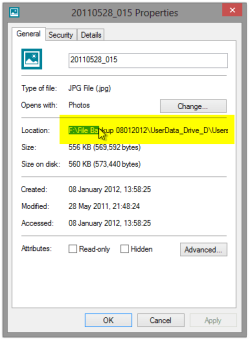
Complete address to properties of photos-20110528_015-properties.png

When your mouse pointer reaches the right border of the Properties window, just keep dragging and you'll notice the path starts scrolling to the left revealing the rest of it, continuing to the end of line. When there, release the left mouse button, right click the selected path to open context menu and select Copy:
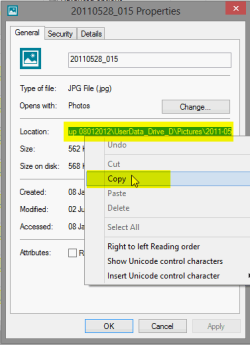
Complete address to properties of photos-20110528_015-properties_2.png

This copies the path with you can then paste to Windows Explorer:
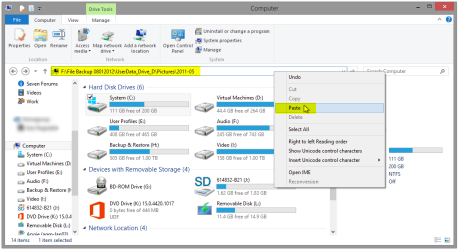
Complete address to properties of photos-20110528_015-properties_4.png

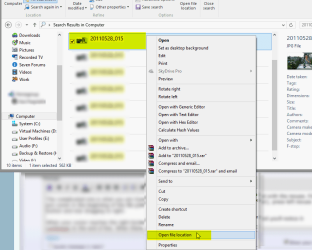
And the easy way: Right click the file in your search results to open context menu, select Open file location. This opens the folder where the file is located:
Complete address to properties of photos-20110528_015-properties_3.png
(Notice please your context menu might not look like the one in screenshot above, but the Open file location selection will be there!)

Kari

Last edited by Kari; 24 Jan 2013 at 05:37 PM.. Reason: Replaced wrong screenshots with correct ones.
My System SpecsSystem Spec
Reply

 Complete address to properties of photos problems?


Thread Tools


Similar help and support threads for: Complete address to properties of photos
Thread Forum
'No Internet Access' IP address shows router not the modem IP address Network & Sharing
SKYDRIVE: How do you make photos show up in "photos?" Music, Pictures & Video
Padlocks on photos on old login, new login cannot view photos at all. General Discussion
Outlook 2010 Auto address complete after restart Microsoft Office
iTunes Complete & Page Load Complete Software


All times are GMT -5. The time now is 12:26 AM.


Windows 7 Forums is an independent web site and has not been authorized,
sponsored, or otherwise approved by Microsoft Corporation.
"Windows 7" and related materials are trademarks of Microsoft Corp.
© Designer Media Ltd