| Windows 7: Strange Flash player issue |
09 Oct 2009
|
#1 | | Windows 7 x64 Ultimate A Finnish immigrant in Leipzig, Germany |
Strange Flash player issue Streaming television from my home country, I can choose the stream quality from 300 kbps to 8 Mbps:
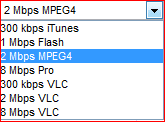
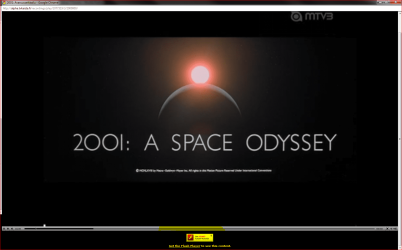
If I choose 1 or 2 Mbps, the stream is opened in a flash player. Since yesterday I've had this strange issue. The full screen display is shown smaller than usual, because a big part of the picture is used by a message telling I should download Flash Player to see the stream.
But I have Flash Player installed and I can see the stream! This issue is not browser dependant, it's the same when using Chrome, FF or IE to access the site.
A call to the this TV-stream service providers help desk resulted the following email: "The system is not yet tested on Windows 7". I've been using this service a couple of years now, on Seven since January but this issue only started yesterday.
How do I get my full screen back, without this annoying message?
Kari | My System Specs |
| Computer type Laptop System Manufacturer/Model Number HP ENVY 17-1150eg OS Windows 7 x64 Ultimate CPU 1.6 GHz Intel Core i7-720QM Processor Memory 6 GB Graphics Card ATI Mobility Radeon HD 5850 Graphics Sound Card Beats sound system with integrated subwoofer Monitor(s) Displays 17" laptop display, 22" LCD and 32" Full HD TV through HDMI Screen Resolution 1600*900, 1680*1050 and 1920*1080 Keyboard Logitech diNovo Media Desktop Laser (bluetooth) Mouse Logitech MX1000 Laser (Bluetooth) Hard Drives Internal: 2 x 500 GB SATA Hard Disk Drive 7200 rpm
External: 2TB for backups, 3TB USB3 network drive for media Internet Speed 50/10 Mbps VDSL Antivirus MSE, Windows Defender Browser Maxthon 3.5.2. Other Info Windows 7 Ultimate Retail Full in English, additional Guest-user accounts in Finnish, German and Swedish (Working languages English & Swedish, Family language German, my own language, mother tongue, Finnish. I really need Ultimate to get to use Language Packs!) |
09 Oct 2009
|
#2 | | |
Make sure your flash player plugin is the latest version and if that does not solve it then maybe the stream does not fully support the latest player version which I have experienced before.
If the stream does not support the latest flash player then just wait and it will correct it's self once they update on their end. | My System Specs | | System Manufacturer/Model Number Custom OS Win7 64bit Ultimate CPU AMD Phenom II X6 1100T Black Edition Thuban 3.3GHz, 3.7GHz Motherboard Gigabyte GA-890FXA-UD5 Memory CORSAIR DOMINATOR GT 8GB (2 x 4GB) 1866 DDR3 Graphics Card XFX HD-697A-CNDC Radeon HD6970 2GB 256-bit Sound Card Creative SoundBlaster X-Fi Platinum Fatal1ty Edition Monitor(s) Displays Dual 25 Inch Hanns-G HZ251 Screen Resolution 1920x1080 X 2 Keyboard Kensington (Low-Profile) Mouse Creative Fatal1ty PSU Corsair 850W Single Rail Case Thermaltake V9 BlacX w/ Dual HDD Docking Station Cooling Air lots and lots of air and copper... Internet Speed 15Gbit (15 Down 5 Up) Other Info XIGMATEK HDT-S1284F 120mm HYPRO Bearing CPU Cooler, LG Blu-Ray Burner. |
09 Oct 2009
|
#3 | | Windows 7 x64 Ultimate A Finnish immigrant in Leipzig, Germany |
Corpsecrank, what you say makes sence. But my Flash Player is the latest, and this issue never occurred before yesterday. I've checked and checked, my Flash Player is the latest from Adobe.
Basically this is not a big issue, I can still watch the stream. It's just that when I until yesterday was able to watch it full screen, now I have this message on the bottom of the display thus shrinking the actual output on my screen.
Kari | My System Specs | | Computer type Laptop System Manufacturer/Model Number HP ENVY 17-1150eg OS Windows 7 x64 Ultimate CPU 1.6 GHz Intel Core i7-720QM Processor Memory 6 GB Graphics Card ATI Mobility Radeon HD 5850 Graphics Sound Card Beats sound system with integrated subwoofer Monitor(s) Displays 17" laptop display, 22" LCD and 32" Full HD TV through HDMI Screen Resolution 1600*900, 1680*1050 and 1920*1080 Keyboard Logitech diNovo Media Desktop Laser (bluetooth) Mouse Logitech MX1000 Laser (Bluetooth) Hard Drives Internal: 2 x 500 GB SATA Hard Disk Drive 7200 rpm
External: 2TB for backups, 3TB USB3 network drive for media Internet Speed 50/10 Mbps VDSL Antivirus MSE, Windows Defender Browser Maxthon 3.5.2. Other Info Windows 7 Ultimate Retail Full in English, additional Guest-user accounts in Finnish, German and Swedish (Working languages English & Swedish, Family language German, my own language, mother tongue, Finnish. I really need Ultimate to get to use Language Packs!) |
11 Oct 2009
|
#4 | | |
Sounds like the issue is coming from the stream provider and not something wrong on your end.
If you had the latest version of flash installed and it was working with the stream fine and then one day it just doesn't play the way it was then my guess would be they made a change on their end that caused it. | My System Specs | | System Manufacturer/Model Number Custom OS Win7 64bit Ultimate CPU AMD Phenom II X6 1100T Black Edition Thuban 3.3GHz, 3.7GHz Motherboard Gigabyte GA-890FXA-UD5 Memory CORSAIR DOMINATOR GT 8GB (2 x 4GB) 1866 DDR3 Graphics Card XFX HD-697A-CNDC Radeon HD6970 2GB 256-bit Sound Card Creative SoundBlaster X-Fi Platinum Fatal1ty Edition Monitor(s) Displays Dual 25 Inch Hanns-G HZ251 Screen Resolution 1920x1080 X 2 Keyboard Kensington (Low-Profile) Mouse Creative Fatal1ty PSU Corsair 850W Single Rail Case Thermaltake V9 BlacX w/ Dual HDD Docking Station Cooling Air lots and lots of air and copper... Internet Speed 15Gbit (15 Down 5 Up) Other Info XIGMATEK HDT-S1284F 120mm HYPRO Bearing CPU Cooler, LG Blu-Ray Burner. |
11 Oct 2009
|
#5 | | Windows® 8 Pro (64-bit) Mumbai, India |
Kari, as a test, uninstall all flash players and try Silverlight. | My System Specs | | System Manufacturer/Model Number Samsung NP530U4B-S02IN OS Windows® 8 Pro (64-bit) CPU Intel® Core™ i5 Processor 2467M (1.60GHz, 3MB L3 Cache) Motherboard Samsung Electronics Memory 6GB DDR3 System Memory at 1,333MHz (on BD 4GB + 2GB x 1) Graphics Card AMD Radeon™ HD7550M 1GB DDR3 (Ext. Graphic) Sound Card Realtek High Definition Audio Monitor(s) Displays 35.56cm (14.0) SuperBright 300nit HD LED Display Screen Resolution 1366x768 Hard Drives 1TB S-ATA II Hard Drive (5400RPM) with ExpressCache 16GB SSD Internet Speed sucks Antivirus Microsoft Security Essentials Browser Google Chrome (Sync enabled) |
11 Oct 2009
|
#6 | | Windows 7 x64 Ultimate A Finnish immigrant in Leipzig, Germany |
Dinesh, that won't work. The PVR-stream needs Flash Player.
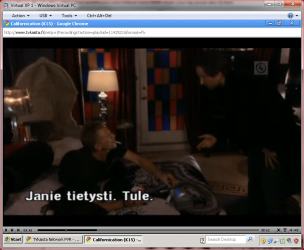
Tested with XP and Vista, both working fine. This issue occurs only in Windows 7. Uninstalled Flash, reinstalled, checked all OS' have the same Flash version. Issue is there in 7, not in XP or Vista. Image is a XP screen capture, full screen fills the display as it should.
Strange.
Kari | My System Specs | | Computer type Laptop System Manufacturer/Model Number HP ENVY 17-1150eg OS Windows 7 x64 Ultimate CPU 1.6 GHz Intel Core i7-720QM Processor Memory 6 GB Graphics Card ATI Mobility Radeon HD 5850 Graphics Sound Card Beats sound system with integrated subwoofer Monitor(s) Displays 17" laptop display, 22" LCD and 32" Full HD TV through HDMI Screen Resolution 1600*900, 1680*1050 and 1920*1080 Keyboard Logitech diNovo Media Desktop Laser (bluetooth) Mouse Logitech MX1000 Laser (Bluetooth) Hard Drives Internal: 2 x 500 GB SATA Hard Disk Drive 7200 rpm
External: 2TB for backups, 3TB USB3 network drive for media Internet Speed 50/10 Mbps VDSL Antivirus MSE, Windows Defender Browser Maxthon 3.5.2. Other Info Windows 7 Ultimate Retail Full in English, additional Guest-user accounts in Finnish, German and Swedish (Working languages English & Swedish, Family language German, my own language, mother tongue, Finnish. I really need Ultimate to get to use Language Packs!) Strange Flash player issue problems? All times are GMT -5. The time now is 10:15 PM. | |