Solved Add initials to photos

rusty post

New member
Power User
Local time
6:43 PM
Messages
89
I saw this personal photo on Facebook, with the posters initials in the lower left corner. I have been searching how to do this, have found no easy solution yet. Is there a fairly simple way to do this? Thank you kindly. Rusty
 

Attachments

  • 485431_618533158174578_1992172223_n.jpg
    485431_618533158174578_1992172223_n.jpg
    91.1 KB · Views: 7

My Computer My Computer

At a glance

W7 HOP 64
OS
W7 HOP 64
This is known as a watermark. It is used to stop people using the image and trying to pass it off as their own work. Programs like Photoshop can do this. Do you use a photo editing software, if so which one?
 

My Computer My Computer

At a glance

Microsoft Windows 7 Home Premium 64-bit 7601 ...Intel(R) Core(TM) i7-3770 CPU @ 3.40GHz8.00 GBIntel(R) HD Graphics 4000
Computer type
PC/Desktop
OS
Microsoft Windows 7 Home Premium 64-bit 7601 Multiprocessor Free Service Pack 1
CPU
Intel(R) Core(TM) i7-3770 CPU @ 3.40GHz
Motherboard
ASUSTeK COMPUTER INC. P8H77-M
Memory
8.00 GB
Graphics Card(s)
Intel(R) HD Graphics 4000
Sound Card
On Board
Monitor(s) Displays
Dell 24"
Screen Resolution
1920 x 1080
Hard Drives
(1) INTEL SSDSC2CT180A3 ATA Device (2) ST500DM002-1BD142 ATA Device (3) WDC WD3200AAKS-75L9A0 ATA Device (4) Generic- Compact Flash USB Device (5) Generic- MS/MS-Pro USB Device (6) Generic- SD/MMC USB Device (7) Generic- SM/xD-Picture USB
PSU
500w Corsair
Case
Cooler Master
Cooling
3 Fans
Keyboard
Logitech MK300
Mouse
Logitech WOM
Internet Speed
75Mb
Antivirus
Norton 360
Browser
Firefox, Opera, IE

My Computer My Computer

At a glance

Win 7 Pro x64 / Win 10 ProIntel(R) Core(TM) i7-3630QM CPU @ 2.40GHz12 GB(1) Intel(R) HD Graphics 4000 (2) NVIDIA GeFo...
Computer type
Laptop
Computer Manufacturer/Model Number
Sager NP9170
OS
Win 7 Pro x64 / Win 10 Pro
CPU
Intel(R) Core(TM) i7-3630QM CPU @ 2.40GHz
Motherboard
CLEVO P170EM
Memory
12 GB
Graphics Card(s)
(1) Intel(R) HD Graphics 4000 (2) NVIDIA GeForce GTX 675M
Sound Card
(1) Realtek High Definition Audio (2) Intel(R) Display Aud
Monitor(s) Displays
17.3
Screen Resolution
1920x1080
Hard Drives
(1) Samsung 860 EVO 500GB(OS) (1) Samsung 860 EVO 500GB(Data)
Keyboard
Backlite
Antivirus
MSE, Malwarebytes Pro
Browser
Firefox
Other Info
DESKTOP: Custom-built.
OS: Win 10 Pro x64.
CASE: Rosewill R5.
CPU: Intel I5 4670K CPU @ 3.40GHz.
CPU COOLER: Cool Master Hyper 212 EVO.
MOTHERBOARD: Asus Z87-A.
MEMORY: Kingston HyperX 2x4 GB.
GPU: Nvidia Geforce 650 TI.
PSU: Corsair TX750.
DRIVES: (1) Samsung 840 120 GB SSD (2) Western Digital blue 500 GB 7200 RPM.
Thanks for the responses, guys. I have been using Microsoft Office picture manager, as it has suited my needs just fine. I am assuming there isn't a watermark function in this, so I will look into the site you mentioned. :geek:
 

My Computer My Computer

At a glance

W7 HOP 64
OS
W7 HOP 64
Faststone Image Viewer (which is free) allows you to put watermarks on your images plus you can batch convert a load of pics at once ;)
 

Attachments

  • watermark.jpg
    watermark.jpg
    104.9 KB · Views: 7

My Computer My Computer

At a glance

Windows 7 Ultimate 64bitAMD Phenom Quad core 9950 black edition16Gb2x XFX Radeon 5850
Computer type
PC/Desktop
Computer Manufacturer/Model Number
Self Built
OS
Windows 7 Ultimate 64bit
CPU
AMD Phenom Quad core 9950 black edition
Motherboard
Gigabyte
Memory
16Gb
Graphics Card(s)
2x XFX Radeon 5850
Sound Card
PCI Express X-Fi Titanium / Logitech G35
Monitor(s) Displays
2x HP 2410i
Screen Resolution
1920x1080
Hard Drives
2x 500Gb Seagate
1x 300Gb Seagate
1x 1Tb Seagate
2x 1Tb Hitatchi
PSU
Jean Tech Storm 700W
Case
Cooler Master COSMOS S
Cooling
Akasa Evo Blue Pro
Keyboard
Logitech G15
Mouse
Mad Catz M.M.O. 7
Internet Speed
12mb
Will take a look at that, thanks Mr. Poo♣ :geek:
 

My Computer My Computer

At a glance

W7 HOP 64
OS
W7 HOP 64
No probs pal let us know how you get along ;)
 

My Computer My Computer

At a glance

Windows 7 Ultimate 64bitAMD Phenom Quad core 9950 black edition16Gb2x XFX Radeon 5850
Computer type
PC/Desktop
Computer Manufacturer/Model Number
Self Built
OS
Windows 7 Ultimate 64bit
CPU
AMD Phenom Quad core 9950 black edition
Motherboard
Gigabyte
Memory
16Gb
Graphics Card(s)
2x XFX Radeon 5850
Sound Card
PCI Express X-Fi Titanium / Logitech G35
Monitor(s) Displays
2x HP 2410i
Screen Resolution
1920x1080
Hard Drives
2x 500Gb Seagate
1x 300Gb Seagate
1x 1Tb Seagate
2x 1Tb Hitatchi
PSU
Jean Tech Storm 700W
Case
Cooler Master COSMOS S
Cooling
Akasa Evo Blue Pro
Keyboard
Logitech G15
Mouse
Mad Catz M.M.O. 7
Internet Speed
12mb
The good news is I successfully watermarked one of my photos and posted it to facebook. When I tried to post it here, tho, I got this message-The website cannot display the page

HTTP 500
Most likely causes:

  • The website is under maintenance.
  • The website has a programming error.
What you can try:

bullet.png
Refresh the page.


bullet.png
Go back to the previous page.


More information

So I took a snip, which did post here. All's good, thanks so much for the help♫ :cool:
 

Attachments

  • snip rusty.jpg
    snip rusty.jpg
    105.9 KB · Views: 3

My Computer My Computer

At a glance

W7 HOP 64
OS
W7 HOP 64
The good news is I successfully watermarked one of my photos and posted it to facebook. When I tried to post it here, tho, I got this message-The website cannot display the page

HTTP 500
Most likely causes:

  • The website is under maintenance.
  • The website has a programming error.
What you can try:

bullet.png
Refresh the page.


bullet.png
Go back to the previous page.


More information

So I took a snip, which did post here. All's good, thanks so much for the help♫ :cool:
Hi Rusty Post
Good to see you have been successful. So far as posting your image here on the Forum can you let us know what file size your photo was and what file extension was it. Presumably JPG but please confirm? Also how did you try to attach the image?
 

My Computer My Computer

At a glance

Microsoft Windows 7 Home Premium 64-bit 7601 ...Intel(R) Core(TM) i7-3770 CPU @ 3.40GHz8.00 GBIntel(R) HD Graphics 4000
Computer type
PC/Desktop
OS
Microsoft Windows 7 Home Premium 64-bit 7601 Multiprocessor Free Service Pack 1
CPU
Intel(R) Core(TM) i7-3770 CPU @ 3.40GHz
Motherboard
ASUSTeK COMPUTER INC. P8H77-M
Memory
8.00 GB
Graphics Card(s)
Intel(R) HD Graphics 4000
Sound Card
On Board
Monitor(s) Displays
Dell 24"
Screen Resolution
1920 x 1080
Hard Drives
(1) INTEL SSDSC2CT180A3 ATA Device (2) ST500DM002-1BD142 ATA Device (3) WDC WD3200AAKS-75L9A0 ATA Device (4) Generic- Compact Flash USB Device (5) Generic- MS/MS-Pro USB Device (6) Generic- SD/MMC USB Device (7) Generic- SM/xD-Picture USB
PSU
500w Corsair
Case
Cooler Master
Cooling
3 Fans
Keyboard
Logitech MK300
Mouse
Logitech WOM
Internet Speed
75Mb
Antivirus
Norton 360
Browser
Firefox, Opera, IE
Aha, Mitchell. Size does matter. I am in the early photo learning stage so it's somewhat Greek to me. I am guessing the non postable size was 1524 x 931, as I read it on the bottom of snipped copy. I reduced it to 1024 x 575 and it worked like a charm. The great thing about digital is the ability to shoot as much as you want and delete what does not work. It's all good. Thank you kindly for your reply. Rusty :geek:
 

Attachments

  • 009 - Copy.JPG
    009 - Copy.JPG
    62.1 KB · Views: 5

My Computer My Computer

At a glance

W7 HOP 64
OS
W7 HOP 64
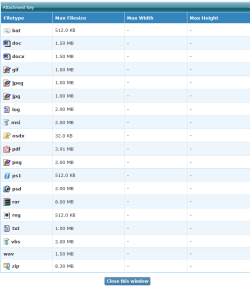
I think it is the actual file size not the pixel size that matters as the screenshot shows.

Attach Key.PNG

I guess when you reduced the pixel size of your image that reduced the file size. If you want to keep the pixel size you can always save the jpeg to a greater compression. You will loose a little quality but so long as you don't go too far that probebly wont notice on anything but the very highest grade monitor. i don't know what Photo editor you use but when you hit thesave button you should get the choice of saving the image to a certain compression either from 1 to 10 or sometimes 1 to 12. If you save at about half way say 5 or 6 then that will give a reasonable quality with a small file size. This is the way to keep the file sizes down but keep the picture size high when you want to send an image by email!
 

My Computer My Computer

At a glance

Microsoft Windows 7 Home Premium 64-bit 7601 ...Intel(R) Core(TM) i7-3770 CPU @ 3.40GHz8.00 GBIntel(R) HD Graphics 4000
Computer type
PC/Desktop
OS
Microsoft Windows 7 Home Premium 64-bit 7601 Multiprocessor Free Service Pack 1
CPU
Intel(R) Core(TM) i7-3770 CPU @ 3.40GHz
Motherboard
ASUSTeK COMPUTER INC. P8H77-M
Memory
8.00 GB
Graphics Card(s)
Intel(R) HD Graphics 4000
Sound Card
On Board
Monitor(s) Displays
Dell 24"
Screen Resolution
1920 x 1080
Hard Drives
(1) INTEL SSDSC2CT180A3 ATA Device (2) ST500DM002-1BD142 ATA Device (3) WDC WD3200AAKS-75L9A0 ATA Device (4) Generic- Compact Flash USB Device (5) Generic- MS/MS-Pro USB Device (6) Generic- SD/MMC USB Device (7) Generic- SM/xD-Picture USB
PSU
500w Corsair
Case
Cooler Master
Cooling
3 Fans
Keyboard
Logitech MK300
Mouse
Logitech WOM
Internet Speed
75Mb
Antivirus
Norton 360
Browser
Firefox, Opera, IE
Good to know, I will be logging this advice into my "photo learning folder." Much obliged. :cool:
 

My Computer My Computer

At a glance

W7 HOP 64
OS
W7 HOP 64
You can always come back to this Forum if you get problem. if you do that please state which editor you use as it makes it easier to give you apprpriate advice!
 

My Computer My Computer

At a glance

Microsoft Windows 7 Home Premium 64-bit 7601 ...Intel(R) Core(TM) i7-3770 CPU @ 3.40GHz8.00 GBIntel(R) HD Graphics 4000
Computer type
PC/Desktop
OS
Microsoft Windows 7 Home Premium 64-bit 7601 Multiprocessor Free Service Pack 1
CPU
Intel(R) Core(TM) i7-3770 CPU @ 3.40GHz
Motherboard
ASUSTeK COMPUTER INC. P8H77-M
Memory
8.00 GB
Graphics Card(s)
Intel(R) HD Graphics 4000
Sound Card
On Board
Monitor(s) Displays
Dell 24"
Screen Resolution
1920 x 1080
Hard Drives
(1) INTEL SSDSC2CT180A3 ATA Device (2) ST500DM002-1BD142 ATA Device (3) WDC WD3200AAKS-75L9A0 ATA Device (4) Generic- Compact Flash USB Device (5) Generic- MS/MS-Pro USB Device (6) Generic- SD/MMC USB Device (7) Generic- SM/xD-Picture USB
PSU
500w Corsair
Case
Cooler Master
Cooling
3 Fans
Keyboard
Logitech MK300
Mouse
Logitech WOM
Internet Speed
75Mb
Antivirus
Norton 360
Browser
Firefox, Opera, IE
Back
Top
