Windows 7 Forums Search
Welcome to Windows 7 Forums. Our forum is dedicated to helping you find solutions with any problems, errors or issues you are experiencing with Windows 7. The Windows 7 forum also covers news and updates and has an extensive Windows 7 tutorial section that covers a wide range of tips and tricks.


Windows 7 - windows media player blocking ?

 
01-31-2009   #1


win7 ultimate / virtual box


windows media player blocking ?

hiya,

does anyone have a clue as to why windows media player should be blocking me playing this video in Windows 7 beta 7k, taken from this page ?

all I get is the firewall could be blocking message but from what i can see in firewall advanced settings internet is allowed in and out for media player

or am i missing something obvious

any help appreciated

My System SpecsSystem Spec
01-31-2009   #2


Windows 7 RTM X64


You need to install silverlight in order to run that video. The download link for silverlight was right on the video for me. That video wasn't made to play in Media Player from what I could see.

You might need to turn off UAC or relax the security settings in Explorer "tools/internet options/security before it will work correctly.
My System SpecsSystem Spec
01-31-2009   #3


Vista Ult 64 bit Seven Ult RTM x64


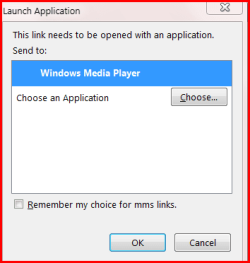
I'm using Firefox. When I clicked on the video link I got this message.

windows media player blocking ?-choose.png

Clicked on OK and it started playing in media player. I do have silverlight installed.

Gary
My System SpecsSystem Spec
.


01-31-2009   #4


Windows 7 RTM X64


That prompt is just giving you a choice of which player to use, since it played in media player it's not blocking you from what I can see.

Looks like you could also choose to play in silver light also with that choose button.
My System SpecsSystem Spec
01-31-2009   #5


Vista Ult 64 bit Seven Ult RTM x64


I'm not finding an .exe file to 'choose' only an install.exe and config.exe. I do have hide protected sys files unchecked. Can you play the vid on the page? I think you need silverlight for that. It has a full screen button and doesn't seem to be using media player as it is not showing up in task mgr.

Gary

Edit: Here is a tutorial on installing from a USB. USB Windows 7 Installation Key Drive - Create
My System SpecsSystem Spec
01-31-2009   #6


win7 ultimate / virtual box


Quote   Quote: Originally Posted by chev65 View Post
You need to install silverlight in order to run that video. The download link for silverlight was right on the video for me. That video wasn't made to play in Media Player from what I could see.

You might need to turn off UAC or relax the security settings in Explorer "tools/internet options/security before it will work correctly.
yup nice one , installing silverlight then running it in Internet Explorer 32 bit now works perfectly for me
My System SpecsSystem Spec
Reply

 windows media player blocking ? problems?


Thread Tools


Similar Threads for: windows media player blocking ?
Thread Forum
set windows media player to 64bit player helppp Music, Pictures & Video
Media Sharing Using Windows Media Player - Enable or Disable Tutorials
Make Windows Media Player X32 Default Opening Media Devices Media Center
Solved Cannot Seem To Make Windows Media Player The Default Player For WAV Music, Pictures & Video
Windows Media Center & Media Player icons are missing Media Center


All times are GMT -5. The time now is 03:29 PM.


Windows 7 Forums is an independent web site and has not been authorized,
sponsored, or otherwise approved by Microsoft Corporation.
"Windows 7" and related materials are trademarks of Microsoft Corp.
© Designer Media Ltd
  

1 2 3 4 5 6 7 8 9 10 11 12 13 14 15 16 17 18 19 20 21 22 23 24 25 26 27 28 29 30