| Windows 7: How can I backup my DVDs for quick & easy access? |
15 Feb 2010
|
#101 | | Windows 7 Home Premium 64 Bit SP 1 |

Quote: Originally Posted by JohnnyScience
Yeah but I'd like it to pull the artwork so it shows up in Media center instead of a big green poster or something.
Will Handbrake pull the artwork? No copying/encoding software can pull the movie artwork. Either you have to install a media manager in your media center (as wishmaster suggested), or you may download them manually (what I do).
I obtain the movie posters from google search, and place them in a folder where the movie is located, rename the poster as Folder.jpg, and thats all. | My System Specs |
| Computer type PC/Desktop System Manufacturer/Model Number Self Assembled OS Windows 7 Home Premium 64 Bit SP 1 CPU Intel Core i3 2120 @ 3.30GHz Motherboard Gigabyte Technology Co., Ltd. H61M-DS2 DVI Memory Corsair 2GB x2 (Single-Channel DDR3 @ 665MHz) Graphics Card 2047MB GeForce GTS 450 (ZOTAC International) Sound Card Onboard (Realtek High Definition Audio) Monitor(s) Displays LG Flatron E2040T Screen Resolution 1600x900 Keyboard Logitech MK220 Mouse Logitech MK220 PSU uMAX 750 watt. Case iBall Cooling Air/ Fans Hard Drives Western Digital 1 TB
Seagate 500 GB Internet Speed BSNL Broadband Antivirus Microsoft Security Essentials Browser Waterfox Other Info Dell Studio 15" Laptop |
17 Feb 2010
|
#102 | | |

Quote: Originally Posted by Arc 
Quote: Originally Posted by JohnnyScience
Yeah but I'd like it to pull the artwork so it shows up in Media center instead of a big green poster or something.
Will Handbrake pull the artwork? No copying/encoding software can pull the movie artwork. Either you have to install a media manager in your media center (as wishmaster suggested), or you may download them manually (what I do).
I obtain the movie posters from google search, and place them in a folder where the movie is located, rename the poster as Folder.jpg, and thats all. What else will a media manager do other than grab artwork & info etc?
I'm already using the folder.jpg with the file2folder option, but having to grab artwork & info just seems time consuming if there is a program that will pull all the meta data. | My System Specs | | System Manufacturer/Model Number Built it myself OS Windows 7 64 & Ubuntu 64 CPU Intel Quad Core Q6600 2.40GHz Motherboard Asus Memory 8g Graphics Card Nvidia 9600 GT & 9800 GT Sound Card Turtle Beach 5.1 Monitor(s) Displays Three 19" Dell's & one 46" Samsung 750 |
17 Feb 2010
|
#103 | | Windows 7 Pro 64 SP1 East Bay Area, CA |

Quote: Originally Posted by JohnnyScience 
Quote: Originally Posted by Arc 
Quote: Originally Posted by JohnnyScience
Yeah but I'd like it to pull the artwork so it shows up in Media center instead of a big green poster or something.
Will Handbrake pull the artwork? No copying/encoding software can pull the movie artwork. Either you have to install a media manager in your media center (as wishmaster suggested), or you may download them manually (what I do).
I obtain the movie posters from google search, and place them in a folder where the movie is located, rename the poster as Folder.jpg, and thats all. What else will a media manager do other than grab artwork & info etc?
I'm already using the folder.jpg with the file2folder option, but having to grab artwork & info just seems time consuming if there is a program that will pull all the meta data. Did you try YAMMM? | My System Specs | | Computer type PC/Desktop System Manufacturer/Model Number Compaq sr5410f case OS Windows 7 Pro 64 SP1 CPU AMD X2 4450E @ 2.3 ghz Motherboard Biostar MCP6P M2+ Memory 4.0 g Graphics Card Nvidia GeForce 9600 GT , 512mb Sound Card onboard Monitor(s) Displays auria eq2367 Screen Resolution 1920 x 1080 Keyboard logitech wave cordless Mouse logitech LX8 cordless laser mouse PSU 250 watts Case Compaq Cooling couple fans Hard Drives 1 tb Hitachi HDT721010SLA scsi, 500 gb external Internet Speed comcast hi speed 19 dn 8 up Antivirus Microsoft Security Essentials Browser IE10 Other Info Laptop specs: HP g7-1365dx /
CPU: AMD A6-3420M APU with Radeon(tm) HD Graphics /
RAM: Crucial 8Gb (2x4Gb) /
SSD: Crucial M4-CT128M4SSD2 ATA Device/ FW 000F /
GFX: AMD Radeon HD 6520G /
OS: Microsoft Windows 7 Professional 64-bit 7601 Multiprocessor Free Service Pack 1 |
17 Feb 2010
|
#104 | | |

Quote: Originally Posted by derekimo 
Quote: Originally Posted by JohnnyScience 
Quote: Originally Posted by Arc
No copying/encoding software can pull the movie artwork. Either you have to install a media manager in your media center (as wishmaster suggested), or you may download them manually (what I do).
I obtain the movie posters from google search, and place them in a folder where the movie is located, rename the poster as Folder.jpg, and thats all. What else will a media manager do other than grab artwork & info etc?
I'm already using the folder.jpg with the file2folder option, but having to grab artwork & info just seems time consuming if there is a program that will pull all the meta data. Did you try YAMMM? Not yet. I just read the link & it seems promising.
But when do I run this program? Is it something that always runs in the background, or do I have to run it every time I rip a movie? | My System Specs | | System Manufacturer/Model Number Built it myself OS Windows 7 64 & Ubuntu 64 CPU Intel Quad Core Q6600 2.40GHz Motherboard Asus Memory 8g Graphics Card Nvidia 9600 GT & 9800 GT Sound Card Turtle Beach 5.1 Monitor(s) Displays Three 19" Dell's & one 46" Samsung 750 |
17 Feb 2010
|
#105 | | Windows 7 Pro 64 SP1 East Bay Area, CA |

Quote: Originally Posted by JohnnyScience 
Quote: Originally Posted by derekimo 
Quote: Originally Posted by JohnnyScience
What else will a media manager do other than grab artwork & info etc?
I'm already using the folder.jpg with the file2folder option, but having to grab artwork & info just seems time consuming if there is a program that will pull all the meta data. Did you try YAMMM? Not yet. I just read the link & it seems promising.
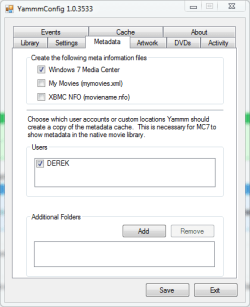
But when do I run this program? Is it something that always runs in the background, or do I have to run it every time I rip a movie? No it installs a service that runs in the background and every time you add a movie it d/l the coverart and metadata, Just make sure the name of the movie is spelled correctly and it will find it. And use that link I gave you earlier in this thread cause the other one hasn't been updated...nevermind here it is again, mikinhosoft: Yammm - Yet Another Media Meta Manager then just use the settings in the "setting up media center library" thread for YAMMM. You'll be all set, never even know it's there till you add a movie. | My System Specs | | Computer type PC/Desktop System Manufacturer/Model Number Compaq sr5410f case OS Windows 7 Pro 64 SP1 CPU AMD X2 4450E @ 2.3 ghz Motherboard Biostar MCP6P M2+ Memory 4.0 g Graphics Card Nvidia GeForce 9600 GT , 512mb Sound Card onboard Monitor(s) Displays auria eq2367 Screen Resolution 1920 x 1080 Keyboard logitech wave cordless Mouse logitech LX8 cordless laser mouse PSU 250 watts Case Compaq Cooling couple fans Hard Drives 1 tb Hitachi HDT721010SLA scsi, 500 gb external Internet Speed comcast hi speed 19 dn 8 up Antivirus Microsoft Security Essentials Browser IE10 Other Info Laptop specs: HP g7-1365dx /
CPU: AMD A6-3420M APU with Radeon(tm) HD Graphics /
RAM: Crucial 8Gb (2x4Gb) /
SSD: Crucial M4-CT128M4SSD2 ATA Device/ FW 000F /
GFX: AMD Radeon HD 6520G /
OS: Microsoft Windows 7 Professional 64-bit 7601 Multiprocessor Free Service Pack 1 |
17 Feb 2010
|
#106 | | |

Quote: Originally Posted by derekimo 
Quote: Originally Posted by JohnnyScience 
Quote: Originally Posted by derekimo
Did you try YAMMM? Not yet. I just read the link & it seems promising.
But when do I run this program? Is it something that always runs in the background, or do I have to run it every time I rip a movie? No it installs a service that runs in the background and every time you add a movie it d/l the coverart and metadata, Just make sure the name of the movie is spelled correctly and it will find it. And use that link I gave you earlier in this thread cause the other one hasn't been updated...nevermind here it is again, mikinhosoft: Yammm - Yet Another Media Meta Manager then just use the settings in the "setting up media center library" thread for YAMMM. You'll be all set, never even know it's there till you add a movie. Ok nice I'll download that shortly.
What about all of the movies I just ripped with DVDShrink? Will it download all of that stuff?
This works within Media Center right? | My System Specs | | System Manufacturer/Model Number Built it myself OS Windows 7 64 & Ubuntu 64 CPU Intel Quad Core Q6600 2.40GHz Motherboard Asus Memory 8g Graphics Card Nvidia 9600 GT & 9800 GT Sound Card Turtle Beach 5.1 Monitor(s) Displays Three 19" Dell's & one 46" Samsung 750 |
17 Feb 2010
|
#107 | | Windows 7 Pro 64 SP1 East Bay Area, CA |

Quote: Originally Posted by JohnnyScience 
Quote: Originally Posted by derekimo 
Quote: Originally Posted by JohnnyScience
Not yet. I just read the link & it seems promising.
But when do I run this program? Is it something that always runs in the background, or do I have to run it every time I rip a movie? No it installs a service that runs in the background and every time you add a movie it d/l the coverart and metadata, Just make sure the name of the movie is spelled correctly and it will find it. And use that link I gave you earlier in this thread cause the other one hasn't been updated...nevermind here it is again, mikinhosoft: Yammm - Yet Another Media Meta Manager then just use the settings in the "setting up media center library" thread for YAMMM. You'll be all set, never even know it's there till you add a movie. Ok nice I'll download that shortly.
What about all of the movies I just ripped with DVDShrink? Will it download all of that stuff?
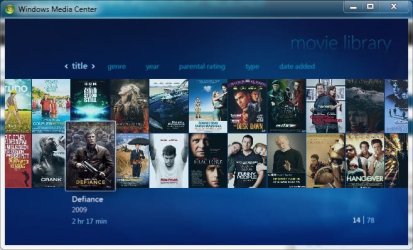
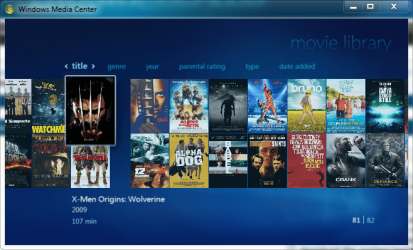
This works within Media Center right? As long as your movies are titled correctly and you tell Yammm what folder to watch for movies, which should also be the same one you tell media center to watch, your media center library will look like this,
So yes it will d/l all the stuff for your movies if it knows where to look for them. | My System Specs | | Computer type PC/Desktop System Manufacturer/Model Number Compaq sr5410f case OS Windows 7 Pro 64 SP1 CPU AMD X2 4450E @ 2.3 ghz Motherboard Biostar MCP6P M2+ Memory 4.0 g Graphics Card Nvidia GeForce 9600 GT , 512mb Sound Card onboard Monitor(s) Displays auria eq2367 Screen Resolution 1920 x 1080 Keyboard logitech wave cordless Mouse logitech LX8 cordless laser mouse PSU 250 watts Case Compaq Cooling couple fans Hard Drives 1 tb Hitachi HDT721010SLA scsi, 500 gb external Internet Speed comcast hi speed 19 dn 8 up Antivirus Microsoft Security Essentials Browser IE10 Other Info Laptop specs: HP g7-1365dx /
CPU: AMD A6-3420M APU with Radeon(tm) HD Graphics /
RAM: Crucial 8Gb (2x4Gb) /
SSD: Crucial M4-CT128M4SSD2 ATA Device/ FW 000F /
GFX: AMD Radeon HD 6520G /
OS: Microsoft Windows 7 Professional 64-bit 7601 Multiprocessor Free Service Pack 1 |
17 Feb 2010
|
#108 | | |

Quote: Originally Posted by derekimo 
Quote: Originally Posted by JohnnyScience 
Quote: Originally Posted by derekimo
No it installs a service that runs in the background and every time you add a movie it d/l the coverart and metadata, Just make sure the name of the movie is spelled correctly and it will find it. And use that link I gave you earlier in this thread cause the other one hasn't been updated...nevermind here it is again, mikinhosoft: Yammm - Yet Another Media Meta Manager then just use the settings in the "setting up media center library" thread for YAMMM. You'll be all set, never even know it's there till you add a movie. Ok nice I'll download that shortly.
What about all of the movies I just ripped with DVDShrink? Will it download all of that stuff?
This works within Media Center right? As long as your movies are titled correctly and you tell Yammm what folder to watch for movies, which should also be the same one you tell media center to watch, your media center library will look like this,
So yes it will d/l all the stuff for your movies if it knows where to look for them.  Ok great so everything seems to have installed properly... where/how do I activate it to download the 50 or so dvds I've ripped recently?
Just turn Media Center on? ---------- Post added at 04:45 AM ---------- Previous post was at 04:41 AM ---------- 
Quote: Originally Posted by JohnnyScience 
Quote: Originally Posted by derekimo 
Quote: Originally Posted by JohnnyScience
Ok nice I'll download that shortly.
What about all of the movies I just ripped with DVDShrink? Will it download all of that stuff?
This works within Media Center right? As long as your movies are titled correctly and you tell Yammm what folder to watch for movies, which should also be the same one you tell media center to watch, your media center library will look like this,
So yes it will d/l all the stuff for your movies if it knows where to look for them.  Ok great so everything seems to have installed properly... where/how do I activate it to download the 50 or so dvds I've ripped recently?
Just turn Media Center on? Hmm ok it seems to have downloaded a bunch of posters, but there are still a lot with out posters. I'm sure there are some it wont find, but things like Alien vs. Predator, Blade, all the Matrix' etc, there are big name movies I have that it didnt download the posters/meta data for?
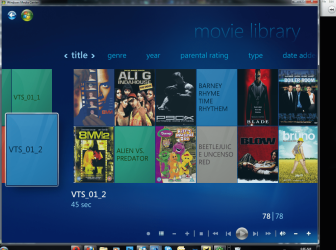
Also why does my MC look different than yours? I have a break in mine or something & it seems to be a real pain to scroll through?
Is there any way I can set it up to scroll through the movies with the mouse wheel? | My System Specs | | System Manufacturer/Model Number Built it myself OS Windows 7 64 & Ubuntu 64 CPU Intel Quad Core Q6600 2.40GHz Motherboard Asus Memory 8g Graphics Card Nvidia 9600 GT & 9800 GT Sound Card Turtle Beach 5.1 Monitor(s) Displays Three 19" Dell's & one 46" Samsung 750 |
17 Feb 2010
|
#109 | | 7 x64 | 7 x64 Syracuse NY, USA |
This info may be late to the scene but its about Shrink.
DvD Shrink is a dated program, yet still functional. It has trouble with some of the newer encription and so then you will need something like anydvd. Shrink by default breaks up vob files into 1gig chunks. But you can edit that setting.
DvDFab is a decent app. But got me into creating a rip folder with categorys, if you'll forgive the term, XP style. I've been following this thread because I'd like to take advantage of MC as well. Now the folder deal is nice because I can use speech to just open the folder and play the file. But with 7 my thoughts are some kind of forward thinking would be better. | My System Specs | | System Manufacturer/Model Number Self - Build | Asus K53e Laptop OS 7 x64 | 7 x64 CPU AMD 64x2 5400 2.8 | i5 Sandy Bridge Motherboard Gigabyte GA-MA785GM-US2H 3.3 | K53e Memory 4 gigs GSkill ddr2 800 | 8 gigs Adata ddr3 1600 Graphics Card xFx HD5670 1 gig ddr5 | Intel HD 3000 Sound Card Realtek HD OnBoard Audio Monitor(s) Displays 19" Samsung 18" NEC & 37" Toshiba | 15.6 Keyboard Rosewill RK-800G PS/2 Gaming Keyboard | Asus Chiclet Mouse Logitec MX518 | MS w/side buttons PSU hec 485w dual rail | 65w Case CoolMaster Centurion 534+ Cooling Sunbeam CR-CCTF 120mm Core Contact Freezer Hard Drives 120 OCZ Vertex II ssd | 750 Caviar Black 7200 sata | 500 spinpoint Internet Speed RoadRunner Other Info Logitec x540 5.1 audio
Windows 7 Speech Recognition
Modified Air-flow / Cooling system |
17 Feb 2010
|
#110 | | Windows 7 Pro 64 SP1 East Bay Area, CA |

Quote: Originally Posted by JohnnyScience 
Quote: Originally Posted by derekimo 
Quote: Originally Posted by JohnnyScience
Ok nice I'll download that shortly.
What about all of the movies I just ripped with DVDShrink? Will it download all of that stuff?
This works within Media Center right? As long as your movies are titled correctly and you tell Yammm what folder to watch for movies, which should also be the same one you tell media center to watch, your media center library will look like this,
So yes it will d/l all the stuff for your movies if it knows where to look for them.  Ok great so everything seems to have installed properly... where/how do I activate it to download the 50 or so dvds I've ripped recently?
Just turn Media Center on? ---------- Post added at 04:45 AM ---------- Previous post was at 04:41 AM ---------- 
Quote: Originally Posted by JohnnyScience 
Quote: Originally Posted by derekimo
As long as your movies are titled correctly and you tell Yammm what folder to watch for movies, which should also be the same one you tell media center to watch, your media center library will look like this,
So yes it will d/l all the stuff for your movies if it knows where to look for them.  Ok great so everything seems to have installed properly... where/how do I activate it to download the 50 or so dvds I've ripped recently?
Just turn Media Center on? Hmm ok it seems to have downloaded a bunch of posters, but there are still a lot with out posters. I'm sure there are some it wont find, but things like Alien vs. Predator, Blade, all the Matrix' etc, there are big name movies I have that it didnt download the posters/meta data for?
Also why does my MC look different than yours? I have a break in mine or something & it seems to be a real pain to scroll through?
Is there any way I can set it up to scroll through the movies with the mouse wheel? Alright, The movies it isn't finding, Go here IMDb Search and see if you can find them, make sure yours are named exactly like they are at imdb so Yammm can find them.
As for media center looking different, mine looks that way too, it's the beginning of the movie list.
I don't think you can scroll through the movies with the mouse wheel, it's either those arrows on the side or a remote.
Also those vts folders you have need to be in named folders, unless thats something else you got going on there, that one is only 45 seconds? | My System Specs | | Computer type PC/Desktop System Manufacturer/Model Number Compaq sr5410f case OS Windows 7 Pro 64 SP1 CPU AMD X2 4450E @ 2.3 ghz Motherboard Biostar MCP6P M2+ Memory 4.0 g Graphics Card Nvidia GeForce 9600 GT , 512mb Sound Card onboard Monitor(s) Displays auria eq2367 Screen Resolution 1920 x 1080 Keyboard logitech wave cordless Mouse logitech LX8 cordless laser mouse PSU 250 watts Case Compaq Cooling couple fans Hard Drives 1 tb Hitachi HDT721010SLA scsi, 500 gb external Internet Speed comcast hi speed 19 dn 8 up Antivirus Microsoft Security Essentials Browser IE10 Other Info Laptop specs: HP g7-1365dx /
CPU: AMD A6-3420M APU with Radeon(tm) HD Graphics /
RAM: Crucial 8Gb (2x4Gb) /
SSD: Crucial M4-CT128M4SSD2 ATA Device/ FW 000F /
GFX: AMD Radeon HD 6520G /
OS: Microsoft Windows 7 Professional 64-bit 7601 Multiprocessor Free Service Pack 1 How can I backup my DVDs for quick & easy access? problems? All times are GMT -5. The time now is 01:56 AM. | |