
You are using an out of date browser. It may not display this or other websites correctly.
You should upgrade or use an alternative browser.
You should upgrade or use an alternative browser.
Music library in Windows media player?
- Thread starter MrShaky
- Start date
I've written a guide on using network folder in Windows 7 libraries, you can find it right here you can also find a general guide on using libraries over here.
My Computer
At a glance
windows 7
- OS
- windows 7
I appreciate the help, but I'm a bit lost. Are you saying that another computer must do the indexing? When I go to my "indexing options" there's no entry for the network drive.
If you want to add the folder from WMP you just need to make sure the folders are shared on the remote computer. If you want to add them through the library interface in windows explorer then yes, the remote computer will have to be told to index the files first.
The drive would be listed under the indexing options of the computer holding the drive.
My Computer
At a glance
windows 7
- OS
- windows 7

- Local time
- 7:26 AM
- Messages
- 234
You need to say something very important:
The network drive must be NTFS formated!
It exist a sort of plugin for "non-NTFS" drive (like FAT and other) which names UNCFATDms but it's not compatible with Seven at this time (I try it).
So if, like me, your network drive are on a linux file serveur (ext formated), you can't add it on the index and then you can't add to the Seven librairies.
I hope that MS will do something until the release of seven, because NAS solution become more and more popular and it's really offen linux inside
The network drive must be NTFS formated!
It exist a sort of plugin for "non-NTFS" drive (like FAT and other) which names UNCFATDms but it's not compatible with Seven at this time (I try it).
So if, like me, your network drive are on a linux file serveur (ext formated), you can't add it on the index and then you can't add to the Seven librairies.
I hope that MS will do something until the release of seven, because NAS solution become more and more popular and it's really offen linux inside
My Computer
At a glance
Vista H.P. SP1 x32 Seven RC x64Q6600 @ 3.4Ghz4Go PC2-64008500GT @ 700/500
- OS
- Vista H.P. SP1 x32 Seven RC x64
- CPU
- Q6600 @ 3.4Ghz
- Motherboard
- GA-EP45-DS3L
- Memory
- 4Go PC2-6400
- Graphics Card(s)
- 8500GT @ 700/500
- Sound Card
- Audigy Platinium
- Monitor(s) Displays
- Mitsubishi Diamond Pro 920 + Mitsubishi Diamond Pro 720
- Screen Resolution
- 1600x1200 twice
- Hard Drives
- Hitachi 160Go
Maxtor 160Go (system drive)
Maxtor 200Go in Antec MX-1 EC external box (eSATA-USB2.0)
- PSU
- Corsair VX550W
- Case
- Thermaltake Xaser III
- Cooling
- Watercooling (CPU, GPU, HDD, NB)
- Keyboard
- MS Wireless Multimedia 6000 V2.0
- Mouse
- IntellEye Explorer 3.0
- Internet Speed
- ADSL 18Mbit/s/1Mbit/s

Another thing to consider is that to work with the libraries feature on windows 7 the sharing OS must be running Search 4.0 which is available for xp vista and Server 2003
Description of Windows Search 4.0 and the Multilingual User Interface Pack for Windows Search 4.0
Description of Windows Search 4.0 and the Multilingual User Interface Pack for Windows Search 4.0
My Computers
-
At a glance
Windows 11 Pro x64 [Latest Release and Releas...Ryzen 9 5950X, 3.8 - 5.2 MHz64GB [2 x 32GB] DDR4 3200MHz4GB NVIDIA GEFORCE GTX 1650 Ti- Computer type
- PC/Desktop
- Computer Manufacturer/Model Number
- ChillBlast - Custom to my design
- OS
- Windows 11 Pro x64 [Latest Release and Release Preview]
- CPU
- Ryzen 9 5950X, 3.8 - 5.2 MHz
- Motherboard
- Asus Prime X570-Pro
- Memory
- 64GB [2 x 32GB] DDR4 3200MHz
- Graphics Card(s)
- 4GB NVIDIA GEFORCE GTX 1650 Ti
- Sound Card
- On-board SPDIF to 5.1 System + HDMI [5.1 system]
- Monitor(s) Displays
- 32" UHD 32 Bit HDR Monitor + 43" UHD 4K 32Bit HDR TV
- Screen Resolution
- 2 x 3840 x 2160 @60Hz
- Hard Drives
- 1TB M2 SSD OS, 500GB Fast Access SSD, 2 x 8TB Data + Various Externals from 1TB to 4TB, 10TB NAS
- PSU
- NZXT C750 80 PLUS Gold 750W Modular PSU
- Case
- Workstation Case [Matt Black]
- Cooling
- NZXT Kraken X63 280mm CPU Cooler +2x Quiet Case fans
- Keyboard
- Logitech Wireless MX Keys & K400 + others
- Mouse
- Logitech Wireless MX Master 3S
- Internet Speed
- 920 MB Down 50 MB Up
- Antivirus
- BitDefender Total Security Pro
- Browser
- Chrome (always run latest Non-Beta)
- Other Info
- Also run ...
Laptop - Quad 8GB - Windows 10 Pro x64
Nexus 7 Android tablet x2
Samsung 10.2" tablet
Blackview TAB 8 4G Android Tablet c/w Keyboard
Wacom Intuos Pro Medium Pen Pad
Wacom Intuos Pro Small Pen Pad
Wacom Expresskeys Remote
Loopdeck+ Graphics Controller
Shuttle Pro v2 Control
-
At a glance
Windows 11 Pro x64 Latest RPIntel I7 10750H 5.0GHz32GB [2x16GB] DDR4 2933 MHznVidia GTX1650Ti 4 GB GDDR6- Computer type
- Laptop
- System Manufacturer/Model Number
- Dell XPS 17 10750H
- OS
- Windows 11 Pro x64 Latest RP
- CPU
- Intel I7 10750H 5.0GHz
- Motherboard
- Dell XPS
- Memory
- 32GB [2x16GB] DDR4 2933 MHz
- Graphics Card(s)
- nVidia GTX1650Ti 4 GB GDDR6
- Sound Card
- Stock [Realtek] 4 Speaker
- Monitor(s) Displays
- 17" IPS UHD+ Infinity Edge Touchscreen
- Screen Resolution
- 3840 x 2400
- Hard Drives
- 2TB M2 NVMe, 4TB External + various 500GB & 1TB External NVMe (also have access to spinner HDD from
- PSU
- Stock
- Case
- Stock XPS Aluminium & Carbon Fibre
- Cooling
- Stock - Active Fan Control
- Keyboard
- Backlit + Various Logitech
- Mouse
- Stock Track Pad + Logitech MX Trackball
- Internet Speed
- 72 MB Down 18MB Up
- Browser
- Chrome
- Other Info
- Also run ...
Laptop - Quad 8GB - Windows 10 Pro x64
Nexus 7 Android tablet x2
10.2" tablet
Sony Z3 Android Smartphone
Wacom Intuos Pro Medium Pen Pad
Wacom Intuos Pro Small Pen Pad
Wacom Expresskeys Remote
Loopdeck+ Graphics Controller
Shuttle Pro v2 Control Pad
10TB NAS
My network drive is a Buffalo Linkstation external NAS, so there's nothing else to do the indexing.
I don't know what I did, but after a bit of fiddling around, WMP spent over an hour scanning the network drive and imported all my music into it's library.
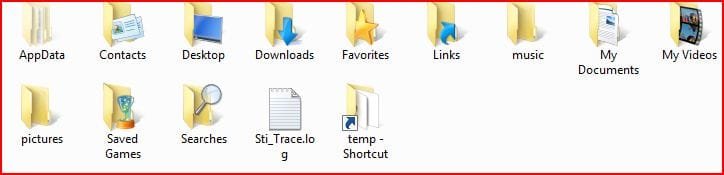
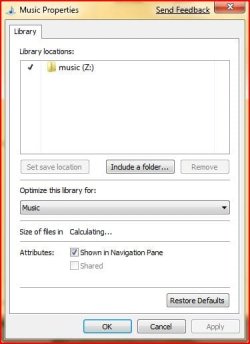
Perhaps a related question: When I click on the icon on my desktop with my name, up pops a file-explorer window with several special icons (AppData, Contacts, Desktop, Downloads, Favorites, Links, My Documents My Videos, Saved Games, Searches) But now that I've moved my music and pictures to my network drive, the icons for those are very different. They just look like an open folder, and the "properties" dialog is all different. Any ideas?
I'd post a picture if I could figure out how...
I don't know what I did, but after a bit of fiddling around, WMP spent over an hour scanning the network drive and imported all my music into it's library.
Perhaps a related question: When I click on the icon on my desktop with my name, up pops a file-explorer window with several special icons (AppData, Contacts, Desktop, Downloads, Favorites, Links, My Documents My Videos, Saved Games, Searches) But now that I've moved my music and pictures to my network drive, the icons for those are very different. They just look like an open folder, and the "properties" dialog is all different. Any ideas?
I'd post a picture if I could figure out how...
My Computer
At a glance
Windows 7
- OS
- Windows 7

Hi, to post a picture use the snipping tool, in accessories.
My Computer
At a glance
Vista Ult64, Win7600Intel Core 2 Quad Q6600 @ 2400 MHz 64bit OS4096 MB DDR3-SDRAMATI Radeon HD 3870 Series x2 Crossfired
- Computer Manufacturer/Model Number
- Self Build 64bit
- OS
- Vista Ult64, Win7600
- CPU
- Intel Core 2 Quad Q6600 @ 2400 MHz 64bit OS
- Motherboard
- Asus P5E3 Deluxe WiFi @p 64 bit OS
- Memory
- 4096 MB DDR3-SDRAM
- Graphics Card(s)
- ATI Radeon HD 3870 Series x2 Crossfired
- Sound Card
- Realtek on board
- Monitor(s) Displays
- Samsung SyncMaster - 23 inches
- Screen Resolution
- 1680x1050 pixels at 60 Hz in True Colors
- Hard Drives
- Hitachi (250 GB)/Samsung 750 GB. /Barracuda 160 GB.
My Book 1 TB external..
- PSU
- Cooler Master 1000w
- Case
- Cooler Master Cosmos 1000.
- Cooling
- Fans and fresh air,
- Keyboard
- Wireless
- Mouse
- Wireless
- Internet Speed
- Never fast enough
- Other Info
- I use a Magnum.
Here's a snip of the icons I'm talking about.
Also, I discovered that my music folder on the NAS is now in my Music Library in windows (as well as in my WM library).
Also, I discovered that my music folder on the NAS is now in my Music Library in windows (as well as in my WM library).
Attachments
Last edited:
My Computer
At a glance
Windows 7
- OS
- Windows 7
Have a look at this tutorial from our sister site that vista forums which gives information on resetting the display of user folders, It should be valid for windows 7
Personal User Shell Folders - Vista Forums
Personal User Shell Folders - Vista Forums
My Computers
-
At a glance
Windows 11 Pro x64 [Latest Release and Releas...Ryzen 9 5950X, 3.8 - 5.2 MHz64GB [2 x 32GB] DDR4 3200MHz4GB NVIDIA GEFORCE GTX 1650 Ti- Computer type
- PC/Desktop
- Computer Manufacturer/Model Number
- ChillBlast - Custom to my design
- OS
- Windows 11 Pro x64 [Latest Release and Release Preview]
- CPU
- Ryzen 9 5950X, 3.8 - 5.2 MHz
- Motherboard
- Asus Prime X570-Pro
- Memory
- 64GB [2 x 32GB] DDR4 3200MHz
- Graphics Card(s)
- 4GB NVIDIA GEFORCE GTX 1650 Ti
- Sound Card
- On-board SPDIF to 5.1 System + HDMI [5.1 system]
- Monitor(s) Displays
- 32" UHD 32 Bit HDR Monitor + 43" UHD 4K 32Bit HDR TV
- Screen Resolution
- 2 x 3840 x 2160 @60Hz
- Hard Drives
- 1TB M2 SSD OS, 500GB Fast Access SSD, 2 x 8TB Data + Various Externals from 1TB to 4TB, 10TB NAS
- PSU
- NZXT C750 80 PLUS Gold 750W Modular PSU
- Case
- Workstation Case [Matt Black]
- Cooling
- NZXT Kraken X63 280mm CPU Cooler +2x Quiet Case fans
- Keyboard
- Logitech Wireless MX Keys & K400 + others
- Mouse
- Logitech Wireless MX Master 3S
- Internet Speed
- 920 MB Down 50 MB Up
- Antivirus
- BitDefender Total Security Pro
- Browser
- Chrome (always run latest Non-Beta)
- Other Info
- Also run ...
Laptop - Quad 8GB - Windows 10 Pro x64
Nexus 7 Android tablet x2
Samsung 10.2" tablet
Blackview TAB 8 4G Android Tablet c/w Keyboard
Wacom Intuos Pro Medium Pen Pad
Wacom Intuos Pro Small Pen Pad
Wacom Expresskeys Remote
Loopdeck+ Graphics Controller
Shuttle Pro v2 Control
-
At a glance
Windows 11 Pro x64 Latest RPIntel I7 10750H 5.0GHz32GB [2x16GB] DDR4 2933 MHznVidia GTX1650Ti 4 GB GDDR6- Computer type
- Laptop
- System Manufacturer/Model Number
- Dell XPS 17 10750H
- OS
- Windows 11 Pro x64 Latest RP
- CPU
- Intel I7 10750H 5.0GHz
- Motherboard
- Dell XPS
- Memory
- 32GB [2x16GB] DDR4 2933 MHz
- Graphics Card(s)
- nVidia GTX1650Ti 4 GB GDDR6
- Sound Card
- Stock [Realtek] 4 Speaker
- Monitor(s) Displays
- 17" IPS UHD+ Infinity Edge Touchscreen
- Screen Resolution
- 3840 x 2400
- Hard Drives
- 2TB M2 NVMe, 4TB External + various 500GB & 1TB External NVMe (also have access to spinner HDD from
- PSU
- Stock
- Case
- Stock XPS Aluminium & Carbon Fibre
- Cooling
- Stock - Active Fan Control
- Keyboard
- Backlit + Various Logitech
- Mouse
- Stock Track Pad + Logitech MX Trackball
- Internet Speed
- 72 MB Down 18MB Up
- Browser
- Chrome
- Other Info
- Also run ...
Laptop - Quad 8GB - Windows 10 Pro x64
Nexus 7 Android tablet x2
10.2" tablet
Sony Z3 Android Smartphone
Wacom Intuos Pro Medium Pen Pad
Wacom Intuos Pro Small Pen Pad
Wacom Expresskeys Remote
Loopdeck+ Graphics Controller
Shuttle Pro v2 Control Pad
10TB NAS
- Local time
- 7:26 AM
- Messages
- 234
Here's a snip of the icons I'm talking about.
Also, I discovered that my music folder on the NAS is now in my Music Library in windows (as well as in my WM library).
Damn!
I'm so curious to know how you made this!
I tried lot of thing for my network drive, without succes (File server, Debian R4 + Samba)
My Computer
At a glance
Vista H.P. SP1 x32 Seven RC x64Q6600 @ 3.4Ghz4Go PC2-64008500GT @ 700/500
- OS
- Vista H.P. SP1 x32 Seven RC x64
- CPU
- Q6600 @ 3.4Ghz
- Motherboard
- GA-EP45-DS3L
- Memory
- 4Go PC2-6400
- Graphics Card(s)
- 8500GT @ 700/500
- Sound Card
- Audigy Platinium
- Monitor(s) Displays
- Mitsubishi Diamond Pro 920 + Mitsubishi Diamond Pro 720
- Screen Resolution
- 1600x1200 twice
- Hard Drives
- Hitachi 160Go
Maxtor 160Go (system drive)
Maxtor 200Go in Antec MX-1 EC external box (eSATA-USB2.0)
- PSU
- Corsair VX550W
- Case
- Thermaltake Xaser III
- Cooling
- Watercooling (CPU, GPU, HDD, NB)
- Keyboard
- MS Wireless Multimedia 6000 V2.0
- Mouse
- IntellEye Explorer 3.0
- Internet Speed
- ADSL 18Mbit/s/1Mbit/s
- Local time
- 7:26 AM
- Messages
- 234
I currently test Windows Home Server 2003 (got it on MS Connect).
At this time it run really fine into a virtual machine with VirtualBox. Network sharing work fine, I have total access to the "file server", even to the remote desktop, etc.
BUT: I still can't add the network drive (pointing to a WHS sharing location) to the index location and in extension to my librairies.
I installed Desktop search V4.x on WHS, it did'nt change anything.
I don't understand what is the problem. Maybe a network configuration that I didn't done??
(Note: no firewall active on both machines)
(Edit: I've send a feedback.. maybe it's a bug in my installation of Seven)
At this time it run really fine into a virtual machine with VirtualBox. Network sharing work fine, I have total access to the "file server", even to the remote desktop, etc.
BUT: I still can't add the network drive (pointing to a WHS sharing location) to the index location and in extension to my librairies.
I installed Desktop search V4.x on WHS, it did'nt change anything.
I don't understand what is the problem. Maybe a network configuration that I didn't done??
(Note: no firewall active on both machines)
(Edit: I've send a feedback.. maybe it's a bug in my installation of Seven)
My Computer
At a glance
Vista H.P. SP1 x32 Seven RC x64Q6600 @ 3.4Ghz4Go PC2-64008500GT @ 700/500
- OS
- Vista H.P. SP1 x32 Seven RC x64
- CPU
- Q6600 @ 3.4Ghz
- Motherboard
- GA-EP45-DS3L
- Memory
- 4Go PC2-6400
- Graphics Card(s)
- 8500GT @ 700/500
- Sound Card
- Audigy Platinium
- Monitor(s) Displays
- Mitsubishi Diamond Pro 920 + Mitsubishi Diamond Pro 720
- Screen Resolution
- 1600x1200 twice
- Hard Drives
- Hitachi 160Go
Maxtor 160Go (system drive)
Maxtor 200Go in Antec MX-1 EC external box (eSATA-USB2.0)
- PSU
- Corsair VX550W
- Case
- Thermaltake Xaser III
- Cooling
- Watercooling (CPU, GPU, HDD, NB)
- Keyboard
- MS Wireless Multimedia 6000 V2.0
- Mouse
- IntellEye Explorer 3.0
- Internet Speed
- ADSL 18Mbit/s/1Mbit/s
Similar threads
- Replies
- 1
- Views
- 4K


- Replies
- 3
- Views
- 1K
- Replies
- 5
- Views
- 5K
- Replies
- 9
- Views
- 3K

- Replies
- 4
- Views
- 3K