Windows 7 Forums Search
Welcome to Windows 7 Forums. Our forum is dedicated to helping you find solutions with any problems, errors or issues you are experiencing with Windows 7. The Windows 7 forum also covers news and updates and has an extensive Windows 7 tutorial section that covers a wide range of tips and tricks.


Windows 7 - WMP still shows deleted files


12-26-2009   #1


Windows 7 Ultimate 64-bit


WMP still shows deleted files

I had some tracks in WMP, i re-ripped the tracks at a higher bit rate and deleted the original files from their containing folder, WMP added the new files and still shows the old ones, i tried playing them and recieved an error(i guessed this would happen) then i right clicked, delete and nothing happens, so, i restored the files from the recycle bin and WMP just added them again so i now have the tracks listed 3 times?

Any assistance would be fantastic, i even tried clearing out my whole library but the tracks stayed there.

Cheers,

DxxS.

My System SpecsSystem Spec
12-26-2009   #2


Windows 7 Professional x64


Just a quick question: did you close WMP at all during this process? Perhaps all it needed was a hard refresh.
My System SpecsSystem Spec
12-26-2009   #3


Windows 7 Pro 64 SP1


I used this method to get rid of the sample media, it's worth a shot.
Deleting sample files from Windows Media Player
My System SpecsSystem Spec
.


12-26-2009   #4


Win 7 Ultimate 64-bit SP1, Win 7 Home Premium 32-bit SP1


Quote   Quote: Originally Posted by DxxS View Post
I had some tracks in WMP, i re-ripped the tracks at a higher bit rate and deleted the original files from their containing folder, WMP added the new files and still shows the old ones, i tried playing them and recieved an error(i guessed this would happen) then i right clicked, delete and nothing happens, so, i restored the files from the recycle bin and WMP just added them again so i now have the tracks listed 3 times?

Any assistance would be fantastic, i even tried clearing out my whole library but the tracks stayed there.

Cheers,

DxxS.
What I did to clear the WMP library......
First, copied the music folder onto my external HDD.
Second, selected all in the folder and hit delete.
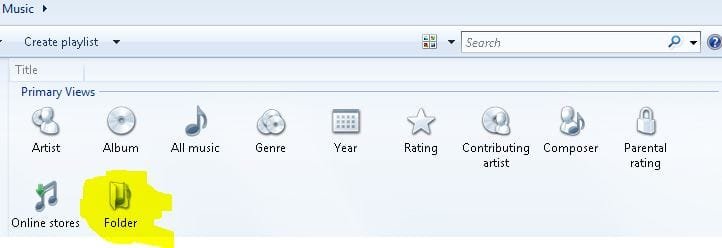
Third....opened up WMP, opened it to where you see the attachment. I double-clicked the highlighted "folders", and deleleted each one. Then I closed WMP, and when I bring it back up now, the library is clear.

After all this, I transferred my tunes back into the internal drive, but I am not using WMP for music. I do think it is getting better, and it's what I use for watching DVD's, but I am sticking with my old standby MediaMonkey for my music, combined with Exact Audio Copy for ripping.

Hopefully this helped you out!
Attached Thumbnails
WMP still shows deleted files-capture.jpg  
My System SpecsSystem Spec
12-26-2009   #5


Windows 7 Home Premium 64bit


Delete the files from the folder you no longer want.

then (If you still have invalid refrences of them in the library, a work around that works)

right click the top bar of WMP, just to left of the PLAY/BURN/Sync tabs ..

youll get a menu:

Choose Tools/ Advanced/ Restore Media library


This will complete empty all references (including invalid and valid ones) and empty the library completly.

it does NOT delete any valid files. Simply empties the library, and erases all references to files.

When you restart WMP it will rebuild the library from scratch, as if a first launch.

The invalid entries will be gone, and only good ones shown again.

hope this helps.


Easiest way I have found to get rid of sample Media is delete the source.
by default: C:/Users/Public ... and delete the sample media from each folder -- ((Music,Videos,Recorded TV,Pictures))

And yes, I agree ...
Media Monkey is pretty sweet once you get it all tweaked to your preferences

Last edited by Wishmaster; 12-26-2009 at 09:37 PM..
My System SpecsSystem Spec
12-26-2009   #6


Vista and Windows7, sometimes Ubuntu and Fedora


Quote:
Choose Tools/ Advanced/ Restore Media library

This method does not work in all cases. What works is:

1. go to C:\Users\your name\AppData\Local\Microsoft
2. there you rename the folder Media Player into Media Player.old
3. restart WMP. It will recreate all entries correctly provided you have proper Music folders
4. If it worked (and it should), you can delete the Media Player.old folder

Last edited by whs; 12-26-2009 at 10:43 PM..
My System SpecsSystem Spec
12-27-2009   #7


Windows 7 32bit RTM


try to resync you're music folders in the library menu... and what I mean by that is.


remove then readd the folders. that should sync the music files.
My System SpecsSystem Spec
12-27-2009   #8


Windows 7 Ultimate 64-bit


Quote   Quote: Originally Posted by Wishmaster View Post
Delete the files from the folder you no longer want.

then (If you still have invalid refrences of them in the library, a work around that works)

right click the top bar of WMP, just to left of the PLAY/BURN/Sync tabs ..

youll get a menu:

Choose Tools/ Advanced/ Restore Media library


This will complete empty all references (including invalid and valid ones) and empty the library completly.

it does NOT delete any valid files. Simply empties the library, and erases all references to files.

When you restart WMP it will rebuild the library from scratch, as if a first launch.
The invalid entries will be gone, and only good ones shown again.
Thanks Wishmaster, worked a treat.
My System SpecsSystem Spec
12-27-2009   #9


Windows 7 Ultimate x86


In the future, make sure you remove the files from the WMP library FIRST, then re-rip them, delete, move etc. and you won't have these problems again... sheesh
My System SpecsSystem Spec
12-27-2009   #10


Windows 7 RTM X64


Remember that Library's are only pointers to the actual files which are contained in your user files or public files. If you want to delate files from the library you need to go into the original file location and delate them. After that you will only see an empty folder left over in the Library which you can then delate. Delating the actual files from the Library isn't the correct way of doing it.
My System SpecsSystem Spec
Reply

WMP still shows deleted files problems?


Thread Tools


Similar Threads for: WMP still shows deleted files
Thread Forum
Went from 32 bit to 64, now explorer shows no files Installation & Setup
Solved Empty recycle bin is grayed out and shows nothing that I've deleted? General Discussion
Deleted Files Log? Backup and Restore
Solved HDD shows up, shows data, no folders or files visible Installation & Setup
SFC Shows Corrupt Files General Discussion


All times are GMT -5. The time now is 05:26 AM.


Windows 7 Forums is an independent web site and has not been authorized,
sponsored, or otherwise approved by Microsoft Corporation.
"Windows 7" and related materials are trademarks of Microsoft Corp.
© Designer Media Ltd
  

1 2 3 4 5 6 7 8 9 10 11 12 13 14 15 16 17 18 19 20 21 22 23 24 25 26 27 28 29 30